
Compare
Buildertrend Alternative 2026 for Subcontractors
Looking for a Buildertrend alternative? Buildertrend is built for home builders and remodelers whose client is a homeowner. If your client is a GC — and your month ends with a pay application, not a homeowner invoice — you're shopping in the wrong aisle. BuildWorkPro runs the subcontractor's workflow for $79/month flat.
$79/month flat · 14-day free trial · No credit card required
The short version
Choose Buildertrend if you build or remodel homes and need homeowner-facing tools: a client portal, selections and allowances, and consumer financing. Choose BuildWorkPro if you're a specialty sub — electrical, plumbing, HVAC, roofing, concrete, framing — who bids to GCs, bills monthly against a schedule of values with retainage, and wants published flat pricing instead of a quote process.
BuildWorkPro vs Buildertrend at a glance
| BuildWorkPro | Buildertrend | |
|---|---|---|
| Built for | Trade subcontractors working for GCs | Home builders & remodelers selling to homeowners |
| Pricing | $79/month flat, published | Custom quote based on volume (historically ~$339–$499+/month entry)* |
| How you buy | Self-serve signup, 14-day free trial | Demo and quote process — no self-serve trial |
| Users | Unlimited | Unlimited |
| Progress billing (schedule of values, retainage) | Core feature — AIA-style pay applications | Oriented to residential invoicing and draws |
| Bidding for subs | Line items, labor rates, markup, PDF proposals to GCs | Proposals oriented to homeowner clients |
| Homeowner portal, selections & allowances | Not the focus | Industry leader |
| Daily logs & time tracking | Included | Included |
| Sales pipeline & CRM | Included — GC and vendor contacts, lead → bid → job | Included — homeowner/client-centric |
| Work by chatting with Claude or ChatGPT | Included — the assistant builds bids & projects in your account | In-platform AI features; no Claude/ChatGPT connection |
| E-signatures for bids & change orders | Built in, included at $79 flat | Available — at custom-quote pricing |
| QuickBooks Online sync | Included — connect from Settings | Included |
| Setup | Same-day — CSV import wizards | Onboarding program, typically weeks |
*Buildertrend moved to quote-based pricing and no longer publishes plan prices; the range reflects its previously published entry tiers and independent reporting as of June 2026. Verify current pricing with Buildertrend. For last-published tiers, renewal quotes, and switching costs, see Buildertrend pricing and cost.
$79/month flat · 14-day free trial · No credit card required
Who each product is actually for
Most “best Buildertrend alternative” lists compare other home-builder platforms. That is the right shortlist if you sell to homeowners. It is the wrong shortlist if you are a trade sub whose customer is a general contractor. The split is who you bill — not how many modules the brochure lists.
Buildertrend fits custom home builders, remodelers, and homeowner-facing specialty trades. The product is organized around a client relationship: selections and allowances, a portal for the homeowner, consumer financing, and residential draws. If that is your business, stay in that category — JobTread is the builder-first name that comes up most often next to Buildertrend.
BuildWorkPro fits specialty subcontractors — electrical, plumbing, HVAC, roofing, concrete, framing, glazing — who bid to GCs and get paid on progress. The loop is estimate → win → monthly pay application with retainage → closeout. That is a different job than sending a homeowner an invoice, which is why a Buildertrend alternative for subs is not the same product as a Buildertrend alternative for builders.
If you are still mapping GC software vs sub software more broadly, start with subcontractor vs general contractor software.
Features that actually differ
Progress billing vs residential invoicing
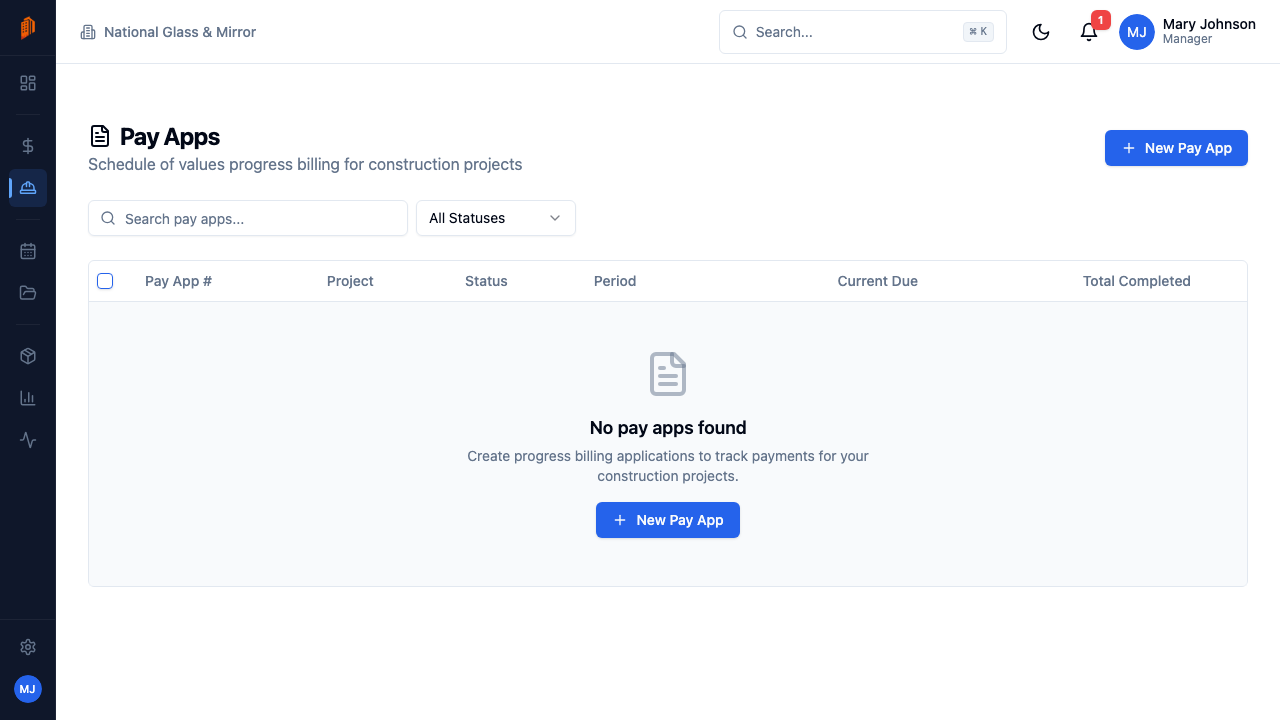
Subs billing GCs live on a schedule of values, stored materials, and retainage — AIA-style pay applications that match how the prime contract pays. That workflow is first-class in BuildWorkPro, including the AIA G702/G703-style pay app path. Buildertrend is oriented to residential invoicing and draws for a homeowner client. Both are billing; they are not the same billing.
Bids written for a GC, not a kitchen selection
A sub’s proposal needs line items, labor rates, markup, and exclusions a GC can evaluate. BuildWorkPro’s construction bidding is built for that, then converts a won bid into the project you will bill. Buildertrend’s proposals are oriented to homeowner clients — a different audience and a different document.
Change orders that roll into the next pay app
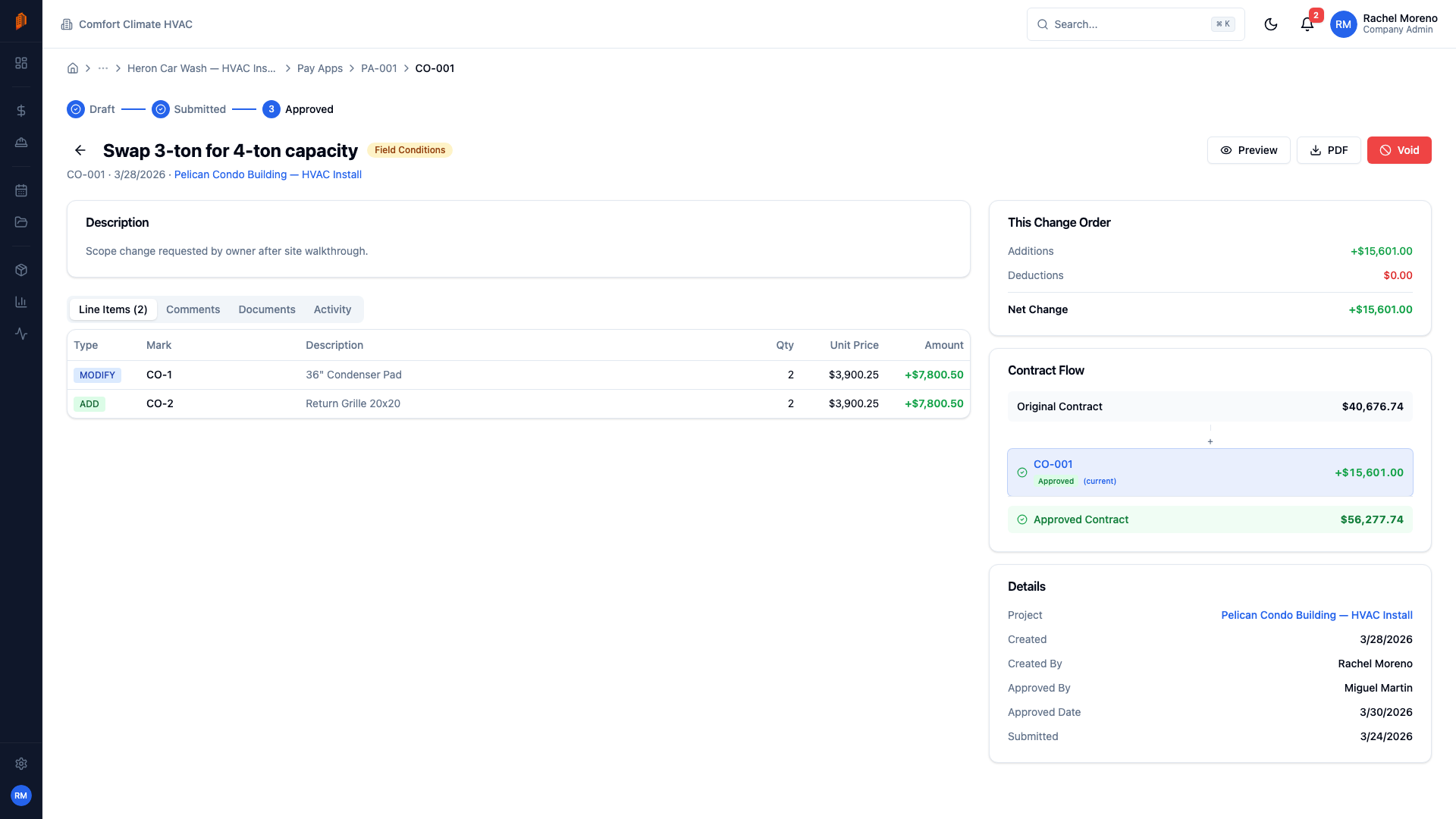
Scope changes on a GC job have to be priced, approved, and billed against the updated contract value. BuildWorkPro change orders are numbered against the project and flow into the next pay application. Buildertrend also handles change orders — in the homeowner / builder context where selections and client approval are the point.
CRM: GC pipeline vs homeowner clients
Both products include a sales pipeline. The difference is who sits in it. BuildWorkPro’s construction CRM is GC, owner, and vendor contacts with leads that convert to bids and jobs. Buildertrend’s CRM is organized around the homeowner relationship that the rest of the platform serves.
Field documentation
Daily logs and time tracking are included on both sides. BuildWorkPro’s site logs and time tracking document self-performed work for the sub’s own record — not a homeowner progress feed.
Where Buildertrend genuinely wins
For a custom home builder or remodeler, Buildertrend's homeowner-facing tools are the point: clients pick finishes through selections and allowances, follow progress in a portal, approve change orders, and even arrange financing. If that's your business, Buildertrend earns its price — and you should still walk into the quote call with a range. We assembled last-published plans, renewal quotes, and switching costs in Buildertrend pricing and cost.
None of that machinery helps a trade sub. Your GC doesn't want a selections portal — they want a clean bid with labor rates and exclusions, a monthly pay application that matches the schedule of values, and change orders priced and approved before the work happens. That billing loop — bid → contract → monthly pay app with retainage → closeout — is the core of BuildWorkPro, not an adaptation of a homeowner workflow.
Pricing posture: published flat vs a volume quote
Buildertrend pricing is custom as of 2026 — the public site collects builder type and construction volume, then a rep quotes you. Independent trackers still cite last-published entry tiers around $339–$499+ per month (unlimited users). Treat those as a baseline for the call, not a live rate card; details and sources live on Buildertrend pricing and cost.
BuildWorkPro publishes one number: $79/month (or $790/year) with every feature and unlimited users, plus a 14-day trial with no credit card. There is no volume form and no demo gate. If you need the homeowner portal, that price does not buy it — and we will not pretend it does.
Built around sub-to-GC billing
Your contract value, change orders, schedule of values, and retainage stay connected from the first estimate to the final pay app.
Frequently asked questions
What is the best Buildertrend alternative for subcontractors?
BuildWorkPro. Buildertrend is excellent software for residential builders and remodelers who sell to homeowners, but its client portal, selections, and allowances workflows are built around that business. BuildWorkPro is built for trade subcontractors who bid to GCs and bill monthly against a schedule of values — with bidding, AIA-style pay applications, change orders, site logs, time tracking, and CRM at $79/month flat.
How much does Buildertrend cost compared to BuildWorkPro?
As of mid-2026, Buildertrend uses quote-based pricing tied to your construction volume; before that change its published plans started around $339–$499 per month. BuildWorkPro publishes one flat price: $79/month or $790/year with every feature and unlimited users included — roughly a tenth of Buildertrend’s historical entry tier. Verify current Buildertrend pricing with Buildertrend.
Is Buildertrend built for subcontractors?
Buildertrend is primarily designed for home builders and remodelers — companies whose client is a homeowner. Its standout features (client portal, selections, allowances, financing tools) serve that relationship. A “specialty contractor” in Buildertrend’s marketing is typically a homeowner-facing reno trade, not a sub billing a GC. A subcontractor working under GCs has a different workflow: estimate to a GC, win the contract, bill progress monthly with retainage, and document the field. BuildWorkPro is designed around that loop.
Does Buildertrend have a free trial?
No. Buildertrend is demo-led: you schedule a call or submit a contact form. There is no self-serve trial where you can evaluate the product on your own work first. BuildWorkPro is the opposite — a 14-day free trial with every feature and no credit card, so you can run a real bid and pay application before paying.
What should I look for in a Buildertrend alternative?
Match the tool to who you bill. If your customer is a homeowner, you want a client portal, selections, and allowances — Buildertrend’s strengths, and the reason most “best Buildertrend alternative” roundups compare other builder platforms. If your customer is a GC, look for schedule-of-values billing with retainage, proposals written for GCs, change orders that roll into the next pay app, and published pricing you can evaluate without a sales call.
Is JobTread a good Buildertrend alternative?
For home builders and GCs who want budget-centric job financials and a strong training community, JobTread is one of the names that comes up most often. It is still builder-first, starts at $199/month plus per-user fees, and has no free trial. If you are the sub billing against someone else’s contract, that is the workflow BuildWorkPro is built around, at $79/month flat.
Can I switch from Buildertrend to BuildWorkPro?
Yes. Export your contacts, leads, and job list, then use BuildWorkPro’s guided CSV import wizards to bring in contacts, leads, products, and projects. The 14-day free trial (no credit card) is enough time to run a real bid and pay application before deciding.
When is Buildertrend the better choice?
If you build or remodel homes and your customer is the homeowner, Buildertrend is the stronger platform — the client portal, selections and allowances, daily-log sharing with clients, and consumer financing integrations are all built for that business. BuildWorkPro is the better fit for specialty trade contractors working under GCs on commercial or residential jobs.
Related comparisons and guides
- Buildertrend pricing and cost — last-published plans, quote posture, and switching costs (2026).
- Subcontractor vs GC software — why the homeowner/builder stack is the wrong aisle for subs.
- BuildWorkPro vs JobTread — the builder-first alternative that shows up next to Buildertrend most often.
- BuildWorkPro vs Contractor Foreman — broader all-in-one with five tiers vs one flat sub plan.
- BuildWorkPro vs Knowify — the trade-focused option, with per-user pricing and job costing on its upper tier.
- BuildWorkPro vs Procore — GC/owner platform vs the sub’s system of record.
- AIA-style pay applications and construction bidding — the two workflows this comparison turns on.
Software that matches how subs actually get paid
Every feature, unlimited users, $79/month flat. 14-day free trial — no credit card, no demo call.
Comparing GC platforms too? See BuildWorkPro vs Procore. Other Buildertrend-adjacent options: vs JobTread and vs Contractor Foreman.