Project management software for subcontractors

The all-in-one platform built for subcontractors. Manage bids, projects, pay apps, change orders, and your crew — without the overhead of software designed for general contractors.

14-day free trial. No credit card required.

app.buildworkpro.com

Built for every trade

Roofing
Glass & Glazing
HVAC
Plumbing
Electrical
Pool & Spa
Concrete & Masonry
Framing
Painting
Remodeling

Built for specialty contractors

Construction management tools built for specialty contractors

Most construction software is built for GCs. BuildWorkPro is designed from the ground up for subcontractors — so you can bid, build, and bill without the bloat.

Project Management

Track every project from bid to completion with phases, tasks, Gantt charts, and team assignments. Kanban boards and timeline views keep your crew aligned.

CRM & Lead Tracking

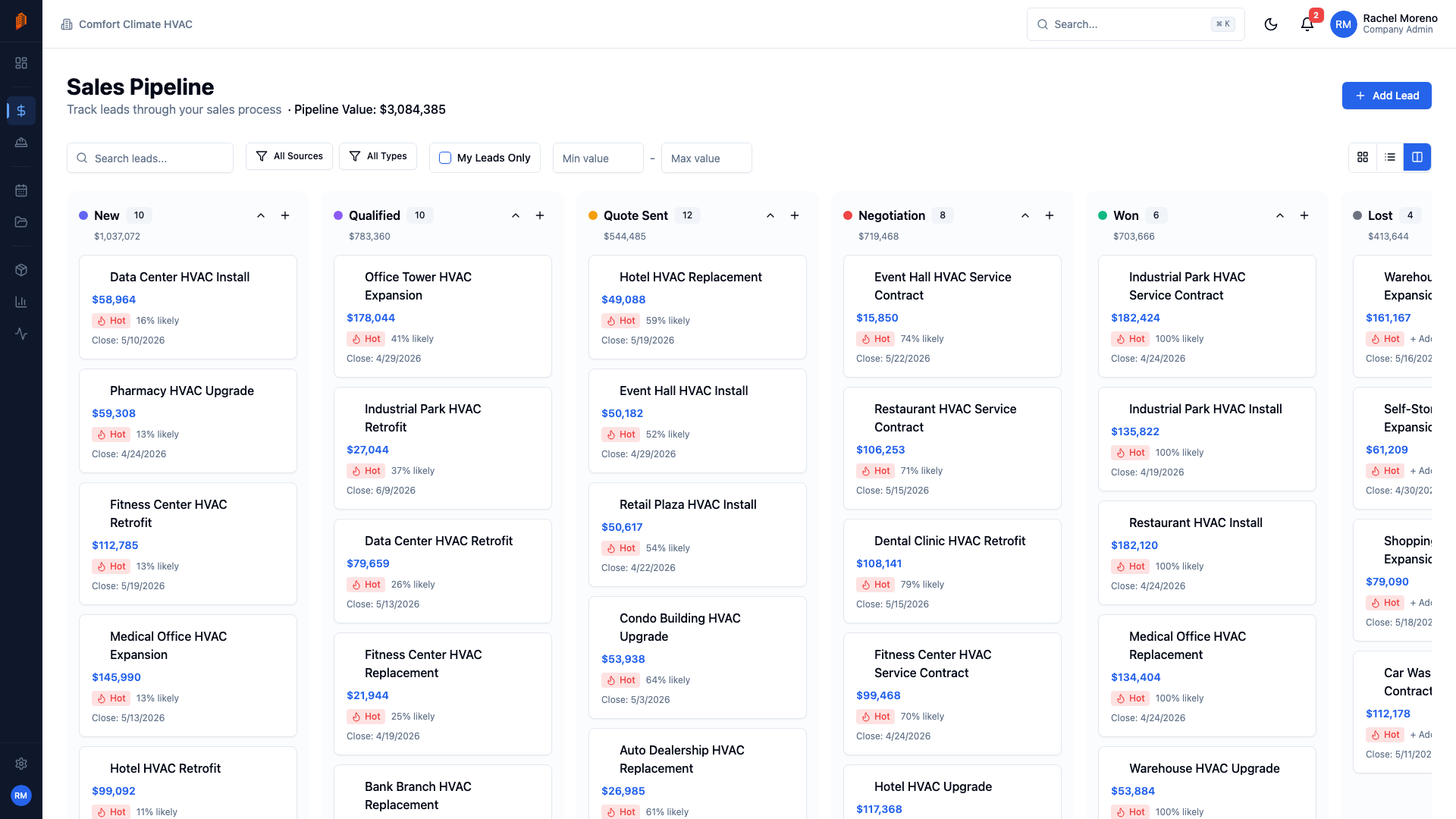
Visual Kanban pipeline with configurable stages, pipeline values, and probability tracking. Convert a won lead straight into a bid — no re-entry.

Bids & Estimates

Professional bids with line items, marks, labor rates, and distributed costs. Generate polished PDFs and convert accepted bids directly into projects.

Pay Applications

AIA-style pay apps with schedule of values and retainage, prefilled from your bid and approved change orders. Track each one from Draft through Approved to Paid.

Change Orders

Price scope changes as line items and track them from Draft to Approved. Approved change orders adjust your contract value and roll into your next pay app.

Site Logs

Daily field documentation with personnel on site, work performed, materials received, issues, and photos. A dated record of every jobsite day when disputes surface.

Contact Management

One contact database for customers, GCs, vendors, and subs — typed, searchable, and importable from CSV. Parent-company links keep branch offices organized.

Time Tracking

Log crew hours against projects and tasks in quarter-hour increments. Managers review entries before they are finalized, with hours and labor cost totaled per period.

Team & Permissions

Role-based access with Admin, Manager, Member, Field Crew, and Viewer roles — including a restricted field role so on-site crews see their work, not your numbers.

Dashboard & Analytics

Your sub business at a glance

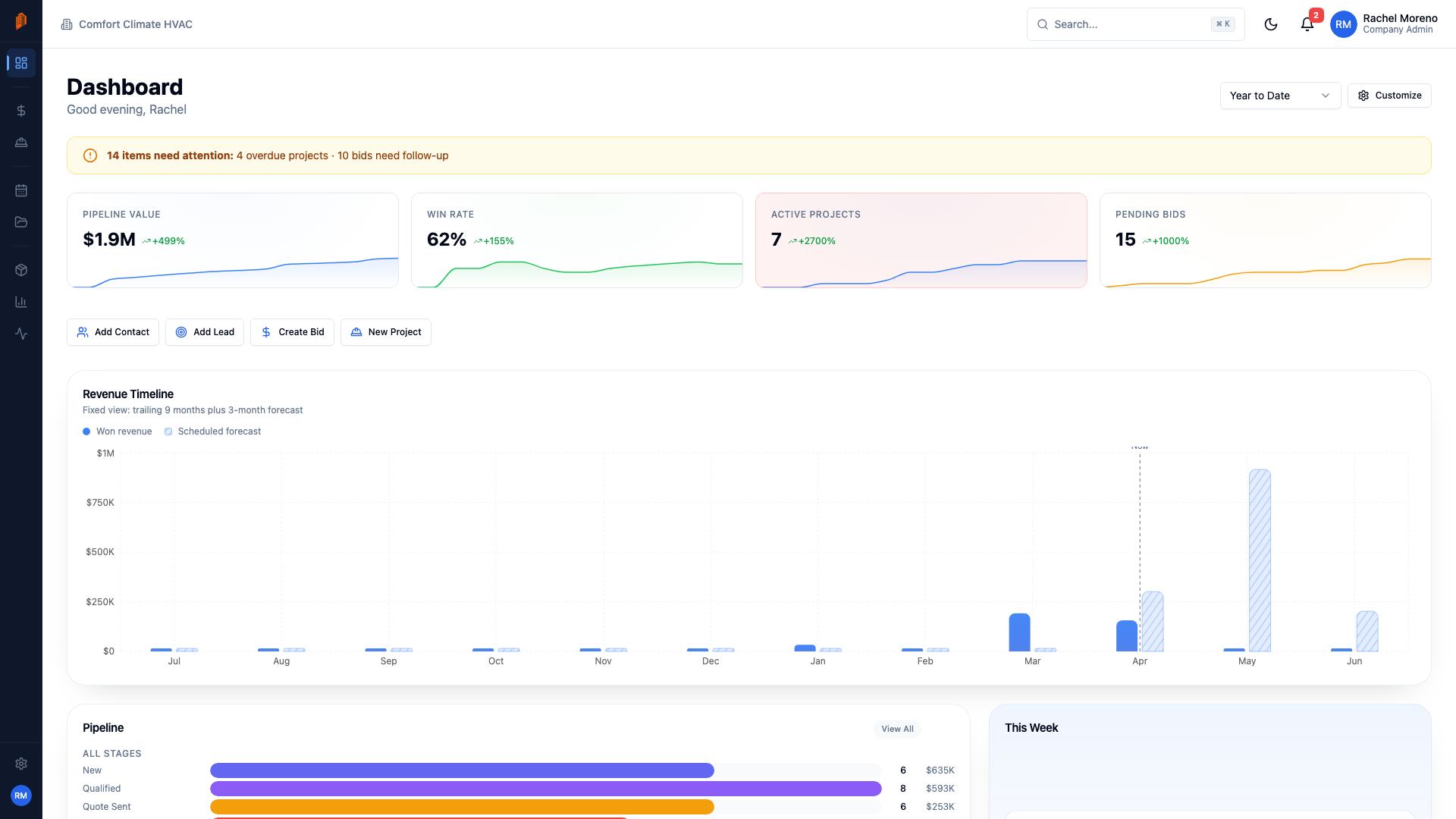
Real-time KPIs built for specialty contractors — pipeline value, active jobs, pending bids, and crew activity. No GC overhead, just what matters to your trade.

  • Real-time project, revenue, and pipeline KPIs
  • Activity feeds with team-wide visibility
  • Pipeline tracking and project status overview
BuildWorkPro dashboard with KPIs showing active projects, pipeline value, and revenue metrics
Sales Pipeline

Never miss a bidding opportunity

Track every opportunity from first call to signed contract. Drag-and-drop Kanban keeps your sales pipeline visible so you can focus on the jobs that matter.

  • Kanban board with drag-and-drop lead stages
  • Deal values and probability tracking
  • Stage-based pipeline with conversion analytics
Sales pipeline Kanban board showing leads organized by stage with deal values
Professional Bids & Estimates

Bid smarter, win more work

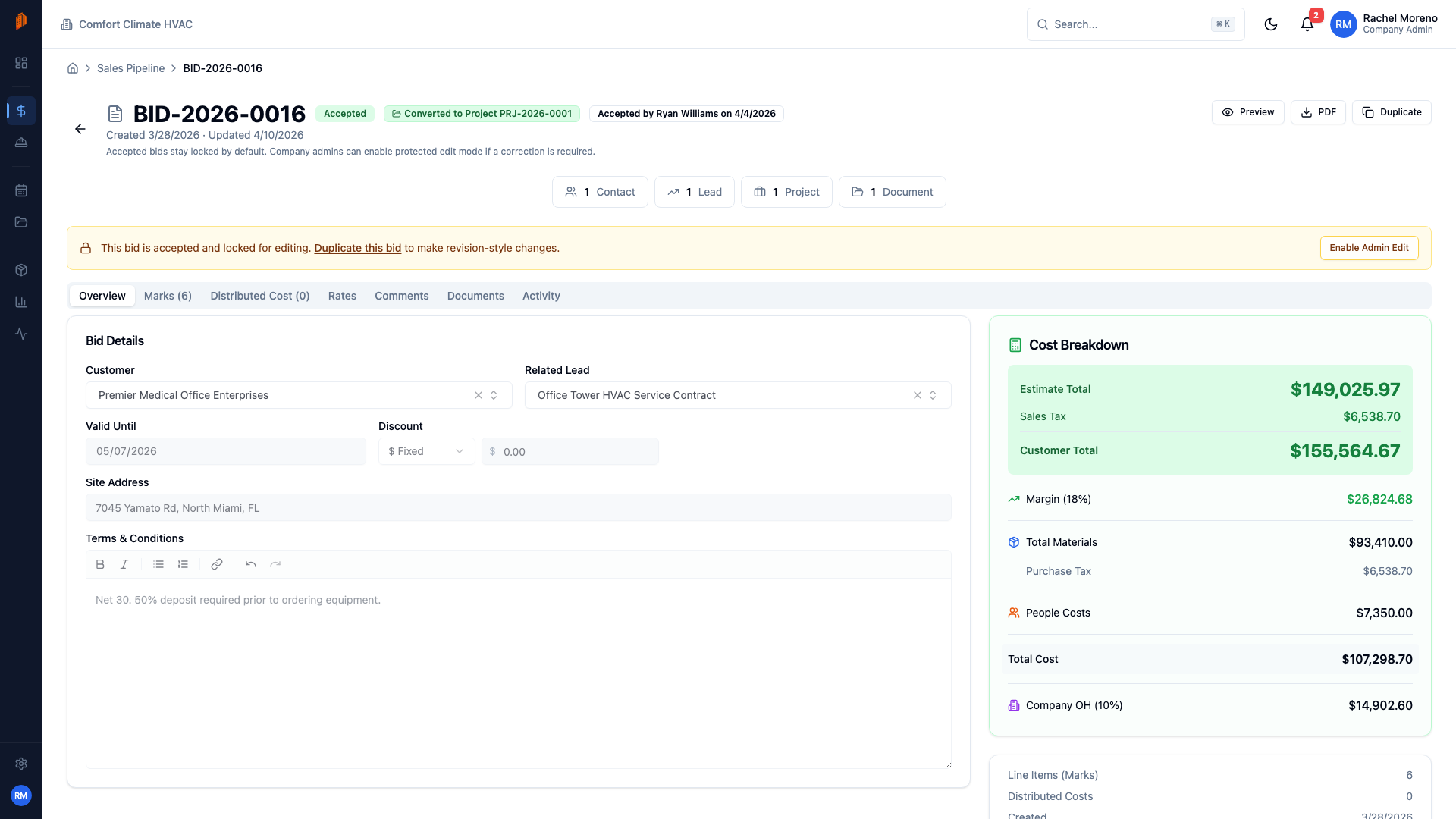
Build detailed estimates with marks, labor rates, material costs, and overhead. Send polished proposals to GCs and convert accepted bids straight into active jobs.

  • Detailed line items with cost breakdown sidebar
  • One-click PDF generation and client delivery
  • Bid-to-project conversion on acceptance
Accepted bid detail showing line items, cost breakdown sidebar, and bid summary
Project Management

Run every job from mobilization to closeout

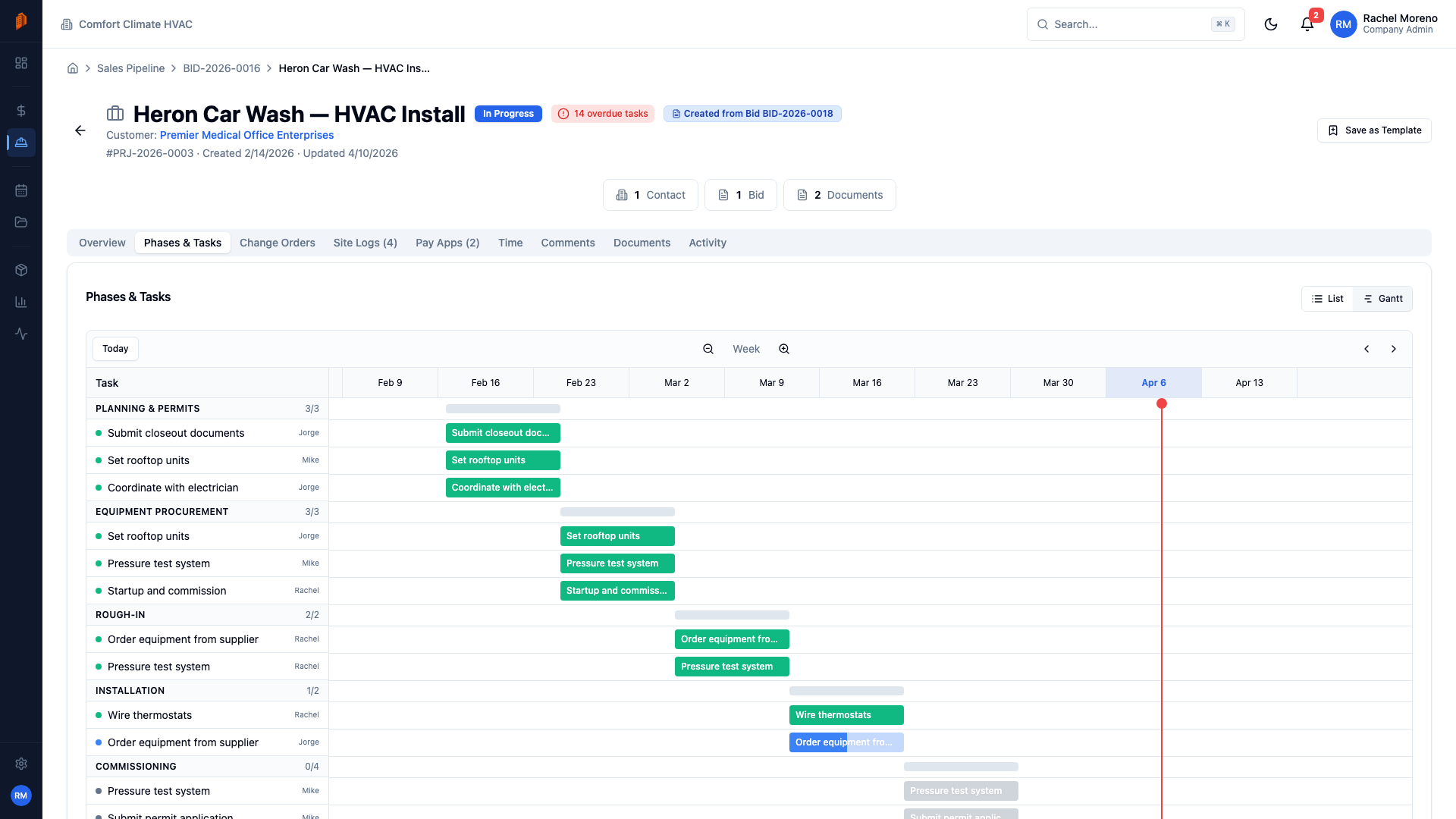
Phases, tasks, Gantt charts, and crew assignments designed for how subs actually run jobs. Track progress across multiple active projects without losing visibility.

  • Phases and tasks with Gantt chart visualization
  • Team assignment and workload tracking
  • Progress tracking with milestone dependencies
Project Gantt chart showing phases, tasks, and timeline with dependencies
Pay Applications

Stop chasing payments

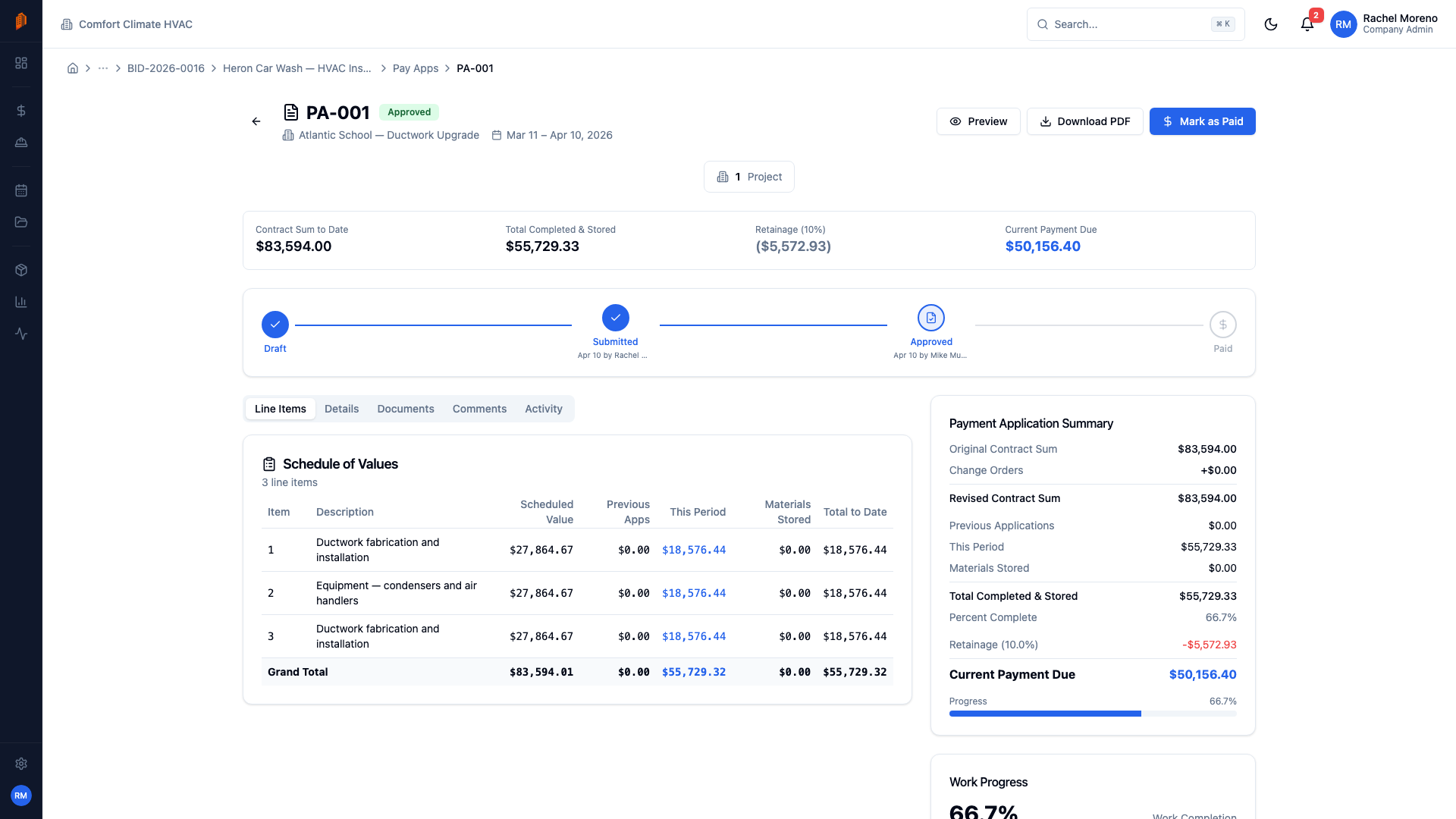
Submit progress billing pay apps to your GC with one click. Track retainage, change order impacts, and approval status so you always know where your money is.

  • Industry-standard schedule of values format
  • Workflow approval: Draft, Submitted, Approved, Paid
  • Retainage tracking and schedule of values
Pay application detail showing workflow stepper, AIA summary, and schedule of values
Change Orders

Protect your margins on scope changes

When the GC changes scope, capture it immediately. Track the contract impact, get approvals through a structured workflow, and make sure every dollar is accounted for.

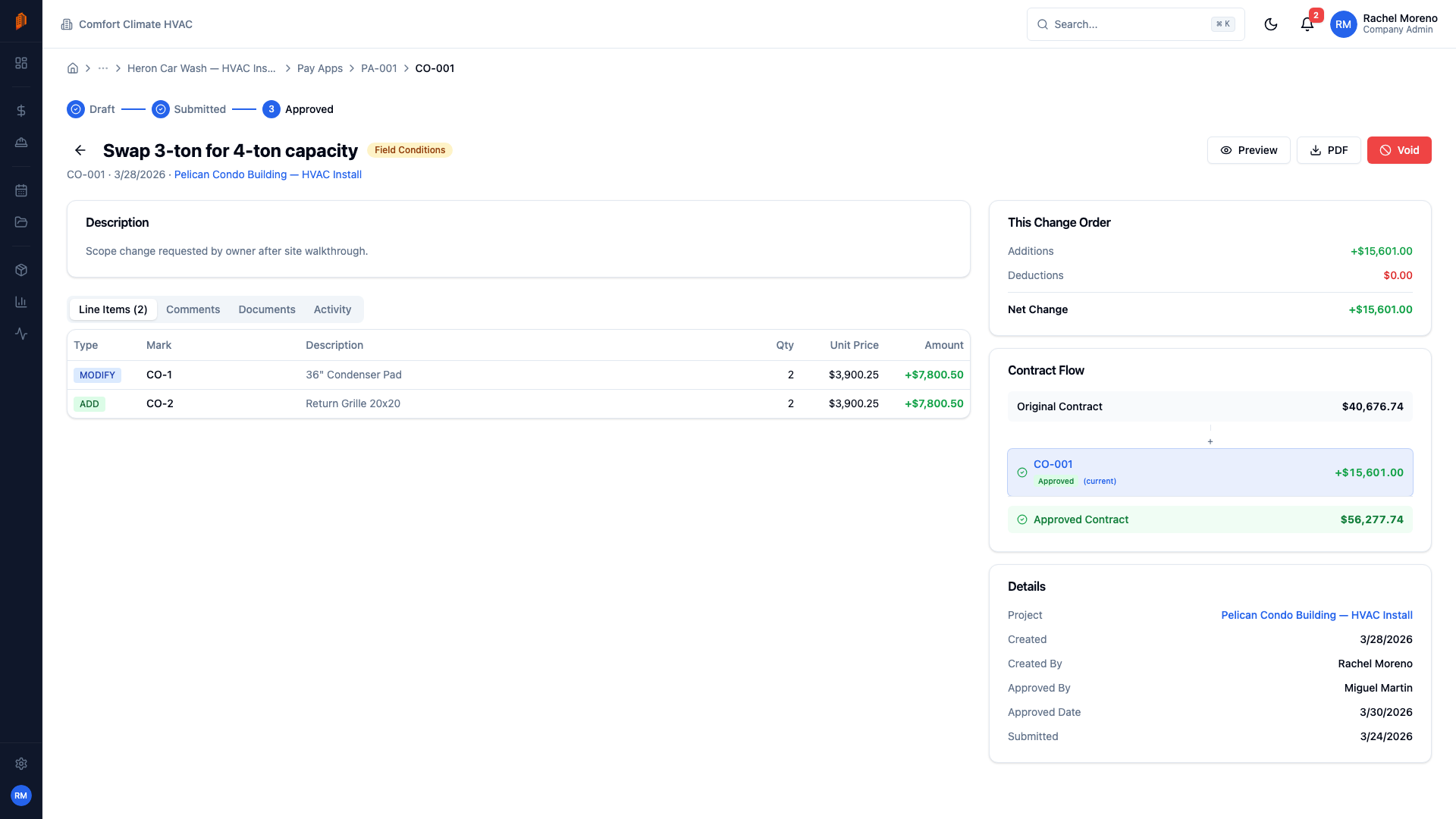
  • Priced line items with add, modify, or remove changes
  • Approved change orders adjust your contract value
  • PDF generation to send for customer approval
Change order detail showing workflow stepper, line items, and contract impact
Site Logs

Every jobsite day, documented

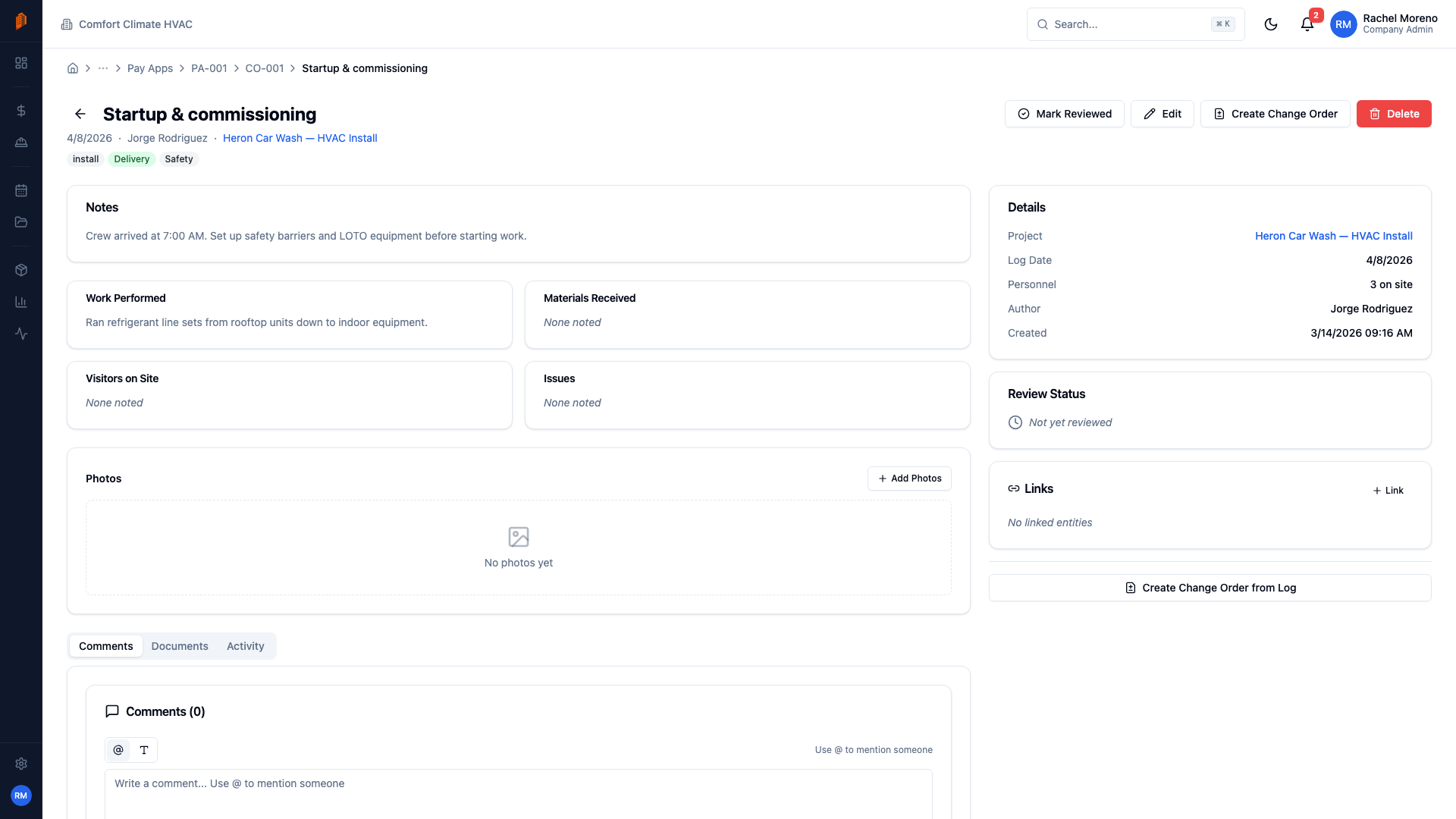
When disputes arise, your site logs are your defense. Record personnel on site, work performed, materials received, visitors, and issues every day — with photos attached.

  • Daily field reports with structured data entry
  • Tag entries: progress, issue, delay, safety, inspection
  • Photo documentation and a manager-reviewed record
Site log detail showing personnel on site, work performed, and daily notes
Reports & Analytics

Data-driven decisions for your business

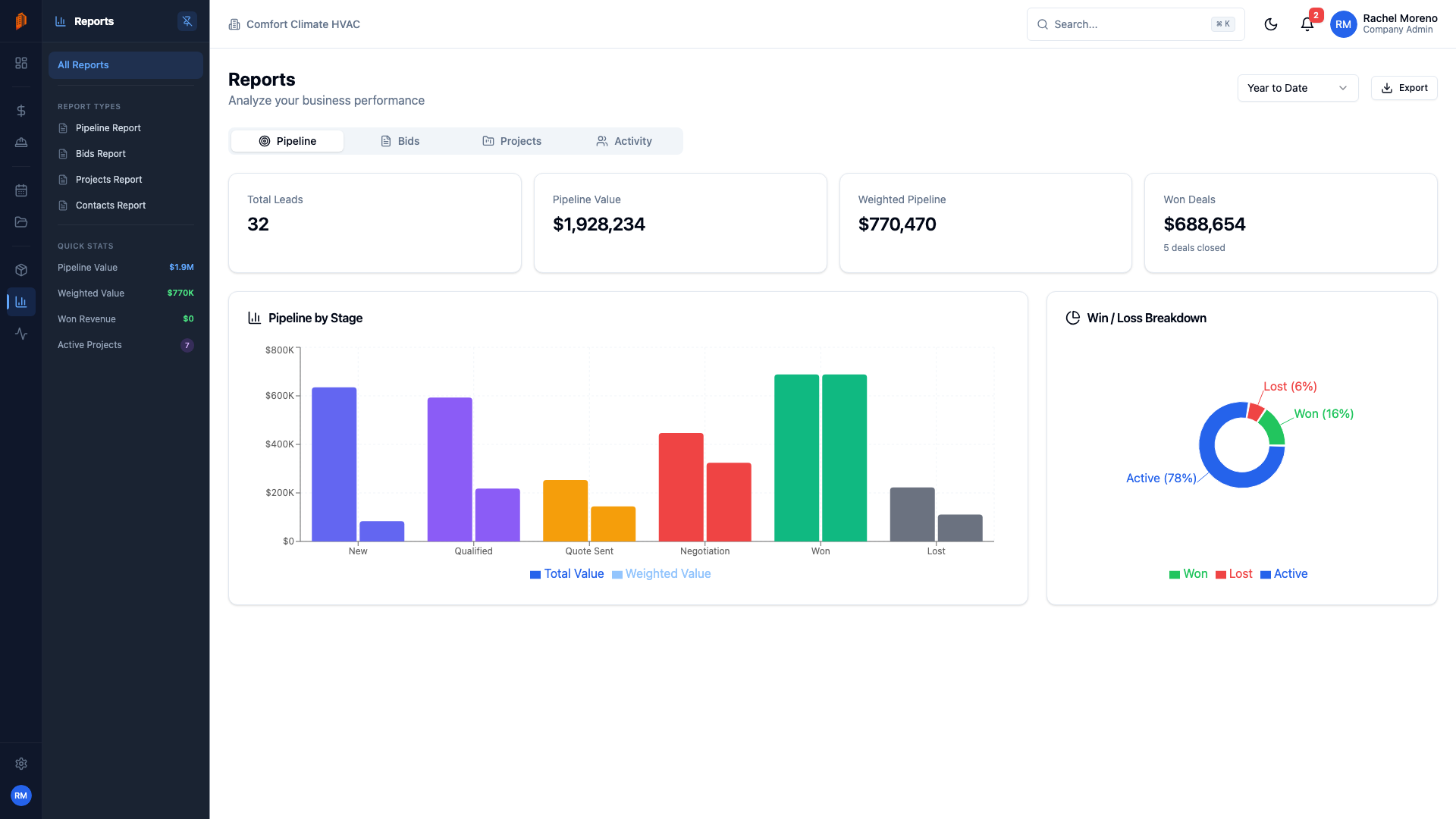
Reports with visual charts for pipeline health, bid conversion, project status, and team activity — so you know which work actually pays.

  • Pipeline and bid analytics with visual charts
  • Project status and value breakdowns
  • Export to CSV or PDF
Reports dashboard showing bar charts and donut charts for pipeline and project analytics

Integrations

Works with the tools you already use

Connect your existing workflow. BuildWorkPro syncs with QuickBooks Online and plugs into Google Workspace and the AI assistants your team already relies on.

Gmail

Send quotes and communicate with clients directly from BuildWorkPro.

Google Calendar

Sync project deadlines, inspections, and meetings to your calendar.

Claude

Connect Claude Desktop to BuildWorkPro and ask AI to draft bids, summarize projects, and more.

ChatGPT

Use ChatGPT with the BuildWorkPro MCP server to query your data and act on your behalf.

QuickBooks

Two-way sync for invoices, payments, and job costs — no double entry.

Simple pricing

One plan. Everything included.

No tiers to compare. No features locked behind upgrades. Every sub gets the full platform at one flat price.

All-inclusive

BuildWorkPro

$79 /month

Pay yearly and get 2 months free — $790/year

That's just $65.83/month billed annually

Unlimited users
Unlimited projects
Unlimited contacts
Bids & estimates
Pay applications
Change orders
Site logs
Time tracking
Sales pipeline & CRM
Gantt charts & scheduling
Reports & analytics
Role-based permissions
Document management
QuickBooks sync
Custom branding
API access
Start 14-day free trial

No credit card required. Cancel anytime.

Most construction software starts at $299/month and charges per user.

BuildWorkPro gives you everything, for everyone, at one price.

FAQ

Frequently asked questions

What is construction project management software?

Construction project management software helps contractors organize bids, track projects, manage pay applications, handle change orders, and keep field operations running smoothly — all in one place. BuildWorkPro is built specifically for subcontractors like electrical, plumbing, HVAC, concrete, and framing companies who need a simpler alternative to tools designed for general contractors.

How much does BuildWorkPro cost and is there a free trial?

BuildWorkPro is $79/month (or $790/year) with all features included and unlimited users. Every account starts with a 14-day free trial — no credit card required. Click "Start free trial" anywhere on this site to get started.

Can BuildWorkPro replace spreadsheets for managing bids and pay apps?

Yes — that's exactly what it's built for. Create detailed estimates with line items, labor rates, and markup. Generate AIA-style pay applications with schedule of values. Track change orders with approval workflows. Everything stays connected to the project, so you stop juggling spreadsheets and email threads.

Does BuildWorkPro work on phones and tablets at the job site?

BuildWorkPro is fully web-based and works on any device with a modern browser — no app to install. Log time, submit site logs, check project status, or review a bid from your phone, tablet, or laptop. A native mobile app is also coming soon.

How does BuildWorkPro handle QuickBooks integration?

BuildWorkPro syncs invoices, payments, and job costs with QuickBooks Online so your books stay up to date without double entry. Connect your QuickBooks company from Settings → Integrations. It also integrates with Gmail and Google Calendar — plus Claude Desktop and ChatGPT via MCP — to keep your existing workflow connected.

Is my construction data secure?

Yes. BuildWorkPro uses TLS encryption in transit and at rest, role-based access control with four permission levels, complete audit logging, and full tenant isolation — your data is never accessible to other companies. We also support two-factor authentication.

How is BuildWorkPro different from Procore or Buildertrend?

Most construction software is built for general contractors and charges per user, often starting at $299/month or more. BuildWorkPro is purpose-built for subcontractors at a flat $79/month for unlimited users. You get bidding, project management, pay apps, change orders, time tracking, and CRM without paying for features subs don't need.

Can I import data from my current system?

Yes. BuildWorkPro supports CSV imports for contacts, projects, and products. If you're migrating from another platform, our team can help with the transition during onboarding.

Ready to run your sub business the right way?

Join specialty contractors who are winning more bids, getting paid faster, and growing their business with the platform built for subs.

14-day free trial. No credit card required.