
Features
Construction CRM & Lead Software for Subcontractors
Construction sales CRM for specialty subcontractors — track every lead from first GC invite to won job on a drag-and-drop pipeline, then start the bid from the same record instead of retyping it.
Get your pipeline out of your inbox
If your pipeline is a notepad, a whiteboard, and a pile of plan invites in your inbox, you don't actually know what's in play — what's waiting on a callback, what needs a site visit, what went quiet after you sent the number. BuildWorkPro is construction lead software that puts every opportunity on a sales pipeline: each lead is a card, each column is a stage, and dragging a card is how the deal moves from New Lead to Contacted to Bid Sent to Won.
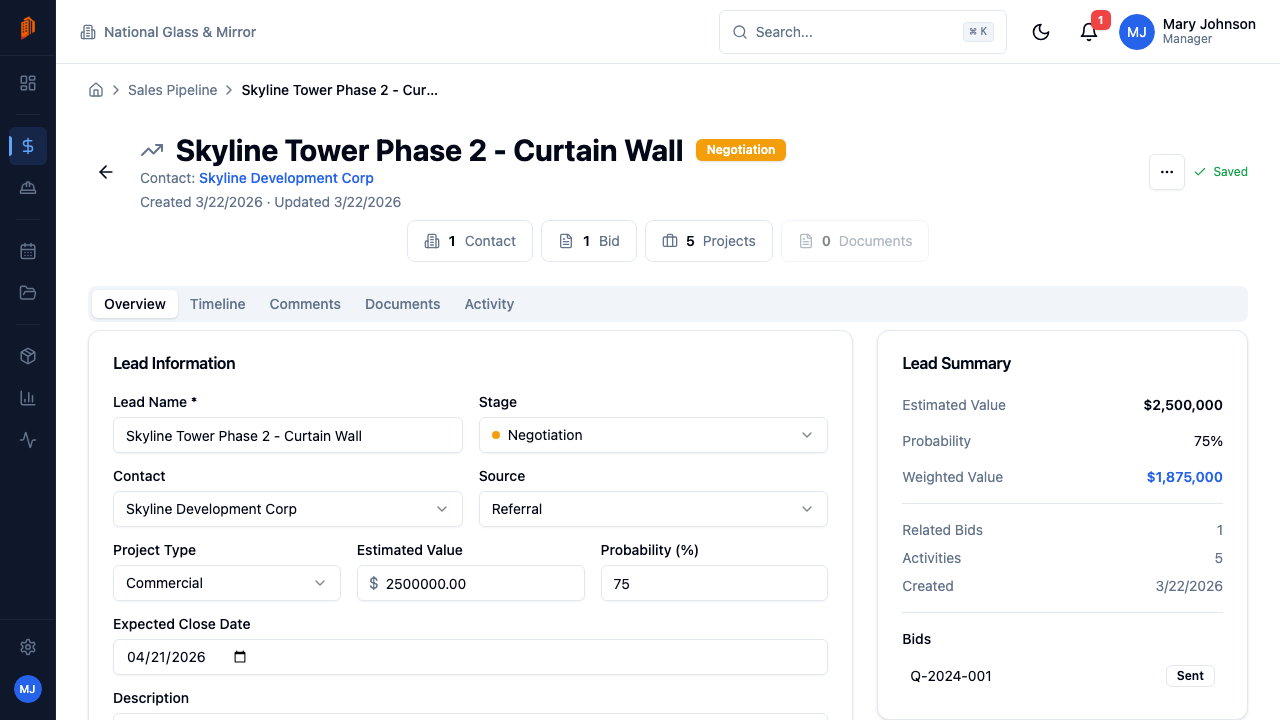
Each lead tracks a pipeline value, a probability, and an expected close date, and its summary card shows the weighted value — pipeline value times probability — so a long shot doesn't read like sure money. Calls, emails, meetings, and notes get logged against the lead on its timeline. When the deal advances, one click starts a construction bid pre-linked to the lead, with its contact and details carried over. The same contact stays attached through the project and the first pay application. After you win, the same project record is where you write construction change orders and bill them — no second system.
Underneath it all is a contact list built for construction: every contact is typed — Customer, General Contractor, Architect, Vendor, and more — and people can nest under a parent company. New to running a pipeline? Start with our construction CRM tips.
The construction sales CRM workflow
Generic CRMs track “deals.” Specialty subcontractors chase invitations, site visits, and bid due dates. Construction sales software has to match that motion: capture the lead, qualify it, work it after the number goes out, then convert the win without a second system.
Capture every invite as a lead
Plan invites, GC emails, and walk-throughs land as leads on the board — named, linked to a contact, and tagged with a source and project type. Pipeline value and expected close date sit on the card so you can see what is actually in play this week, not just what arrived in your inbox.
Qualify before you estimate
Not every invite is worth a takeoff. Move a lead through Contacted and Site Visit Scheduled while you log the calls and the walk-through. Probability and weighted value keep a long-shot from crowding out the jobs you can win. Stages are editable, so the columns match how your trade actually sells.
Follow up after Bid Sent
Once the estimate is out, the lead stays on the pipeline in Bid Sent or Negotiation. Log the follow-up, the addendum, the “did you get our number?” call — the timeline is the record, not a thread you have to hunt. When the GC awards the work, Create Bid (if you have not already) or Convert to Project takes the same contact into execution and the first pay application.
Not a GC-first CRM
Most construction CRMs are built for general contractors who buy work. Specialty subcontractors sell work to those GCs — so construction lead software has to run a sales pipeline, not a bid-leveling inbox.
GC-first tools
Buy-side coordination
- Built to collect and compare bids from many trades, not to chase your next job.
- Contacts are owners and architects on the GC's project — not the GCs you sell to.
- Pipeline stages look like generic Prospect / Qualified, not Bid Sent after a takeoff.
- A won “deal” does not become your estimate, project, or pay app.
Fine when a GC requires collaborator access on their job. That access is not a sales CRM for your company — see subcontractor vs. general contractor software. Volume-quoted enterprise CRM is a different cost model; independently reported Procore pricing for subcontractors scales with construction volume.
Subcontractor sales CRM
BuildWorkPro construction lead software
- GC, owner, and vendor contacts typed for how specialty trades actually sell.
- A Kanban lead pipeline with stages like Site Visit Scheduled and Bid Sent — editable to match your trade.
- Activity, probability, and weighted pipeline value on every opportunity you are chasing.
- A won lead becomes a construction bid, then a project and pay application.
$79/month flat, unlimited users, 14-day free trial. CRM, bidding, and billing are one plan — not a separate sales SKU.
Key capabilities
Contact management
One list for everyone you work with, typed as Customer, General Contractor, Architect, City, HOA, Vendor, Subcontractor, Employee, or Other — filter to exactly who you need, and nest people under a parent company.
Construction sales pipeline
Leads as cards in stage columns — drag a card to move the deal forward. Prefer a different layout? The same pipeline also comes as a Cards grid and a row-per-lead Table.
Configurable stages
Start with seven default stages — New Lead, Contacted, Site Visit Scheduled, Bid Sent, Negotiation, Won, Lost — then add, rename, reorder, and recolor them to match how you actually sell.
Weighted pipeline value
Every lead carries a pipeline value, probability, and expected close date. Its summary card shows the weighted value — value times probability — so you see realistic numbers instead of wishful ones.
Activity timeline
Log phone calls, emails, meetings, and notes against a lead. Everything lands on the lead's timeline, so you can see where the conversation stands — and logged activity feeds the pipeline reports.
Lead-to-bid conversion
When a lead advances, start a construction bid pre-linked to it — contact and details carry over. Won without a formal bid? Convert the lead straight into a project.
How it works
Build your contact list
Add GCs, customers, and vendors one at a time, or bulk-import from CSV with column mapping. Every contact gets a type and at least one way to reach them — email, phone, or mobile.
Add a lead
Name the opportunity, link a contact, and set the pipeline value, source, and project type. The lead starts in your default stage.
Work the board
Drag leads across stages as deals move. Log calls, emails, meetings, and notes on each lead, and keep the probability and expected close date honest as you learn more.
Convert the win
Click Create Bid to start a bid pre-linked to the lead, or Convert to Project to take it straight to execution — the lead moves to the Won stage. The same contact carries into pay applications once the job is underway.
Full walkthrough in the docs: Sales pipeline · Leads · Contacts
Frequently asked questions
What is a construction CRM?
A construction CRM is software for tracking the people you sell to and the jobs you are chasing — not a generic contact database. For specialty subcontractors that means GC, owner, and vendor contacts plus a sales pipeline of leads with stage, dollar value, and expected close date. In BuildWorkPro, a won lead converts into a bid or project so the same record runs from first invite to pay app.
What is construction lead software?
Construction lead software tracks every opportunity before it becomes a bid: who sent the invite, what it is worth, which stage it sits in, and what follow-up is due. BuildWorkPro is construction lead software for specialty subcontractors — each job you are chasing is a lead on a Kanban pipeline with value, probability, and an activity log of calls, emails, and site visits. When the lead lands, it becomes the bid without retyping.
What is a construction sales CRM?
A construction sales CRM is CRM built around how subcontractors sell work: GC and owner contacts, pipeline stages like Site Visit Scheduled and Bid Sent, and a path from the won lead into estimating and billing. Generic sales CRMs stop at the deal. BuildWorkPro carries the same contact from first call through the bid, the project, and the pay application.
How does the sales pipeline work?
Leads appear as cards on a Kanban board, organized into stage columns. A new workspace starts with seven stages — New Lead, Contacted, Site Visit Scheduled, Bid Sent, Negotiation, Won, and Lost — and you can add, rename, reorder, and recolor stages to match how you actually sell. Drag a card to move it to another stage, or switch to the Cards or Table view of the same pipeline.
Does a lead connect to a bid?
Yes. From the lead detail page, Create Bid starts a bid pre-linked to the lead, carrying its contact and details over — no retyping. You can also convert a lead straight into a project, which moves the lead to the Won stage.
How does contact management work?
Every contact gets a type — Customer, General Contractor, Architect, City, HOA, Vendor, Subcontractor, Employee, or Other — so you can filter the list to exactly who you need. Contacts can be hierarchical: set a parent company to nest a person under the company they work for. You can also bulk-import contacts from CSV with column mapping.
Why use a CRM built into the same tool as bidding?
A standalone CRM stops at the won deal — then you re-enter everything into whatever you estimate and invoice with. Because BuildWorkPro's CRM lives in the same system as bidding and projects, the lead you win becomes the bid, the bid becomes the project, and the contact behind it stays attached the whole way. One record from first call to final pay app.
Which trades is the CRM built for?
Trade subcontractors who sell work to GCs and property owners: drywall and sheetrock crews, plumbing, electrical, HVAC, glass and glazing, concrete, framing, roofing, flooring, painting, and excavation contractors all run the same motion — chase the job, bid it, win it, bill it. The pipeline stages are fully editable, so the board matches how your trade actually sells.
How much does a construction CRM cost?
The CRM is included in the single BuildWorkPro plan: $79/month (or $790/year) with unlimited users and every feature — bidding, projects, pay applications, and more. There is a 14-day free trial with no credit card required.
Run your construction sales pipeline from a board, not a notepad
Construction lead software is included in the $79/month flat plan — unlimited users, every feature. 14-day free trial, no credit card required.
Start free trial