
For Concrete Contractors
Concrete Contractor Software
From footings to flatwork, run every pour and every project in one place. Bid the work by line item, schedule placement days by phase, log deliveries and inspections, and submit pay apps that match your schedule of values. BuildWorkPro handles the office work so you can focus on the concrete.
14-day free trial. No credit card required.
Why concrete contractors use BuildWorkPro
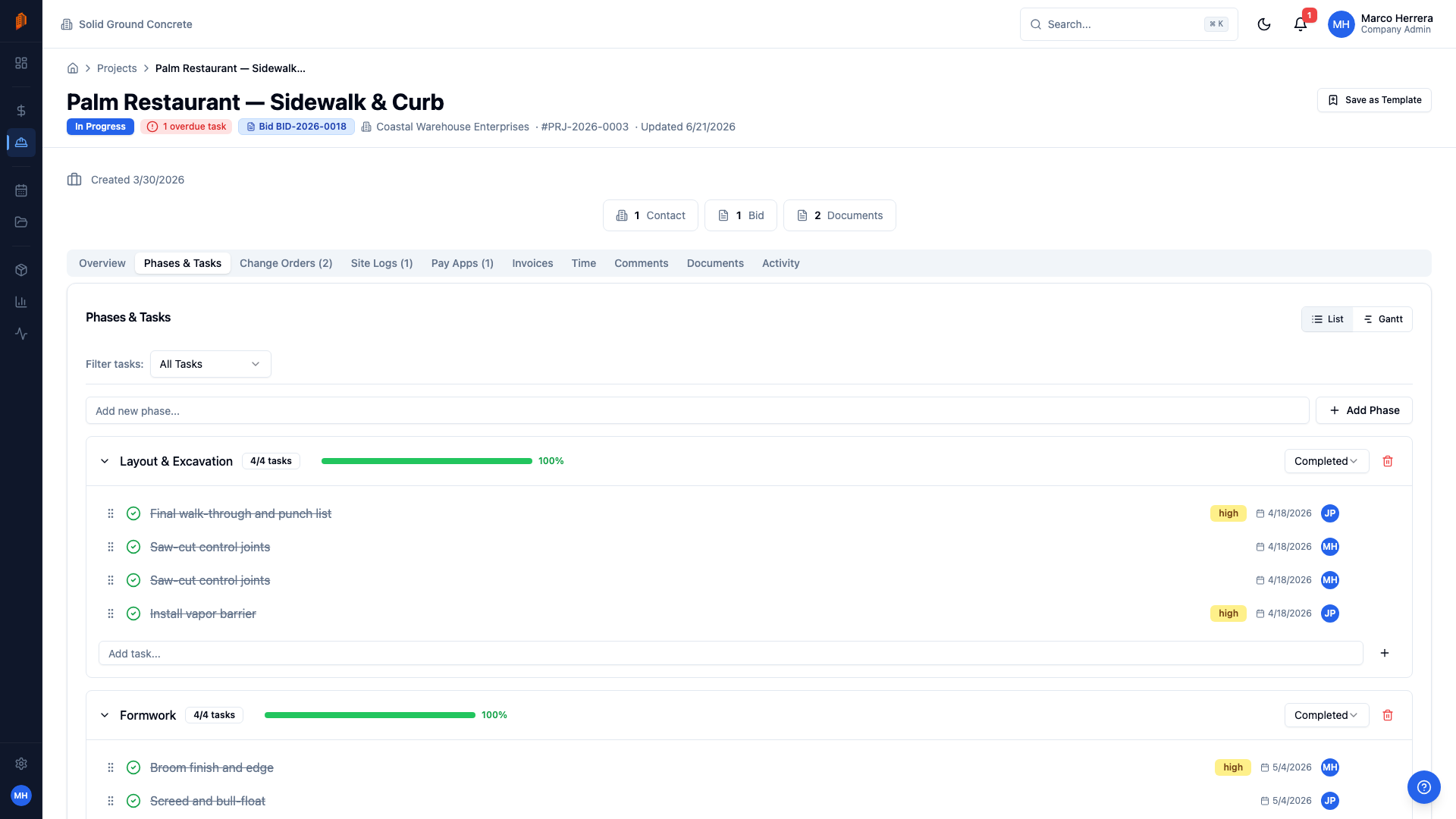
Schedule footings, walls, and slabs as phases
Break each job into phases and tasks with dependencies, so forming, rebar, pre-pour inspection, and placement stay in order on the Gantt chart. When a pour date moves, the dependencies show exactly what moves with it.
Price yardage, pump time, and rebar per line
Build bids by phase — footings, walls, slabs, flatwork — with forming, rebar, placement, and finishing as line items split into material, labor, and other costs. Mobilization, pump rental, and permits go in as bid-level costs spread across your sell prices. For CMU walls, the free concrete block calculator turns a wall into blocks, mortar, grout and rebar you can price. The concrete price trend shows ready-mix by region.
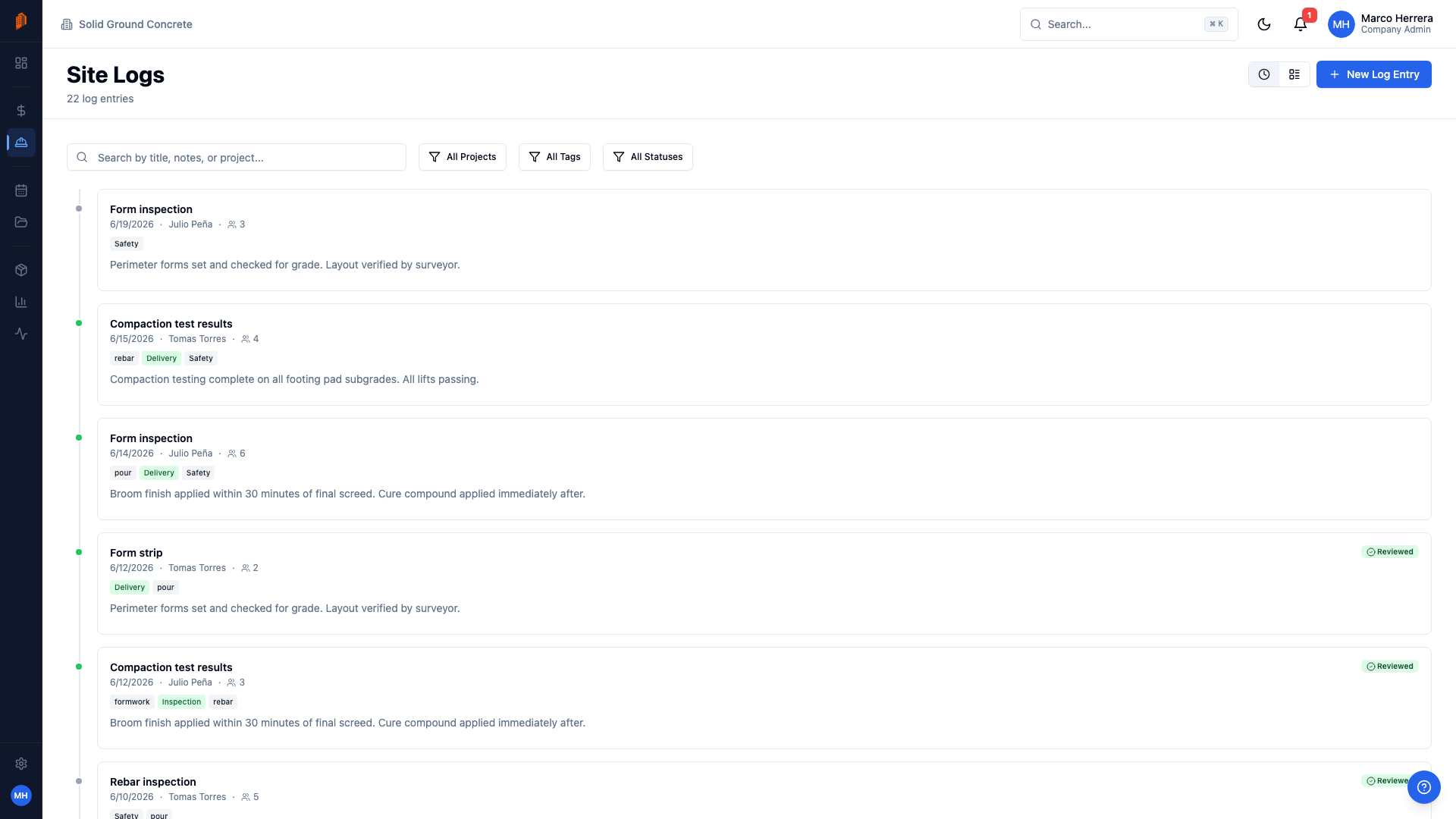
Pour records, deliveries, and inspections
Log who was on site, work performed, and every mix delivery under Materials Received. Tag entries as Delivery or Inspection, note issues, and attach photos — your site logs become the paper trail that settles disputes.
Bill by pour and phase
Generate AIA-style pay applications from a schedule of values broken out by foundations, structural walls, elevated slabs, and site concrete. Retainage is calculated on every line, and approval statuses track each pay app to paid.
Get paid for T&M extras
Out-of-scope work — added footings, washout moves, rock excavation — becomes a change order with priced line items and an approval flow. Approved change orders roll into the contract sum, so your next pay application reflects the new total.
Know where crew hours went
Crews log hours against specific projects and tasks, and every entry carries a review status so the office checks time before payroll. A restricted field-crew role lets workers file logs and hours without seeing bids or billing.
Everything you need at one flat price
$79/month for unlimited users and projects. No per-user fees.
Free templates for concrete contractors
The same documents BuildWorkPro generates, as free fillable PDF, Excel and Word templates — no email required.
- Concrete Estimate Template PDF · Excel · Word
- Construction Estimate Template Excel · PDF
- Construction Bid Proposal Template Word · PDF
- Construction Change Order Template PDF · Word · Excel
- Pay Application Template (G702 & G703 style) Excel · PDF
- T&M Ticket Template PDF · Excel
Free calculators and price data: Rebar Calculator · Concrete Block Calculator · Asphalt Calculator · Concrete Prices · Steel and Rebar Prices
Frequently asked questions
What is the best software for concrete contractors?
For structural and flatwork concrete subcontractors working for GCs, BuildWorkPro covers the whole job cycle in one tool: line-item bids, phase-based pour scheduling, daily site logs, change orders, and AIA-style pay applications. It costs $79/month flat with unlimited users, so estimators, project managers, and field crews all work from the same numbers without per-seat fees. Most alternatives are built for GCs or homebuilders and treat the pay-app workflow concrete subs bill through as an afterthought.
Can I document pours, deliveries, and inspections?
Yes. Site logs record personnel on site, work performed, materials received, visitors, and issues — so a pour day captures the crew, the work placed, and every mix delivery in one entry. Tag entries as Delivery or Inspection to find them fast later, and attach photos of forms, embeds, and finished slabs. A restricted field-crew role lets workers file logs without seeing bids or billing.
How do I bill for completed pours each month?
Create an AIA-style pay application with a schedule of values broken out the way you build — footings, walls, elevated decks, slab-on-grade, site concrete. Each billing period, enter the work completed against each line and BuildWorkPro calculates the amount due with retainage withheld. Approval statuses track every pay app from draft through approved to paid.
Can I price pump time, mobilization, and winter protection into a bid?
Yes. Pump time, blankets, and heat go in as line items split into material, labor, and other costs, while job-wide costs like mobilization, pump rental, and permits go in as bid-level project costs that BuildWorkPro spreads across your line items' sell prices. Nothing rides for free, and the GC sees a clean PDF proposal instead of your cost breakdown.
How much does BuildWorkPro cost?
One plan: $79/month, or $790/year. That includes unlimited users, unlimited projects, and every module — bidding, pay applications, change orders, site logs, scheduling, time tracking, and CRM. The 14-day free trial requires no credit card.
Run your concrete work from one tool
Bids, pay apps, change orders, site logs, scheduling, and time tracking — $79/month flat, unlimited users. 14-day free trial, no credit card required.
Start free trialComparing platforms? See how BuildWorkPro stacks up as a Procore alternative or a Buildertrend alternative.