
Free online tool
Pay Application Builder
Type your schedule of values once. Each month, enter this period’s work, get the certificate math, and download a filled G702/G703-style PDF. It saves in your browser and rolls forward when the application is approved.
- Saves in this browser
- Fills the free PDF template
- Carries forward each period
- No email required
Pay application builder
Project and application
These fill the header of the application page and the continuation sheet.
Schedule of values (continuation sheet)
Enter scheduled value, previous, this period and stored. Columns G to I and retainage calculate. The highlighted column is the only one you touch each month.
| A · Item | B · Description of work | C · Scheduled value | D · From previous | E · This period | F · Stored | G · Completed & stored | % | I · Balance | Retainage | Remove |
|---|---|---|---|---|---|---|---|---|---|---|
| Grand total | ||||||||||
How it works
-
Month one
Set up the job
Enter the project, your schedule of values and the retainage rate from the contract. If you are mid-job, put what you have already billed in the “from previous” column.
-
Every period
Enter this period, download the PDF
Type this period’s work and any stored material. Lines 1 to 9 and every continuation column compute, then the PDF is filled on your computer, ready to sign and send.
-
When approved
Roll it forward
One click closes the application, carries the totals into “from previous”, sets line 7, and starts the next number. The second application takes two minutes.
The PDF you get
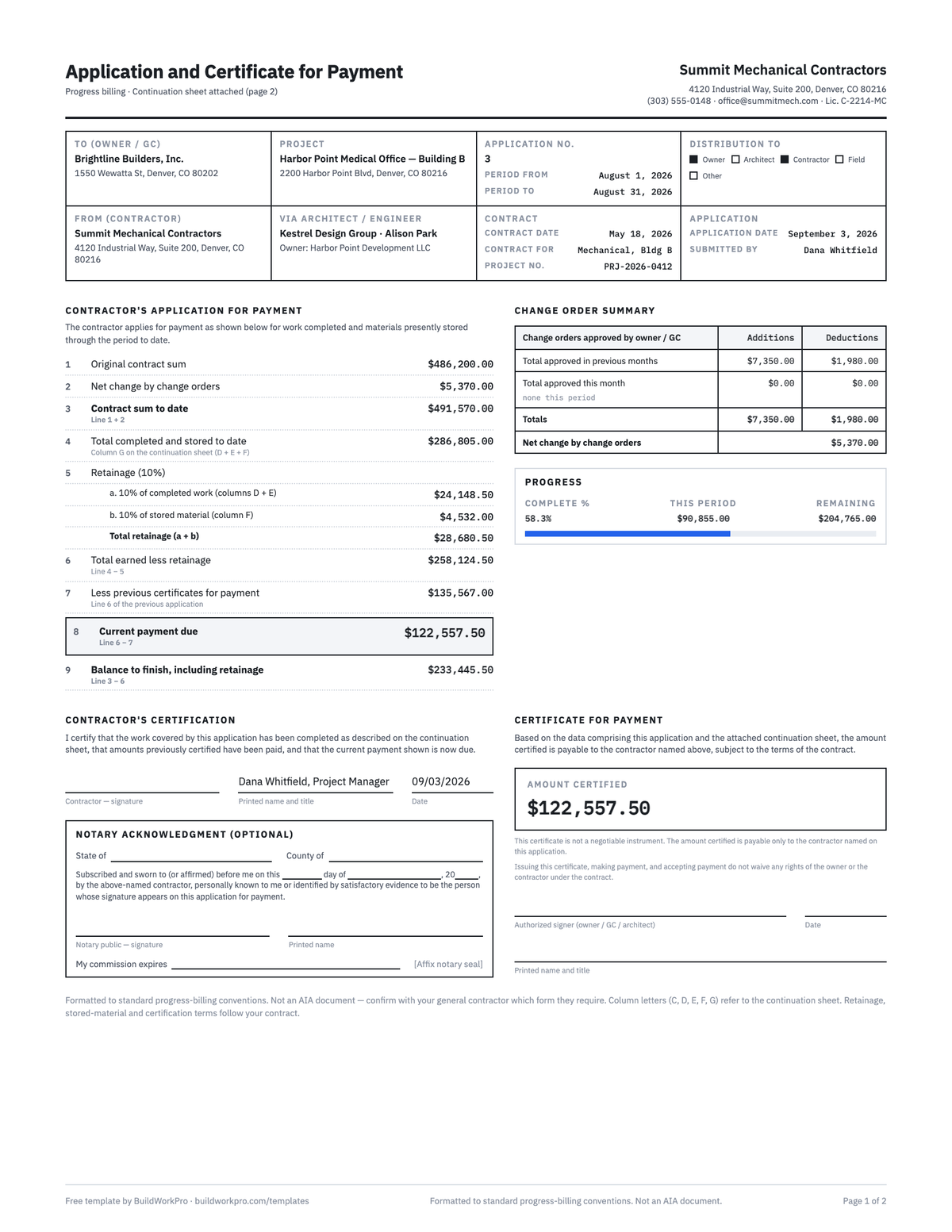
A two-page, G702/G703-style application and continuation sheet, the same fillable template on our free templates page, with every field filled and still editable. It never prints the AIA marks; the disclaimer on the templates page applies here too.
Frequently asked questions
Is my pay application data sent to BuildWorkPro?
No. Everything you type stays in your browser’s local storage on this device. The only network request the tool makes is to fetch the blank PDF template from this site; the filled PDF is generated on your computer. Clear it any time with “Start blank” or by clearing site data in your browser.
How does the roll-forward work?
When an application is approved, press “Start next application”. This period’s amounts move into the “from previous applications” column, this period clears, stored materials stay for you to update, the application number increments, the billing period advances a month, and line 7 (less previous certificates) becomes the total earned less retainage from the application you just closed. That is the reconciliation most subs do by hand each month.
How is retainage calculated?
On the cumulative total, not on this period alone. Line 5a is the rate times work completed to date (columns D plus E) and line 5b is the rate times materials presently stored (column F). Total retainage comes off line 4 to give line 6, total earned less retainage. Because it is figured on the cumulative total, each period only releases the net difference.
Where do change orders go?
Add each approved change order as its own line with “Add change order line”. Use the CO number as the item number and enter a negative scheduled value for a deductive change. The tool sums them into line 2 (net change by change orders) and line 3 (contract sum to date), and prints them on the continuation sheet with a CO tag, which is how most general contractors want to trace them.
Is the PDF an official AIA G702 or G703?
No. AIA, G702 and G703 are trademarks of The American Institute of Architects, and the official forms are licensed through AIA Contract Documents. This tool fills an independent template formatted in the same general style, with the same numbered lines and A to I continuation columns, which many GCs accept. Confirm with your GC whether they require the licensed form.
What happens when I have more than 22 lines?
The tool keeps computing correctly, but the PDF continuation sheet has room for 22 lines and the tool tells you how many will not print. Combine small lines, or bill the rest on a second continuation sheet. If you bill jobs with long schedules of values every month, BuildWorkPro prints as many pages as the job needs.