
For Framing Contractors
Framing Contractor Software
Manage wall layouts, floor systems, and roof framing across all your jobs from one platform. Price lumber packages at current quotes, schedule crews for each building or phase, track material deliveries, and submit pay apps tied to your percent complete.
14-day free trial. No credit card required.
Why framing contractors use BuildWorkPro
Organize by building and phase
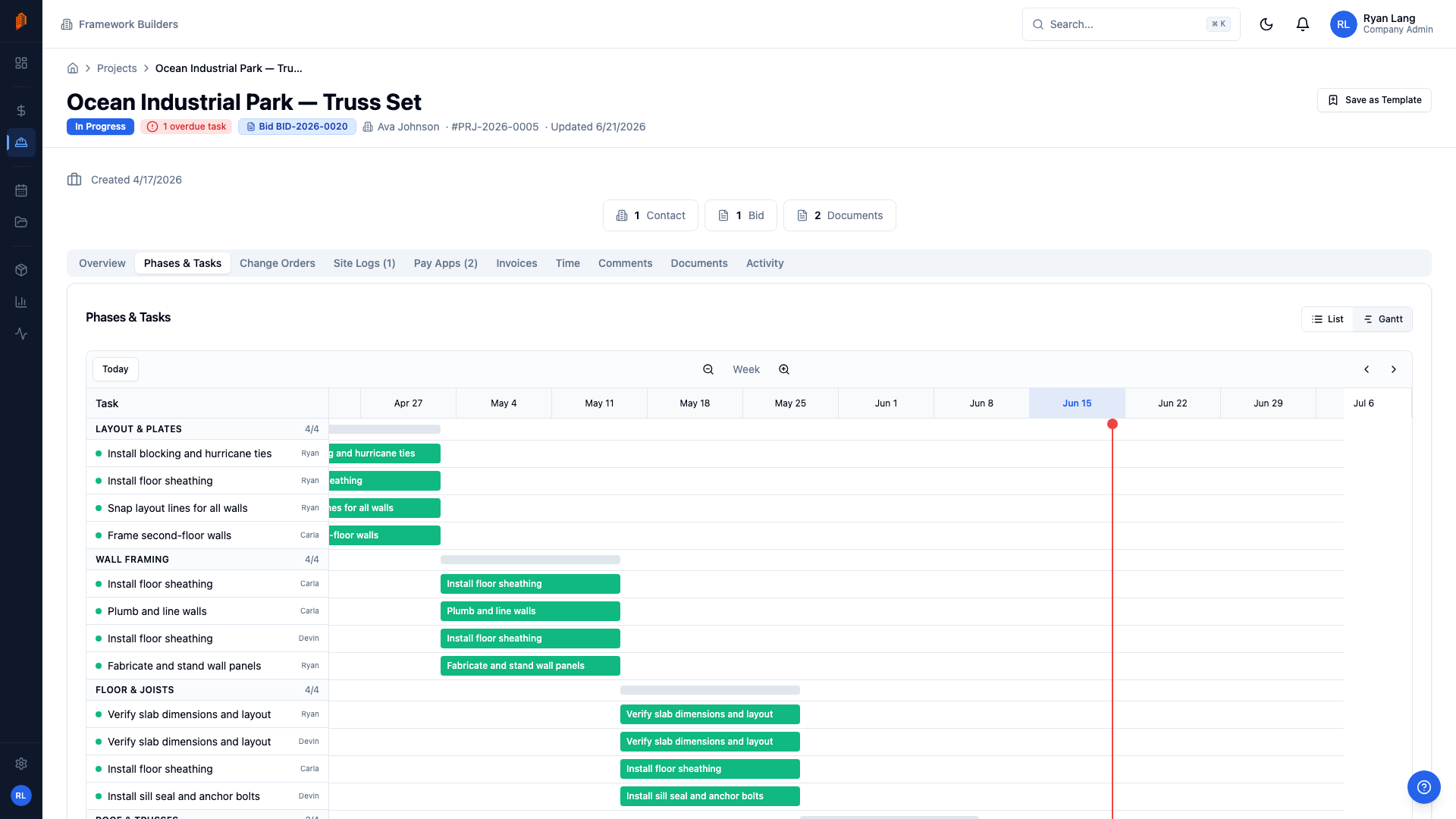
Break multi-building projects into phases and tasks — layout, wall framing, floor systems, roof trusses, sheathing — per building or unit. Task dependencies and the Gantt view in project management show what's framed, what's next, and where every crew stands.
Price lumber packages that hold up
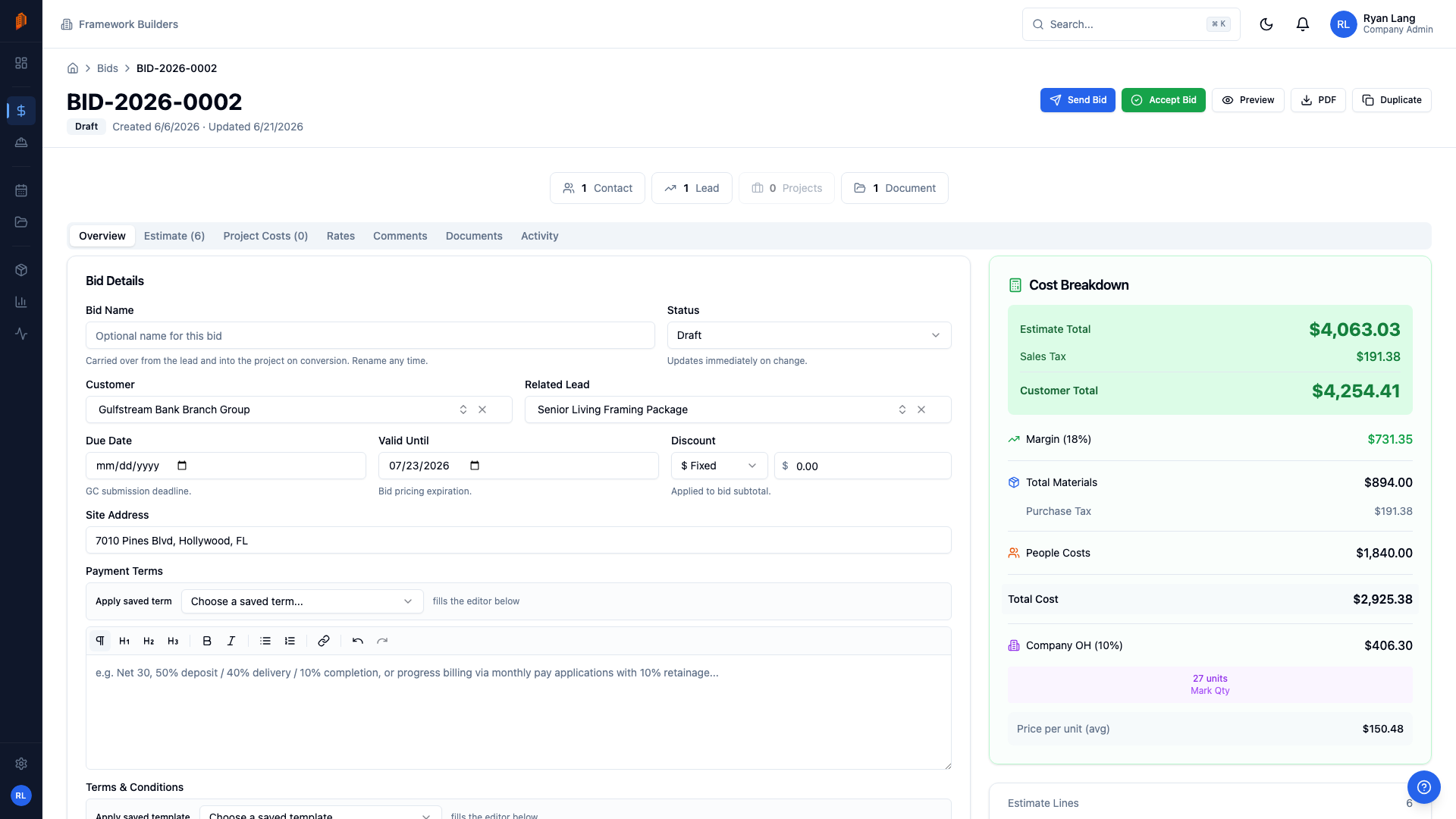
Build bids with line items split into material and labor — stud counts, truss packages, hardware, and your production rates for layout, standing walls, and roof framing. Import your supplier's CSV price list so volatile lumber quotes hit the bid at this week's numbers, not last month's. For decks and stairs, the free deck calculator and stair stringer calculator count the framing before you price it. The lumber price trend shows how far framing lumber has moved this month.
Track lumber deliveries
Log lumber drops, truss deliveries, and hardware shipments in site logs under Materials Received, tagged Delivery, with photos from the site. Know what's on the ground before the crew shows up — not after they're standing around waiting on a truck.
Bill per building or per unit
Build AIA-style pay applications on a schedule of values with a line per building, unit, or phase. Bill first-floor walls, second-floor deck, and roof framing separately, with percent complete and retainage tracked per line.
Know where every crew hour went
Crews log hours against a specific project and task with time tracking, so labor on Building 3 doesn't blur into Building 4. Review and approve hours by job, and compare actual framing labor against what you bid.
Inspection-ready daily records
Record work performed, nailing and shear wall details, and inspector visits in daily site logs tagged Inspection, with photos attached. When a question comes up about a unit months later, the record is already there.
Everything you need at one flat price
$79/month for unlimited users and projects. No per-user fees.
Free templates for framing contractors
The same documents BuildWorkPro generates, as free fillable PDF, Excel and Word templates — no email required.
- Construction Estimate Template Excel · PDF
- Construction Bid Proposal Template Word · PDF
- Construction Change Order Template PDF · Word · Excel
- T&M Ticket Template PDF · Excel
- Construction Daily Report Template PDF · Word · Excel
- Construction Timesheet Template Excel · PDF
Free calculators and price data: Deck Calculator · Stair Stringer Calculator · Fence Calculator · Lumber Prices
Frequently asked questions
What is the best software for framing contractors?
The best framing contractor software handles what framing subs actually deal with: lumber-heavy estimates, crews spread across buildings, and progress billing tied to percent complete. BuildWorkPro is built for trade subcontractors — framing subs use it on residential tracts, multifamily projects, and commercial wood and metal stud jobs. Bidding, scheduling, site logs, time tracking, and AIA-style pay applications are all in one system at one flat price.
How do I keep up with lumber price swings when bidding?
Keep lumber pricing in your product catalog and re-import your supplier's CSV price list whenever a new quote lands — the column mapping is saved, so refreshing prices takes minutes, not an afternoon. For repeat work, duplicate a past bid and update the costs instead of rebuilding the estimate. Margin, overhead, and commission are set on the Rates tab, so when material costs move, your sell price moves with them.
Can I bill per building or per unit?
Yes. Pay applications in BuildWorkPro run on a schedule of values you structure however you bill — a line per building, per unit, or per phase like walls, floor systems, and roof framing. Percent complete and retainage are tracked per line, so Building 3's framing bills separately from Building 4's.
How do I track crews across multiple jobsites?
Crew members log hours against a specific project and task, so you can see who worked which jobsite and what each building's framing actually cost in labor. Project schedules with tasks and Gantt charts show where each crew should be next as buildings dry in. The restricted field-crew role gives workers site logs and time tracking without exposing bids, contracts, or pricing.
How much does framing contractor software cost?
BuildWorkPro is $79/month flat, or $790/year, with unlimited users and unlimited projects — every module included. There are no per-user fees, so putting your whole crew on it costs nothing extra. The 14-day free trial doesn't require a credit card.
Run every framing job from one system
$79/month flat for unlimited users — bidding, scheduling, site logs, time tracking, and pay apps included. 14-day free trial, no credit card required.
Start free trialComparing platforms? See how BuildWorkPro stacks up as a Procore alternative or a Buildertrend alternative.