
Features
Construction Bidding Software for Subcontractors
Built around how subs actually estimate: line items broken into material, labor, and other costs; margin, overhead, and commission applied as rates; a branded PDF proposal; and a won bid that converts straight into a project.
Stop losing money on inaccurate bids
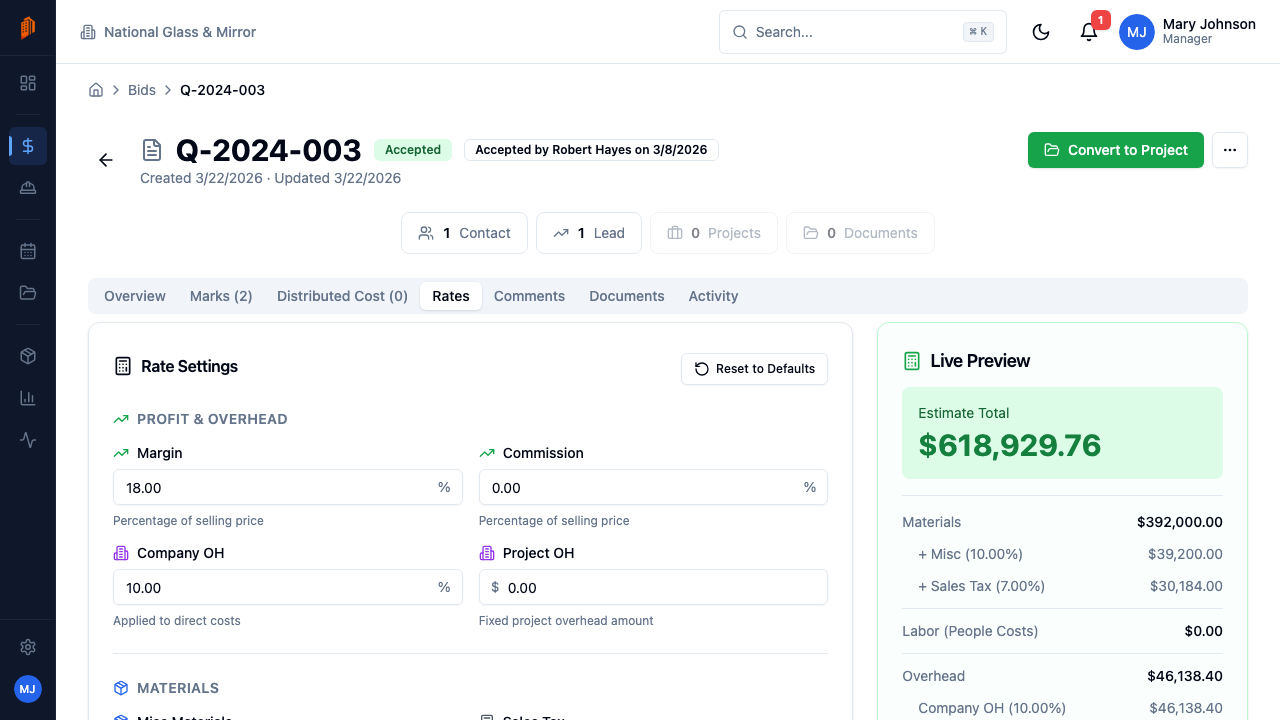
For subcontractors, every bid is a balancing act. Price too high and you lose the job. Price too low and you eat into your margin on every hour worked. BuildWorkPro is construction bidding software that makes that math systematic: break costs into material, labor, and other expense, then apply margin, overhead, and commission on the Rates tab instead of guessing a single markup number.
Every bid lives in your system as a permanent record. You track which bids were sent, which are pending, and which you won or lost. Over time your bid history becomes the dataset for sharper pricing — and the starting point for the next estimate, since any bid can be duplicated or saved as a template with your payment terms and conditions.
New to structured bidding? Our guide on how to create a construction bid walks through the full process, from takeoff to proposal. Win the job and the estimate flows straight into project scheduling and your first pay application — no re-entering numbers.
The subcontractor estimating workflow
GC software is built to collect bids. Construction bidding software for subcontractors is built to create them. The workflow is takeoff → cost the work → protect margin → send a proposal the GC will open → convert the win into a job without retyping the numbers.
Line-item bids with material, labor, and other costs
Each bid is a list of line items, and each line breaks into cost items typed as Material, Labor, or Other — with quantities, units, buy and sell tax, and live rollups. Pull prices from a reusable catalog (or import a vendor CSV) instead of hunting last month's spreadsheet. Duplicate a past bid or load a template when the work repeats.
Margin, overhead, and commission as rates — not a guessed markup
The Rates tab applies margin, commission, and overhead to the whole estimate so the sell price is systematic. Job-wide costs like mobilization, a dumpster, or permits go in Project Costs and spread across line-item sell prices. Markup and margin are not the same number — confusing them donates profit on every bid.
PDF proposals, then bid-to-project
Generate a branded PDF with scope, payment terms, and conditions, and control how much cost detail the GC sees. Send it from BuildWorkPro — optionally for e-signature. When the bid is accepted, one click converts it into a project: the contract value carries over and prefills the schedule of values on the first pay application. Scope that changes after the bid is won is priced as construction change orders on that same job.
Not GC bid-leveling software
Most construction platforms are built for general contractors who buy work. Subcontractors sell work — so subcontractor bidding software has to estimate, price, and propose, not just track inbound numbers.
GC-first tools
Bid leveling and coordination
- Built to receive and compare bids from many trades, not to build yours.
- Estimating often still happens in Excel, then gets pasted into the GC's portal.
- Quote-based or per-user pricing that punishes putting the field on the system.
- Won work does not become your project, pay app, or change-order record.
Fine when a GC requires collaborator access on their job. That access is not a system of record for your company — see subcontractor vs. general contractor software. Quote-based GC platforms price bidding inside an ACV bundle; see Procore pricing for subcontractors for independently reported ranges.
Subcontractor bidding
BuildWorkPro construction bidding
- You build the estimate: line items, catalog prices, and typed cost detail.
- Margin, overhead, and commission live on the Rates tab, not in a side spreadsheet.
- Branded PDF proposals, optional e-signature, status from draft through accepted.
- A won bid converts into a project and prefills the first pay application.
$79/month flat, unlimited users, 14-day free trial. Bidding is included — not a separate estimating SKU.
Key capabilities
Line items with cost detail
Each line item breaks down into cost items for material, labor, and other costs — with quantities, units, buy and sell tax, and per-line totals that roll up live.
Reusable product catalog
Price bids from a catalog of materials, labor, and kits with SKUs, costs, and sell prices. Add an item once, pull it into every bid — or import vendor price lists from CSV with reusable column mappings.
Margin, overhead & commission
The Rates tab turns your costs into a sell price systematically — set margin, commission, and overhead once per bid instead of hand-tuning every line.
Job-wide project costs
Mobilization, dumpsters, permits — add costs that apply to the whole job and BuildWorkPro spreads them across your line items' sell prices, so nothing rides for free.
Professional PDF proposals
Generate clean proposals with your branding, scope, payment terms, and conditions. Display options control how much cost detail the GC sees. Send it without leaving BuildWorkPro.
Bid-to-project conversion
When a bid is accepted, convert it into an active project in one click. Your contract value flows into the project and prefills the schedule of values on your first pay application.
Get the bid signed, not just sent
Send a bid for legally-binding e-signature and the acceptance takes care of itself. Your customer signs from an emailed link — no BuildWorkPro account, no app to install, no login — and the moment they do, the bid is accepted in your system.
Send it for signature
Request a signature when you send the proposal. The signing link goes out with the same branded PDF you already send.
They sign from the link
One link, any browser. Nothing to download and no account to create — the same thing you would want if you were on their side of it.
The bid accepts itself
A signed bid is an accepted bid — same status, same totals, and the same one-click conversion into a project.
BuildWorkPro chases the signature for you with automated reminders, and files the certified signed PDF back onto the bid's Documents — so the executed contract lives with the job instead of in someone's inbox. E-signature runs on Documenso and is included in the $79/month plan.
How it works
Create a bid
Start from scratch, duplicate a past bid, or load a template with your standard estimate structure and terms. Set the customer, project details, and due date.
Build the estimate
Add line items and break each into material, labor, and other cost items — typed in by hand, pulled from your product catalog, or imported from a vendor's CSV price list.
Set rates and project costs
Apply margin, commission, and overhead on the Rates tab. Add job-wide costs like mobilization and permits, and BuildWorkPro distributes them across your sell prices.
Send, track, and convert
Send the PDF proposal and track status from draft to accepted. Win the job? One click converts the bid into a project, ready for scheduling and pay applications.
Full walkthrough in the docs: Creating a bid · Line items · Sending & tracking
Not ready for software? Start with the free templates
The same documents BuildWorkPro generates, as free fillable PDF, Excel and Word templates — no email required.
Frequently asked questions
What is construction bidding software?
Construction bidding software replaces spreadsheet estimating with structured bids: line items broken into material, labor, and other costs; margin, overhead, and commission applied consistently; and a professional PDF proposal generated from the same numbers. In BuildWorkPro, every bid also tracks its status — draft, sent, accepted, or rejected — and a won bid converts directly into a project.
Is BuildWorkPro construction estimating software?
Yes. BuildWorkPro is construction estimating software built for subcontractors. You build each estimate from line items typed as material, labor, or other cost, pull prices from a reusable catalog instead of retyping them, and apply margin, overhead, and commission on the Rates tab so your sell price is systematic rather than guessed. The same estimate becomes a branded PDF proposal and, once accepted, converts straight into a project — so the numbers you estimated carry into the schedule and your first pay application.
How does BuildWorkPro handle labor and material pricing?
Every line item breaks down into cost items typed as Material, Labor, or Other, each with its own cost, sell price, and tax settings. You can pull items from a reusable product catalog instead of retyping prices, and import vendor price lists from CSV with reusable column mappings.
Can I reuse estimates from past jobs?
Yes, two ways. Duplicate any past bid as a starting point, or save a bid template that captures your estimate structure, payment terms, and conditions — so repeat work starts 80% done instead of from a blank page.
How do markup, overhead, and bid-level costs work?
The Rates tab sets the margin, commission, and overhead applied to the bid, so your sell price is systematic instead of guessed. Job-wide costs like mobilization, a dumpster, or permits go in Project Costs, and BuildWorkPro spreads them across your line items' sell prices automatically.
What happens when I win the bid?
Convert the accepted bid into an active project in one click. The contract value carries into the project, and when you create your first pay application, the original contract sum and schedule of values prefill from the bid — no re-entering numbers.
How much does it cost?
Bidding is included in the single BuildWorkPro plan: $79/month (or $790/year) with unlimited users, unlimited projects, and every feature. There is a 14-day free trial with no credit card required.
How is construction bidding software different from GC project software?
GC platforms are built to receive and level bids from many trades. Construction bidding software for subcontractors is built to create those bids: line-item estimates with material, labor, and other costs; margin and overhead applied as rates; a branded PDF proposal; and a one-click path from a won bid into a project and the first pay application. BuildWorkPro is the second kind.
Is there a free construction bidding software option?
BuildWorkPro includes a 14-day free trial with no credit card required, so you can build line-item bids, apply margin and overhead, and export PDF proposals before you pay. After the trial, bidding is part of the single $79/month plan (or $790/year) with unlimited users — there is no separate bidding SKU and no forever-free tier.
Win more work at margins that hold up
Bidding is included in the $79/month flat plan — unlimited users, every feature. 14-day free trial, no credit card required.
Start free trial