
Features
Construction Scheduling & Project Management Software
Break each job into phases and tasks, schedule them on a Gantt chart you can drag to reschedule, and keep change orders, site logs, and pay apps on the same page — for every GC you work for.
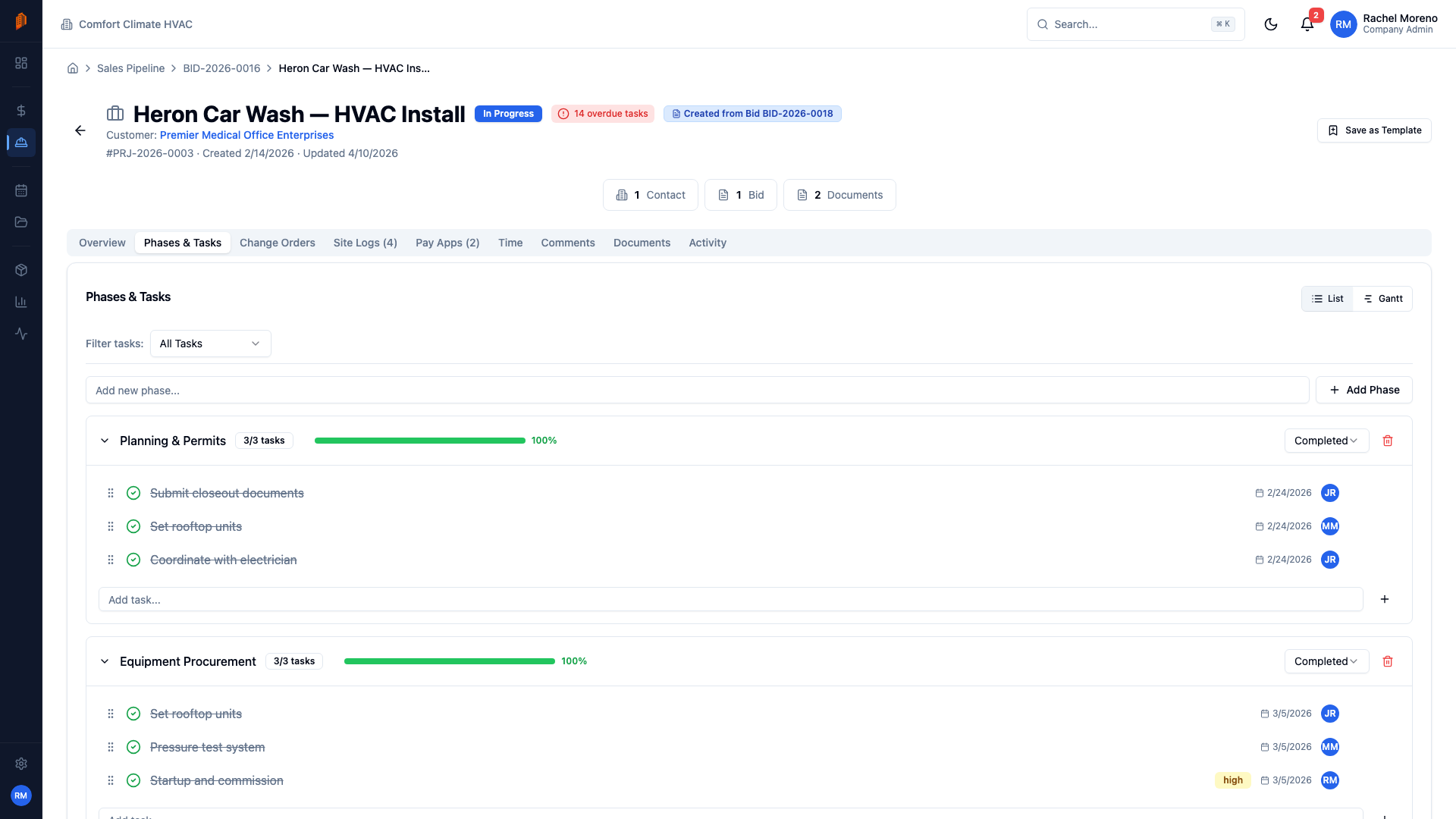
Run every job from one page
A subcontractor's week is rarely one job. It's a rough-in for one GC, a punch list for another, and two more starting Monday — each with its own schedule, paperwork, and crew. The Projects module puts them all in one list with Kanban, Card, and Table views, search, and status filters. When a job moves from Planning to In Progress, drag its card to the next column.
Inside a project, the Phases & Tasks tab is the work breakdown. Phases and tasks carry start dates, workday-based durations, assignees, priorities, and checklists. Link the tasks that depend on each other and BuildWorkPro highlights the critical path. The same tab switches to a Gantt view, where the schedule becomes bars on a timeline you reschedule by dragging.
Projects also connect to the money and the field. A won lead from the construction CRM becomes a bid; a won bid from bidding converts straight into a project — line items map to phases or tasks, and they can seed the schedule of values for pay applications. The same project page carries tabs for daily site logs, time tracking, change orders, invoices, and documents — so the answer to "where does that live?" is always the project.
Key capabilities
Phases and tasks
Phases are the stages of the job, each with its own status. Tasks live inside them with a status, priority, assignee, and checklist. Drag to reorder, and filter the list to overdue or unassigned work.
Gantt chart
Every dated task is a bar on the timeline. Drag a bar to move it, drag its edge to change the duration, and zoom between day, week, and month. A red line marks today; phases roll up into summary bars.
Dependencies and critical path
On any task, link the tasks that must finish first. BuildWorkPro highlights the project's critical path, and dependency arrows on the Gantt show how a slip in one task pushes the work behind it.
Kanban, Card, and Table views
See every project as a card in status columns — Planning, In Progress, On Hold, Closeout, Completed — and drag between them. Prefer a grid or a dense table? Switch views; your choice is remembered.
Project templates
Save a finished project as a template — phases, tasks, priorities, and durations come with it — or build one from scratch. New projects start from a template with the work breakdown already in place.
Documents, comments & activity
Upload contracts, drawings, permits, and photos to the project's Documents tab. Discuss work in threaded comments with mentions, and check the Activity tab for a history of who changed what, and when.
How it works
Create the project
Click New Project — optionally starting from a template — or convert an accepted bid and choose how its line items map onto the schedule: as phases, as tasks, or onto a template's phases.
Break down the work
Add phases for the stages of the job and tasks inside them. Set start dates and durations — BuildWorkPro counts workdays and skips weekends — plus assignees, priorities, checklists, and dependencies.
Work the schedule
Switch the Phases & Tasks tab to Gantt. Drag bars when dates move, watch dependency arrows show the knock-on effects, and cycle task statuses from To Do to In Progress to Done as the crew works.
Run the job from one page
Everything else about the job lives in the same project's tabs: change orders, site logs, pay apps, invoices, time, comments, and documents. Move the project through Closeout to Completed when it wraps — our punch list management guide covers the last stretch.
Full walkthrough in the docs: Projects overview · Phases and tasks · Gantt chart
Not ready for software? Start with the free templates
The same documents BuildWorkPro generates, as free fillable PDF, Excel and Word templates — no email required.
Frequently asked questions
What does construction project management software do for a subcontractor?
It keeps each job's schedule, paperwork, and crew assignments in one place instead of spread across spreadsheets and text threads. In BuildWorkPro, every job is a project with phases, tasks, a Gantt chart, and tabs for change orders, site logs, pay applications, time, and documents. The Projects list shows all of them at once in Kanban, Card, or Table view — useful when you are running work for several GCs at the same time.
Is BuildWorkPro construction scheduling software?
Yes. Scheduling is built in: give each task a start date and a workday-based duration and it lands on a Gantt chart you reschedule by dragging the bars. Link the tasks that must finish first as dependencies and BuildWorkPro highlights the critical path, so you can see what slips when one task moves. Because the schedule lives on the same project as change orders, site logs, pay applications, and time tracking, a date change is visible to everyone working the job — no separate scheduling tool to keep in sync.
How do phases, tasks, and dependencies work?
Phases are the major stages of a job; tasks are the work inside each phase, each with a status, priority, assignee, and optional checklist. Give a task a start date and a duration in days — BuildWorkPro counts workdays and skips weekends to compute the end date — and it appears on the Gantt chart. Link the tasks that must finish first as dependencies, and BuildWorkPro highlights the project's critical path.
Can I reuse the same project structure on repeat jobs?
Yes. Save any project as a template — its phases and tasks are copied, including names, priorities, and durations — or build templates from scratch in Settings. When you create a new project, pick one under Start from template and the work breakdown is created with it. A preview shows how many phases, tasks, and checklist items you'll get.
How does a won bid become a project?
Open an accepted bid and click Convert to Project. You choose how the estimate maps onto the schedule: each line item becomes a phase, each becomes a task, or a project template is applied with line items mapped to its phases. The new project links back to the original bid, and the bid's line items can seed the schedule of values for your first pay application.
Where do project files and discussion live?
Every project has Documents, Comments, and Activity tabs. Upload contracts, drawings, permits, and photos to Documents and they stay linked to the job — they also appear in the app-wide Documents library. Comments is a threaded discussion where mentioning a teammate notifies them, and Activity is a read-only history of every change on the project.
How much does it cost?
Project management is included in the single BuildWorkPro plan: $79/month (or $790/year) with unlimited users, unlimited projects, and every feature. There is a 14-day free trial with no credit card required.
Every job, every crew, one schedule
Project management is included in the $79/month flat plan — unlimited users, every feature. 14-day free trial, no credit card required.
Start free trial