
For Plumbing Contractors
Plumbing Contractor Software
Manage rough-in through fixture trim across every job from one platform. Track bids on new construction and tenant improvements, schedule your crews for underground and top-out work, and submit pay apps that match your schedule of values. BuildWorkPro keeps your plumbing operation organized.
14-day free trial. No credit card required.
Why plumbing contractors use BuildWorkPro
Manage every phase of the job
Break each job into underground, slab rough-in, top-out, fixture trim, and final test — as phases and tasks with dependencies on a Gantt chart. Project management shows where every active job stands.
Win bids with accurate estimates
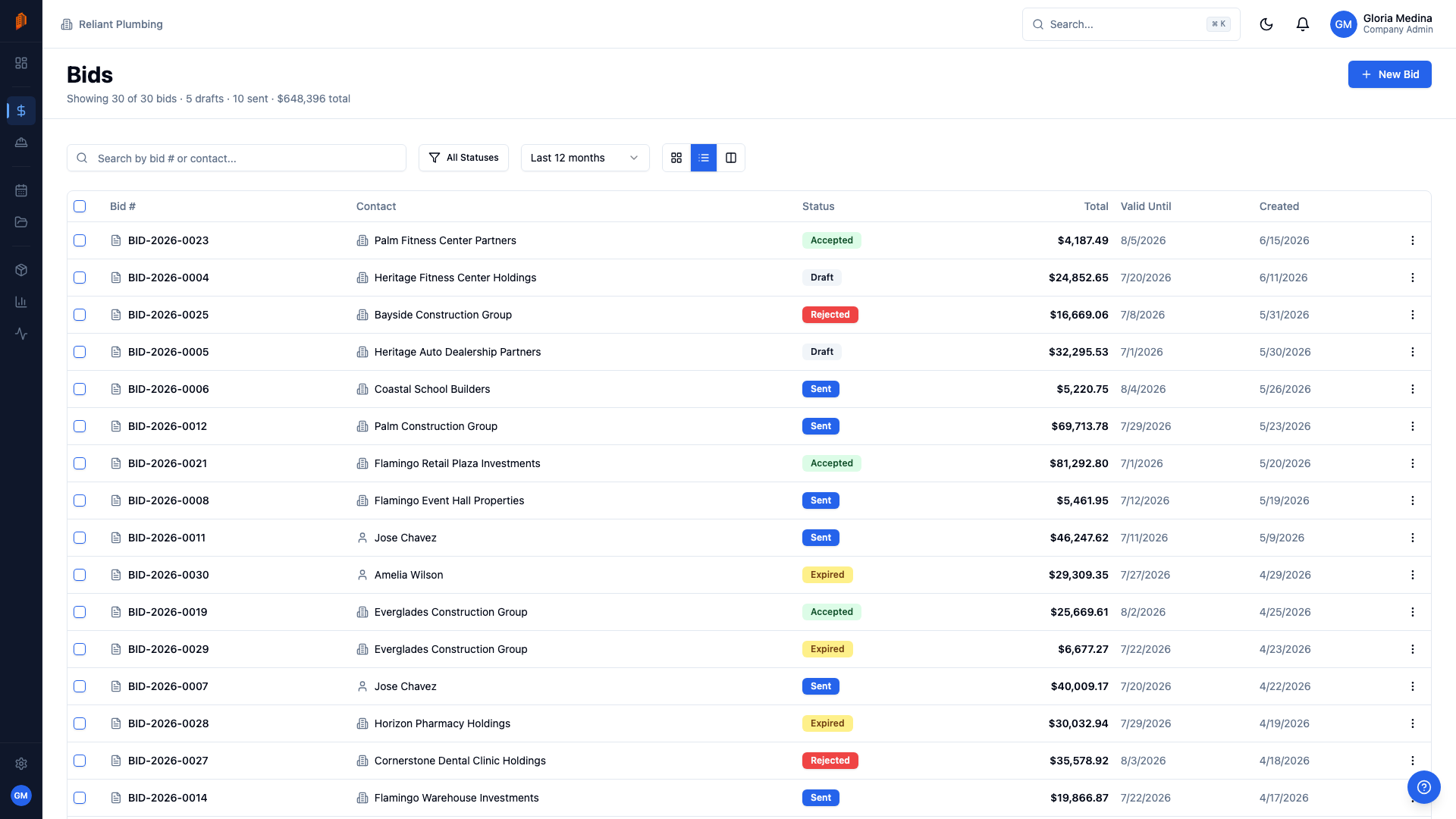
Build bids with line items split into material and labor, priced from a catalog of your copper, PEX, cast iron, and DWV assemblies. Save fixture packages as kits, import vendor price lists from CSV, and duplicate past bids for similar building types.
Track inspections and testing
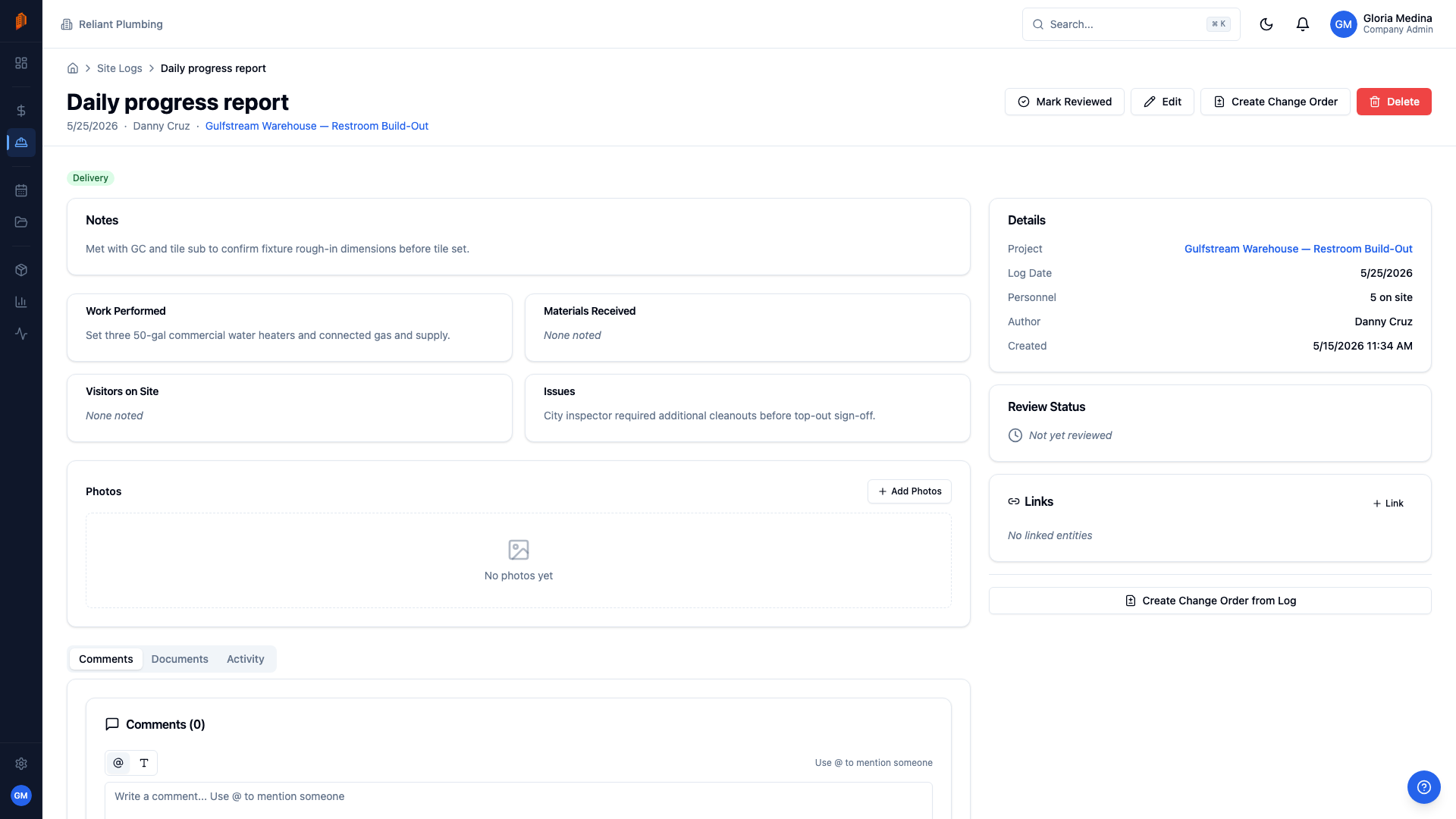
Record pressure tests and inspection results as site logs with an Inspection tag, issues, and photos. When a walkthrough fails, the punch items and the fix are documented on the project — not in someone's text messages.
Pay apps tied to your SOV
Bill underground, rough-in, top-out, and trim as separate schedule of values lines on AIA-style pay applications. Update percent complete each period and retainage calculates automatically.
Know where crew hours go
Plumbers log hours against the project and task they worked — rough-in at the mid-rise, trim at the TI. Review and approve entries before payroll, and give field crews a restricted role that shows only their projects, site logs, and time.
Change orders under control
When the architect adds fixtures or reroutes a waste line, price the change as line items and track it through approval. Approved change orders roll into the contract sum, so your pay apps bill against the right number.
Everything you need at one flat price
$79/month for unlimited users and projects. No per-user fees.
Free templates for plumbing contractors
The same documents BuildWorkPro generates, as free fillable PDF, Excel and Word templates — no email required.
- Plumbing Estimate Template PDF · Excel · Word
- Construction Estimate Template Excel · PDF
- Construction Bid Proposal Template Word · PDF
- Construction Change Order Template PDF · Word · Excel
- Pay Application Template (G702 & G703 style) Excel · PDF
- T&M Ticket Template PDF · Excel
Free calculators and price data: Labor Burden Calculator · Markup vs Margin Calculator · Construction material prices
Frequently asked questions
What is the best software for plumbing contractors?
The best software depends on the work you do. BuildWorkPro is built for project-based plumbing subcontractors on commercial and residential construction — companies that bid jobs, bill against a schedule of values, and run crews through underground, rough-in, top-out, and trim. If your business is service dispatch or drain cleaning, a dispatch tool is a better fit; BuildWorkPro handles bids, pay applications, change orders, scheduling, and site logs for contract work.
Can I bill underground, rough-in, and trim as separate phases?
Yes. Pay applications in BuildWorkPro bill against a schedule of values, and each SOV line is whatever you define — underground, slab rough-in, top-out, fixture trim, final test. Each billing period you update percent complete per line, and retainage and totals calculate on an AIA-style pay application.
How do I document inspections and failed walkthroughs?
Create a site log for the day, tag it Inspection, and record what happened in work performed and issues. Attach photos of the failed items — a missing nail plate, an unsupported stack — so the correction is documented before re-inspection. Every log stays on the project as a dated record you can pull up if a dispute comes later.
Can I reuse my fixture-package estimates?
Yes, three ways. Save a bid as a template to keep your estimate structure, payment terms, and conditions; duplicate any past bid for a similar building type; or build fixture packages as kits in the product catalog — a water closet with carrier, supply lines, and labor as one item you pull into any bid.
How do you bid plumbing work?
Count fixtures and runs from the plans, take off material by fixture package and pipe run, estimate labor hours per phase (underground, rough-in, trim), then apply overhead and margin on top of cost — not lumped into it. In BuildWorkPro each of those becomes a priced line item with material and labor split out, your fixture packages save as reusable templates, and the finished bid exports as a professional PDF proposal for the GC.
How much does BuildWorkPro cost for a plumbing company?
$79/month, or $790/year — one flat price with unlimited users, unlimited projects, and every feature included. There are no per-user fees, so your estimator, project manager, and every field plumber can be on the same account. The 14-day free trial requires no credit card.
Bid it, build it, bill it — from one system
$79/month flat for unlimited users — your estimator, project manager, and every field plumber on the same account at no extra cost. 14-day free trial, no credit card required.
Start free trialComparing platforms? See how BuildWorkPro works as a Procore alternative or a Buildertrend alternative.