
Free template
Pay Application Template — G702 & G703 Style
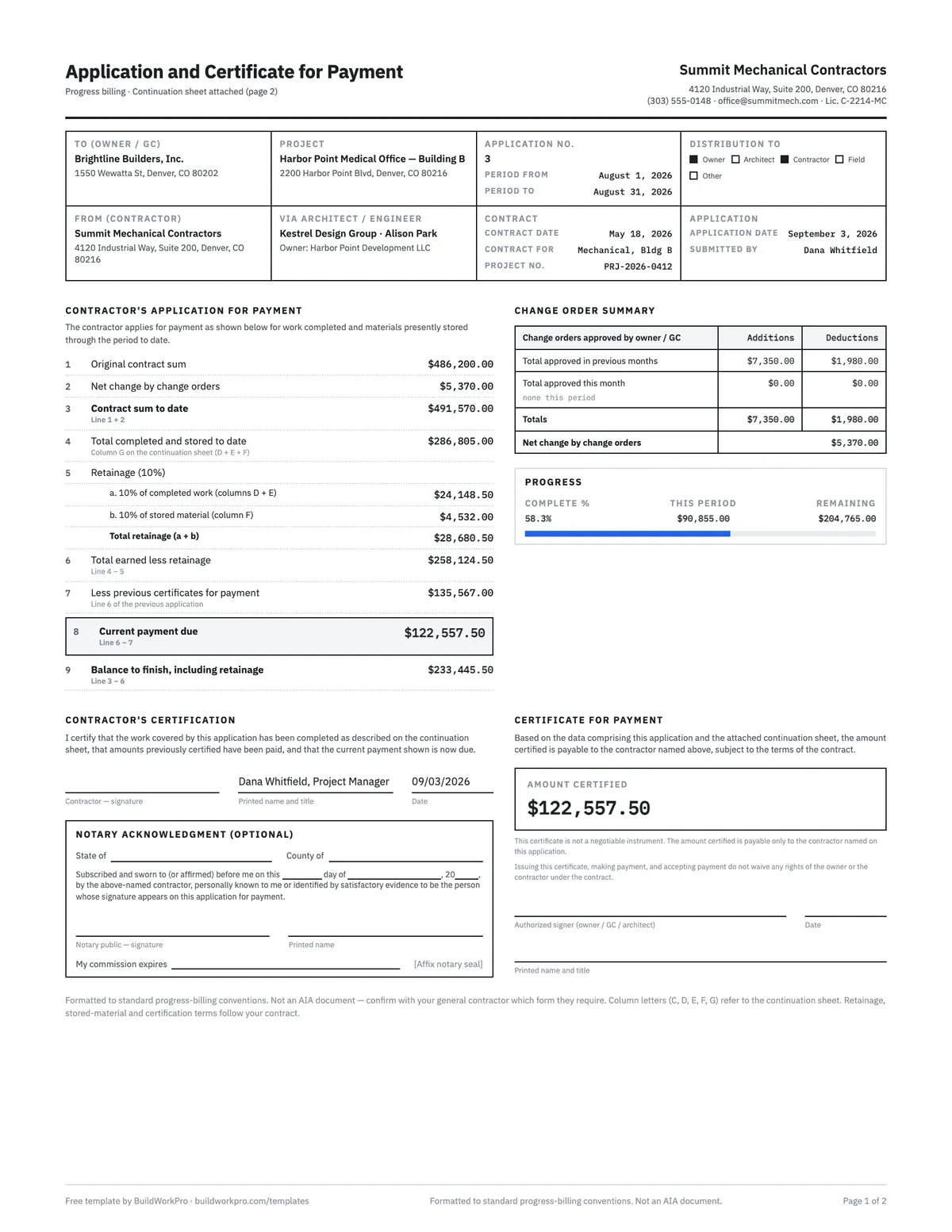
The application and certificate for payment your GC expects, with the math already wired: an Excel workbook whose continuation sheet drives lines 4 through 9, and a two-page fillable PDF for the application you sign and send. The completed example is a real third application on a $491,570 mechanical contract.
Free · No email required · Free to use and share for your own business
Updated September 17, 2026 · Built by the BuildWorkPro team, checked on real subcontractor jobs.

What's in the template
How to fill it out
-
1
Set up the contract on page 1
Fill in who you are billing, the project, and the application number and billing period. Enter line 1, the original contract sum, and put approved change orders in the change order summary — additions and deductions, previous months and this month. Line 2 and line 3 (contract sum to date) follow.
-
2
Build the continuation sheet
One row per schedule-of-values line, scheduled value in column C. The column C total must equal line 3 — in the workbook a tie-out cell turns red until it does. Add approved change orders as their own rows with the CO number as the item number.
-
3
Bill the period
For each row enter this period (E) and materials presently stored (F). Column G totals D + E + F, H is the percent complete, I the balance to finish, and the last column the retainage at your rate. The grand total of G becomes line 4.
-
4
Set retainage and enter last period’s line 6
Line 5 is your retainage rate — 10% by default, 5% is common, and some contracts step down after 50%. Line 7 is the one number you carry in by hand: line 6 from the previous application (zero on application no. 1). Line 8, current payment due, and line 9, balance to finish, compute.
-
5
Sign, send, then roll forward
Sign the contractor’s certification (notarize if your contract requires it) and send both pages with your lien waiver. After approval, add this period into previous applications, clear this period, update stored material, and start the next number.
What a pay application is, and what the two pages do
A pay application (progress billing, application for payment, "pay app") is how a subcontractor bills a general contractor for a period of work on a fixed-sum contract. Instead of invoicing a lump amount, you bill a percentage of each line on a schedule of values, the GC or owner certifies what they agree is due, and retainage is held back until closeout. Nearly every commercial GC in the United States expects the two-page format the AIA popularized, which is why this template mirrors it line for line.
Page 1 — the application and certificate. A form register at the top identifies the parties, the project, the application number and the period. The left column carries the nine numbered lines that turn work completed into a payment due. The right column summarizes approved change orders. Below them the contractor certifies the application, and the owner, GC or architect certifies the amount they will pay.
Page 2 — the continuation sheet. A landscape table, one row per schedule-of-values line, with the lettered columns GCs read by name: A item number, B description, C scheduled value, D work from previous applications, E this period, F materials presently stored, G total completed and stored to date (D + E + F), H percent complete (G ÷ C), I balance to finish (C − G), and retainage. The grand total of column G is line 4 on page 1. If you have never built one, start with the schedule of values template; the pay application bills against it every period.
The nine lines, explained
| Line | What it is | Where it comes from |
|---|---|---|
| 1 Original contract sum | The signed subcontract value | Your contract |
| 2 Net change by change orders | Additions minus deductions, all approved COs | Change order summary |
| 3 Contract sum to date | What the job is worth today | Line 1 + 2 |
| 4 Total completed and stored to date | Everything earned so far, before retainage | Column G grand total |
| 5 Retainage (5a + 5b) | The holdback on completed work and on stored material | Rate × (D + E), rate × F |
| 6 Total earned less retainage | Cumulative amount payable | Line 4 − 5 |
| 7 Less previous certificates | What has already been certified | Line 6 of the previous application |
| 8 Current payment due | The check you are asking for | Line 6 − 7 |
| 9 Balance to finish, including retainage | What is left on the contract | Line 3 − 6 |
Two lines cause most rejected applications. Line 3 must equal the column C total on the continuation sheet — if a change order was approved but never added as a row, the sheet no longer ties to the contract. And line 7 is the previous application's line 6, not its line 8: carrying the wrong number forward double-bills or under-bills a full period. The workbook computes everything except line 7, which you type in from last month.
A worked example: application no. 3
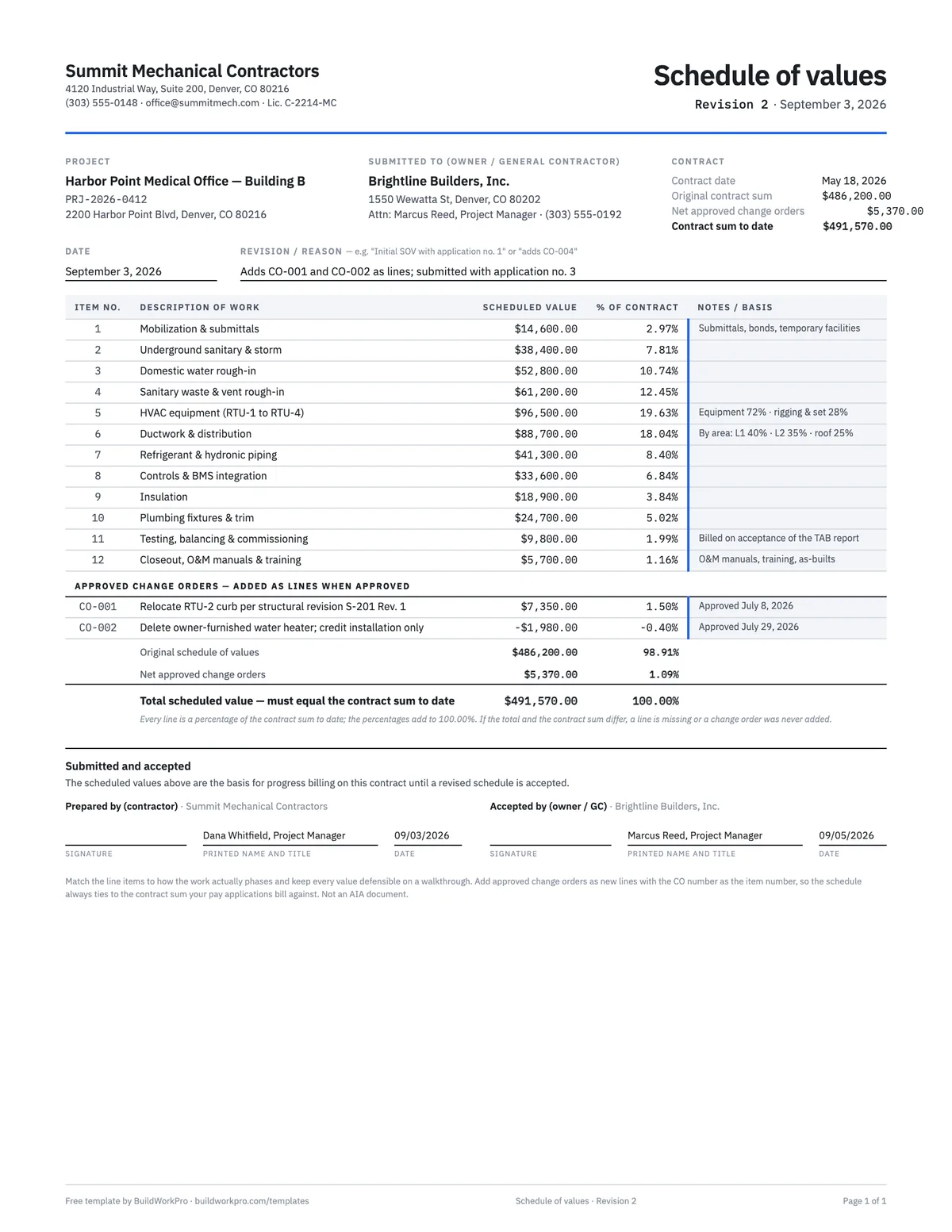
The completed example is a mechanical subcontractor's third application on a medical office building, covering August. The original contract is $486,200.00; two approved change orders (+$7,350.00 for a relocated rooftop unit curb, −$1,980.00 for a deleted water heater installation) put the contract sum to date at $491,570.00, and both appear as their own rows on the continuation sheet. Work billed on applications 1 and 2 totals $150,630.00; August adds $90,855.00 of completed work and $45,320.00 of stored material — two rooftop units on the pad and the building controllers — for $286,805.00 completed and stored, 58.3% of the contract.
Retainage at 10% is $24,148.50 on completed work plus $4,532.00 on stored material, $28,680.50 in total, leaving $258,124.50 earned less retainage. Application no. 2 certified $135,567.00, so the current payment due is $122,557.50 — exactly 90% of what was completed and stored in August — and $233,445.50 remains to finish, retainage included. That $122,557.50 is also the amount on the conditional lien waiver that travels with the application, and the third change order, still unsigned on the application date, is the one carved out as a pending change.
Retainage, stored materials and the roll-forward
Retainage is calculated on the cumulative total, not on the period, which is why the form computes it on line 4 and then subtracts what was previously certified. If your contract steps retainage down (10% until 50% complete, then 5%, for example), change the rate cell for the application where the step happens and enter line 7 from the prior application as usual — the workbook does not try to recompute history. Our retainage guide covers release at closeout.
Stored material lives in column F only until it is installed, then it moves to column E in the period it goes in. That is the whole roll-forward: after an application is approved, column D on the next one equals this application's D + E, E starts at zero, and F is whatever is still sitting on site. Do it line by line, in the same order, every month, and the sheet never drifts.
Pay application vs. invoice vs. schedule of values
- Schedule of values — the contract broken into lines with a value each. Built once, revised when change orders are approved. Schedule of values template.
- Pay application — the monthly bill against that schedule, with retainage, for work under a GC. This template.
- Invoice — a bill for a complete amount, typically direct to an owner or for service work, with sales tax and payment terms rather than a continuation sheet. Some GCs want one on top of the pay application for their accounts-payable system. Contractor invoice template.
- Change order — the signed amendment that changes line 2, and becomes a new row on page 2. Change order template.
Mistakes the workbook is built to catch
- Column C not adding to the contract sum to date — the tie-out cell turns red.
- Retainage figured on this period instead of the cumulative total.
- Billing stored material twice: once in F, again in E when installed.
- Carrying forward line 8 instead of line 6.
- Leaving a change order out of the summary so line 2 and the continuation sheet disagree.
- Sending the application without the lien waiver and stored-material backup the GC will ask for anyway.
For the full walkthrough of the format and what GCs check before they approve, read the AIA pay application guide. When you are billing several jobs a month, AIA billing software carries the schedule of values, retainage and previous applications forward for you.
Outgrown the spreadsheet?
The template does the G702/G703 math. When you are billing more than one job a month, AIA billing software prefills the schedule of values from your bid and approved change orders, locks previous applications, tracks retainage on every pay app, and emails the PDF to your GC. $79/month flat, 14-day free trial.
See AIA billing softwareFrequently asked questions
What are the G702 and G703 forms?
They are the American Institute of Architects’ standard payment paperwork: the G702 Application and Certificate for Payment summarizes what a contractor is owed for a billing period, and the G703 Continuation Sheet breaks the contract into a schedule of values and tracks how much of each line item is complete. Most general contractors expect subcontractors to bill in this format, whether or not the official AIA forms are used.
Is this an official AIA document?
No. AIA, G702, and G703 are trademarks of The American Institute of Architects, and official forms are licensed through AIA Contract Documents. This is an independent template formatted in the same general style — the same numbered lines, the same A–I continuation columns — which is what many GCs accept in practice. Confirm with your GC whether they require the licensed AIA form or accept a G702-style equivalent.
Can I use Excel instead of the AIA form?
Usually, yes. Most subcontracts say the application must be in a form "acceptable to the contractor" or "similar to" the AIA documents rather than requiring the licensed forms themselves, and the GC cares that the numbers foot to the continuation sheet, not who printed the form. Ask before your first application: if the GC or the owner’s lender insists on the licensed document, buy it from AIA Contract Documents and use this workbook to do the math.
How do I fill out a pay application?
Enter your original contract sum and approved change orders, break the contract into schedule-of-values line items on the continuation sheet, then each billing period record the work completed this period and any materials stored on site. The application computes total completed and stored to date, subtracts retainage and previous certificates, and gives you the current payment due. Our full guide walks through every line.
How do I calculate retainage on a pay application?
Multiply the retainage rate by the total completed and stored to date (column G), not by this period alone. On the form that is line 5: 5a is the rate times completed work (columns D + E) and 5b is the rate times stored material (column F), which some contracts hold at a different rate. Total retainage comes off line 4 to give line 6, total earned less retainage. Because retainage is figured on the cumulative total, each period you only release the net difference — the workbook does this for you.
What retainage rate should I use?
Whatever your contract says — 5% and 10% are the most common in the United States, and some contracts step retainage down after the project passes 50% complete. The template has a single rate cell on line 5 that drives the retainage column on the continuation sheet and lines 5a, 5b, 6 and 8.
What goes in column F, materials presently stored?
Material delivered to the site (or to a bonded off-site location your contract allows) that has not been installed yet — rooftop units on the pad, fixtures in the mechanical room, pipe racked in the yard. It is billed in F only once; when it is installed it moves into column E as work completed. Expect the GC to ask for invoices, delivery tickets and proof of insurance on stored items, and note that some contracts do not pay for stored material at all.
What does "certificate for payment" mean?
The application is what the contractor submits; the certificate is the block where the owner, GC or architect states the amount they agree is due — the "amount certified". If the certified amount differs from your line 8, the form asks them to explain the difference, and that difference is what you reconcile before the next application. The certificate is not a check; it is the approval that releases one.
How many pay applications does a job have?
One per billing period, which is monthly on almost every commercial subcontract, from mobilization through substantial completion — a six-month job produces six or seven, the last one usually a final application that releases retainage. The application number goes on every page and every lien waiver that references it, so number them in sequence and never reuse a number, even for a rejected and resubmitted application.
How does the template handle my second and third applications?
After each approved application, add the This Period amounts into the From Previous Applications column, clear This Period, update Materials Stored, and enter last period’s line 6 on line 7. That roll-forward is exactly the part software exists for: BuildWorkPro locks previous applications automatically and carries every value forward, so application #7 takes minutes instead of an afternoon of reconciliation.
Templates that go with this one
Schedule of Values Template
Break the contract sum into billable line items with % of contract math and a tie-out check.
Excel · PDF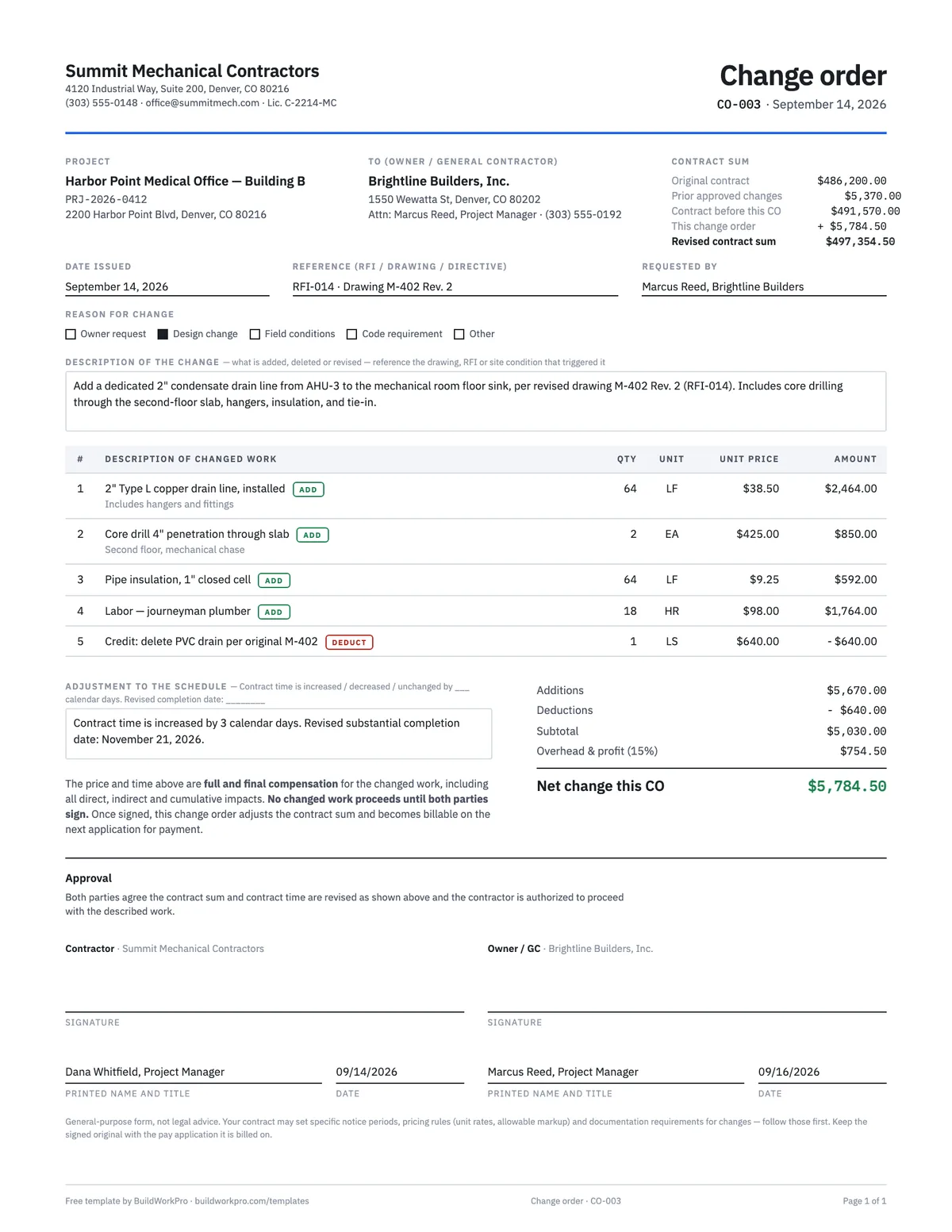
Construction Change Order Template
Price the change, adjust the contract sum and schedule, and get both signatures before the work starts.
PDF · Word · Excel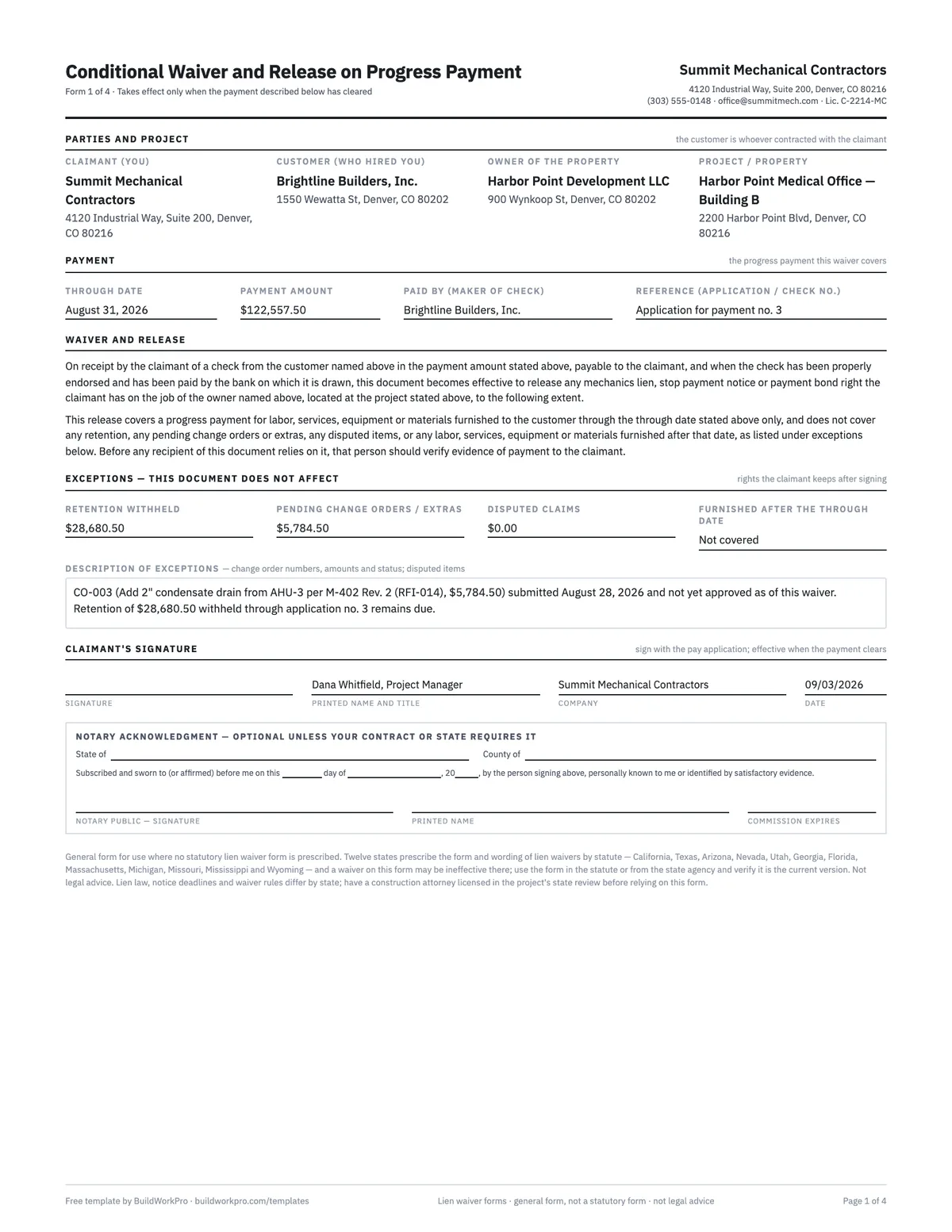
Lien Waiver Forms (4 types)
Conditional and unconditional waivers for progress and final payment, with the exception fields that protect you.
Word · PDF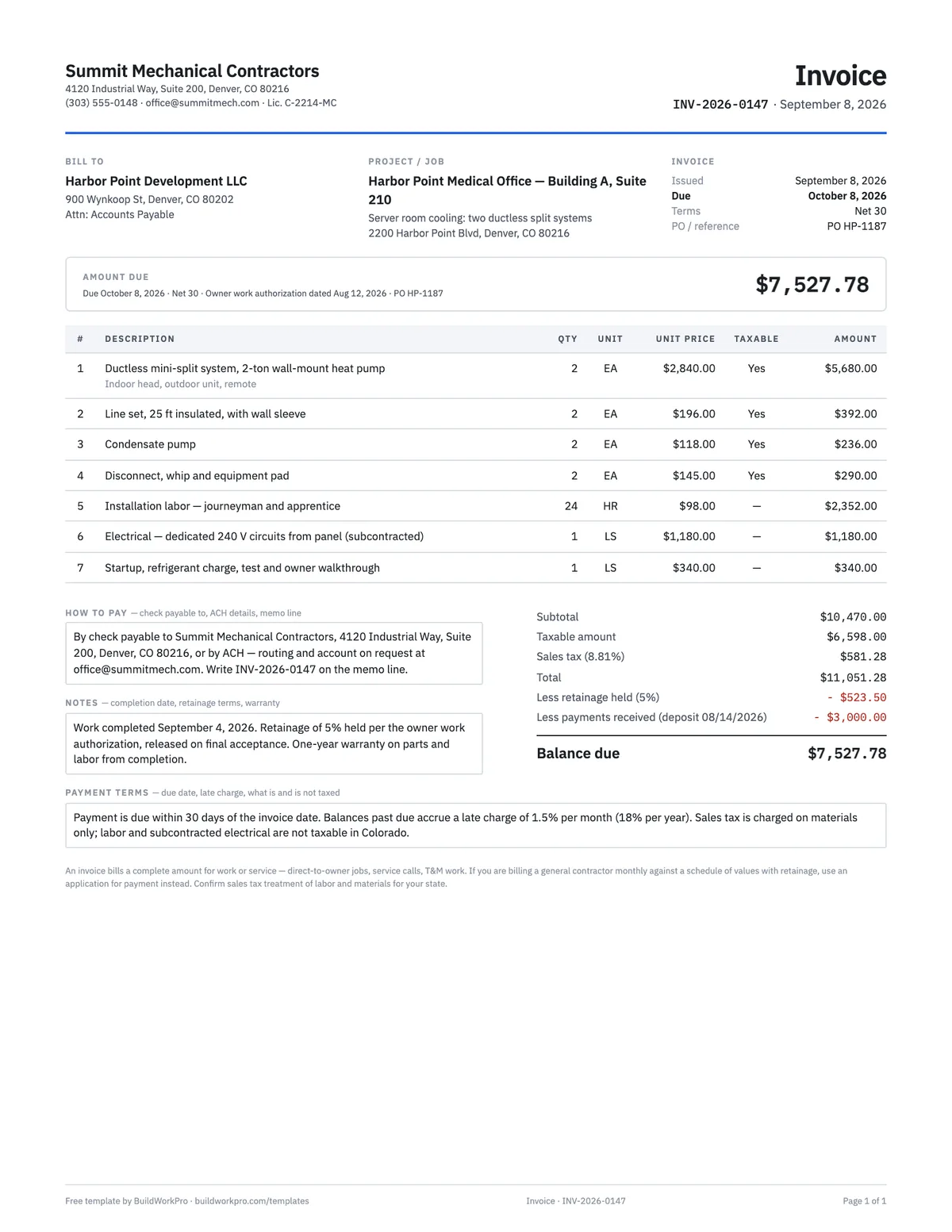
Contractor Invoice Template
Line items with computed amounts, sales tax, retainage and balance due — for work billed directly, not through a GC.
Excel · Word · PDFFree calculators and price data for this work: Pay Application Builder
Application #7 shouldn’t take an afternoon
BuildWorkPro builds the schedule of values from your accepted bid, locks previous applications, carries everything forward each period, and exports the PDF your GC expects — with retainage handled.
$79/month flat · 14-day free trial · No credit card required
Not an official AIA document. "AIA," "G702," and "G703" are trademarks of The American Institute of Architects; this independent template is formatted in the same general style. Confirm with your GC which form they require.