
Features
Construction Daily Log Software
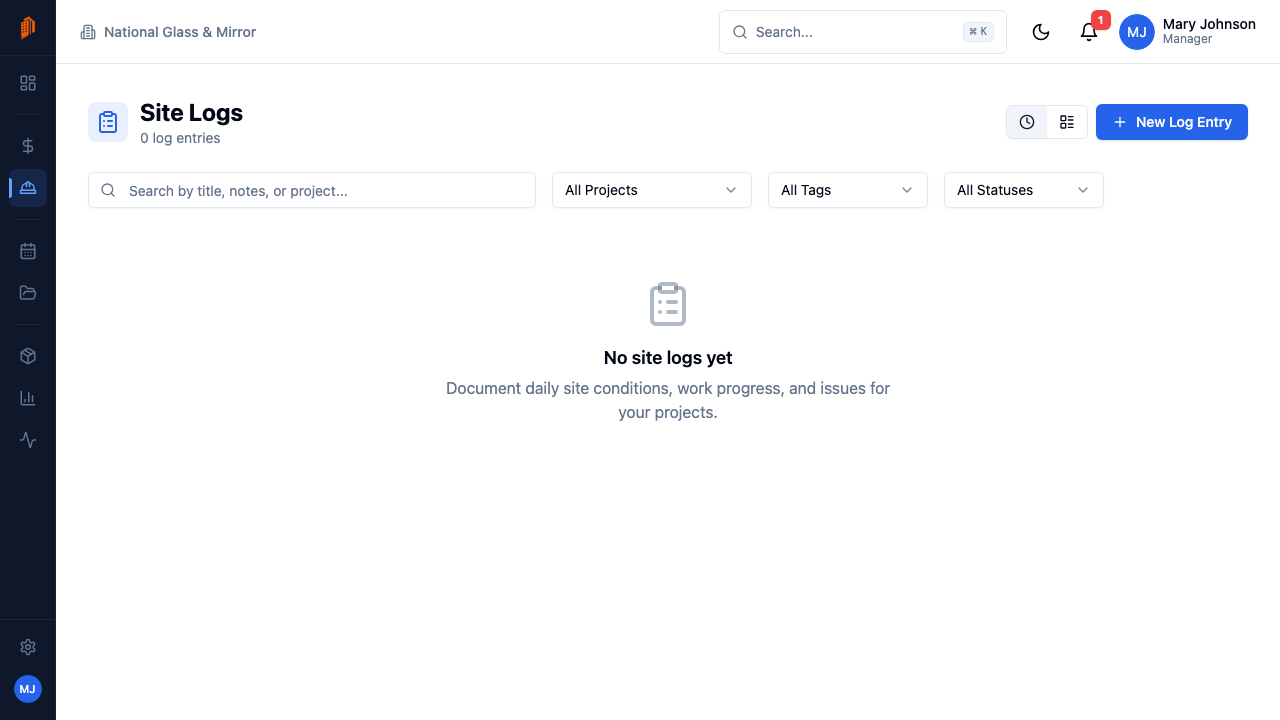
Record personnel, work performed, materials received, visitors, and issues for every day on site — with photos, tags, and a reviewed status — so the record exists when a question comes up months later.
Get the day on record before everyone forgets it
When a delay claim shows up months after the pour, nobody remembers what happened on a Tuesday in March. A daily log written that Tuesday does. BuildWorkPro site logs are daily records of what happened on a job — progress, issues, deliveries, and visits — kept for project history and dispute resolution. Each entry is tied to a project and a date, so the record builds itself one day at a time.
Site Logs is a top-level module: open it from the sidebar to see entries across every job, or work from a single project's own Site Logs tab inside project management. Logs capture the narrative of the day; pair them with time tracking to log crew hours against the same project. Every log also carries its own comments, documents, and activity history.
New to daily logs, or trying to get a crew to keep them consistently? Our guide to how to write a construction daily report covers what to record and how to make the habit stick. The full product walkthrough is in the site logs docs.
Key capabilities
Structured daily entries
Each log is tied to a project and a date (it defaults to today). Record personnel on site, give the entry a title, tag it, and write the notes — the same fields every day, so nothing gets skipped.
Tags that classify the day
Tag each log Progress, Issue, Delay, Safety, Delivery, Inspection, or General. Months later, filter by tag to pull every delay or safety entry on a job in seconds.
Personnel and visitors
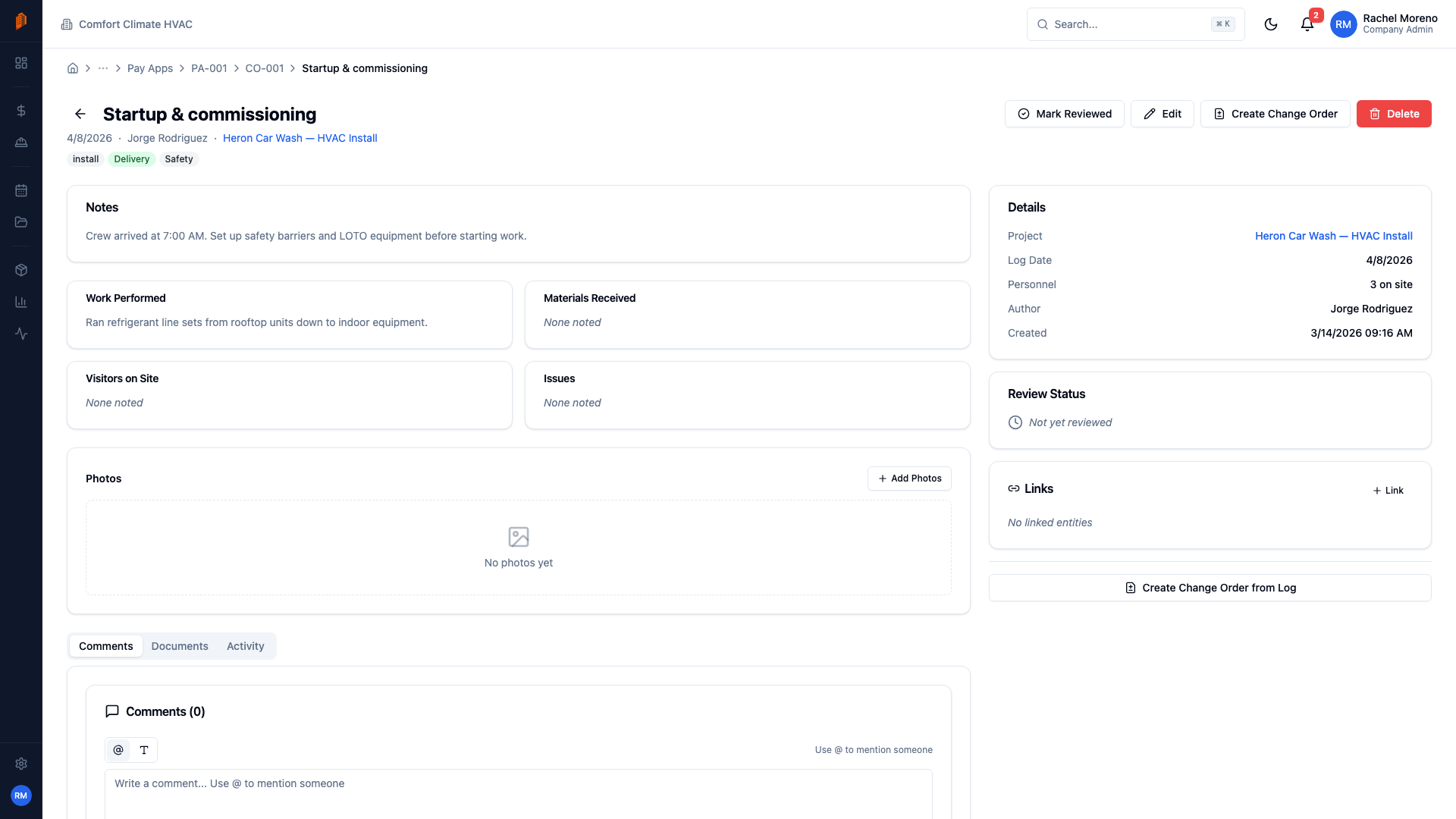
Every entry records personnel on site for the day, and the detail page adds visitors on site — the inspector, the GC's super, a delivery driver. Who-was-there questions get answered from the log, not from memory.
Work performed, materials, issues
The detail page captures the substance of the day: the work performed, the materials received, and any issues that came up — the three things you'll be asked about later.
Photos from the job site
Attach photos directly to the log entry. Progress, deliveries, and problems get documented visually, tied to the project and the date they happened.
Reviewed status
A manager marks each log reviewed once it's been checked. Filter by reviewed status to see which days still need a look — in timeline or table view, on one project or across all of them.
How it works
Start a log entry
Click New Log Entry, pick the project, and set the date — it defaults to today, because the best time to write the log is the day it happened.
Record the day
Enter personnel on site, an optional title, tags, and the notes. Company admins, managers, members, and field crew can all create logs — so the person who was on site writes the record.
Add the detail
Open the log to fill in work performed, materials received, visitors on site, and issues — and attach photos from the field while the day is still fresh.
Review and find it later
A manager marks the log reviewed once it's checked. Browse the timeline or table view, filter by project, tag, or reviewed status, or search by title and notes.
Full walkthrough in the docs: Site logs · Time tracking · Projects overview
Not ready for software? Start with the free templates
The same documents BuildWorkPro generates, as free fillable PDF, Excel and Word templates — no email required.
Frequently asked questions
What is a construction daily log?
A construction daily log (also called a daily report or site log) is a dated record of what happened on a jobsite on a given day: who was on site, what work was performed, what materials arrived, and what problems came up. Crews keep them because memory fades fast — and because a consistent run of daily logs is the project history you reach for when a dispute, delay claim, or payment question surfaces months later.
What does a BuildWorkPro site log record?
Each log is tied to a project and a date and records personnel on site, an optional title, tags — Progress, Issue, Delay, Safety, Delivery, Inspection, or General — and notes. The detail page adds work performed, materials received, visitors on site, and issues, plus photos from the job site. A manager can mark the log reviewed once checked, and every log carries its own comments, documents, and activity history.
Why do daily logs matter in disputes and delay claims?
Because they are written the day it happened, not reconstructed later. When a delay claim or payment dispute surfaces, a run of dated logs showing who was on site, what was performed, and which issues held the work up is far stronger evidence than recollection. BuildWorkPro site logs exist for exactly this — a daily project history you can filter by project or tag and walk back through on a timeline.
Who can create site logs in BuildWorkPro?
Company admins, managers, members, and field crew can all create and edit site logs. Field Crew is a restricted role designed for on-site workers — they can write the daily record without getting access to bids, pricing, or billing. Viewers have read-only access.
Can I attach photos to a site log?
Yes. Open a log's detail page and attach photos straight from the job site — progress shots, deliveries, or documentation of an issue. Photos live on the log entry, tied to the project and the date, so the visual record sits next to the written one.
How much does it cost?
Site logs are included in the single BuildWorkPro plan: $79/month (or $790/year) with unlimited users and every feature. There is a 14-day free trial with no credit card required.
Every day on site, on the record
Site logs are included in the $79/month flat plan — unlimited users, every feature. 14-day free trial, no credit card required.
Start free trial