
Blog
AIA Pay Application Guide: How to Fill Out G702 & G703
Published March 10, 2026 · 7 min read
Pay applications are how subcontractors get paid on commercial construction projects. If you've worked on any job larger than a small renovation, you've likely encountered AIA pay app forms — and if you're filling them out wrong, you're delaying your own payment.
This guide breaks down the two standard AIA pay application forms, how to fill them out correctly, and how to avoid the mistakes that slow down approvals.
Key takeaways
- The G702 is the summary cover sheet; the G703 carries the line-item detail — complete the G703 first and the G702 math follows.
- Structure your schedule of values around how the work actually progresses — you'll bill against those line items every month for the life of the job.
- Bill defensible percentages: you should be able to walk the GC through the job and show the work in place for every line item.
- Include all required backup — lien waivers, certified payroll, stored-materials invoices — and submit a few days before the GC's cutoff.
- Push change orders to approval quickly so each pay app reflects your real contract sum.
Want the spreadsheet instead of the theory?
Grab our free G702/G703-style pay application template — Excel workbook with the continuation sheet, retainage math, and carry-forward built in. No email required.
What Are AIA Pay Applications?
The American Institute of Architects (AIA) publishes standardized contract documents used across the construction industry. The two forms used for progress billing are:
- G702 — Application and Certificate for Payment. This is the cover sheet. It summarizes the total contract amount, work completed to date, retainage, previous payments, and the current amount due.
- G703 — Continuation Sheet. This is the detail. It breaks down the contract into line items (your schedule of values) and shows the work completed and materials stored for each line item.
Together, these two forms tell the GC and owner exactly how much work you've done, how much you've been paid, and how much you're requesting this period.
Setting Up Your Schedule of Values
The schedule of values (SOV) is the backbone of every pay application you'll submit on a project. It gets established at the start of the job and stays with you through the final payment. Getting it right upfront saves headaches for the entire project duration. If you priced the job in construction bidding software, the SOV should follow the bid's line items — otherwise you rebuild the contract in a spreadsheet every month.
Break your contract into meaningful line items that reflect actual phases of work. A mechanical sub might break theirs into rough-in, underground, above-ceiling, trim-out, and startup/commissioning. An electrical contractor might separate by floor, by system (power, lighting, fire alarm, low voltage), or by phase.
Tips for structuring your SOV:
- Front-load strategically, but don't overdo it. It's standard practice to weight early work items (mobilization, submittals, rough-in) slightly higher to improve early cash flow. But if your SOV is obviously front-loaded, the GC or architect will reject it.
- Include a mobilization line item. This covers your costs for getting set up on the job — temporary facilities, initial material deliveries, and coordination.
- Separate labor and materials if the contract requires it. Some owners want to see the split. Check your subcontract.
- Make line items match your work flow. You'll be billing against these items monthly, so they should align with how the work actually progresses.
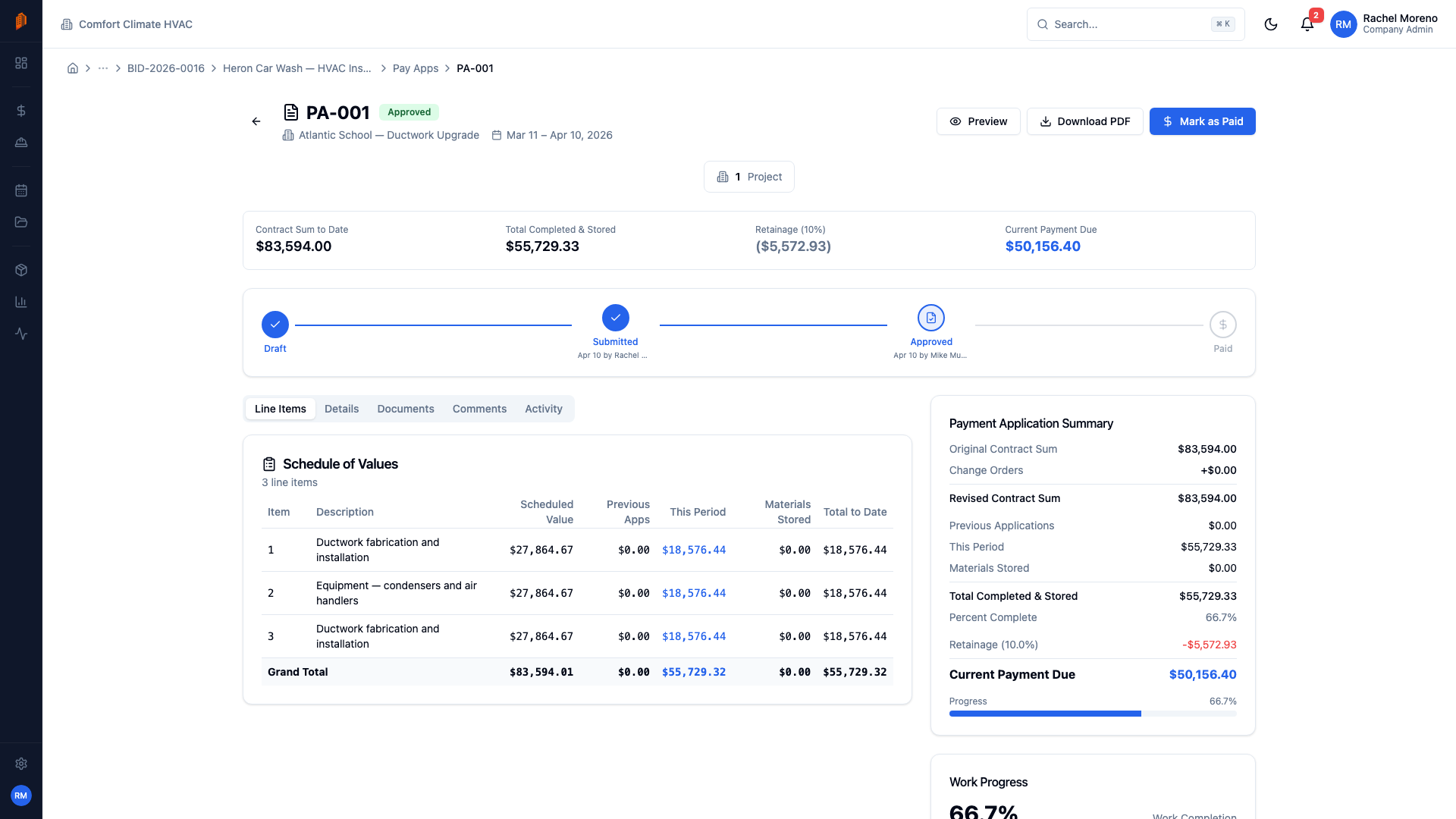
Filling Out the G702 (Cover Sheet)
The G702 is mostly a math exercise once your G703 is complete. Here's what goes in each field:
- Original contract sum. Your base contract amount, as awarded.
- Net change by change orders. The total of all approved change orders — additions minus deductions.
- Contract sum to date. Original contract plus net change orders.
- Total completed and stored to date. Pulled from the G703 total — this is the sum of all work completed and materials stored across all line items.
- Retainage. Typically 10% of the completed work, though some contracts reduce retainage after 50% completion. Check your subcontract for the specific retainage terms.
- Total earned less retainage. Completed work minus retainage held.
- Less previous certificates for payment. What you've already been paid on previous pay apps.
- Current payment due. The difference — this is what you're requesting.
On the final pay application, line items go to 100% and retainage is billed so the current payment due includes funds held throughout the job. That last G702 is one piece of the construction project closeout checklist — it typically will not be processed until punch list, closeout documents, and lien waivers travel with it.
Filling Out the G703 (Continuation Sheet)
The G703 is where you track progress on each line item. For each row:
- Column A: Item number
- Column B: Description of work
- Column C: Scheduled value (from your approved SOV)
- Column D: Work completed from previous applications
- Column E: Work completed this period
- Column F: Materials presently stored (not yet installed)
- Column G: Total completed and stored to date (D + E + F)
- Column H: Percentage complete (G / C)
- Column I: Balance to finish (C - G)
The most important thing: your numbers need to be defensible. If you bill 60% on a line item, you should be able to walk the GC through the job and demonstrate that 60% of that work is actually in place. Overbilling erodes trust and leads to disputes.
Common Mistakes That Delay Payment
- Math errors. Sounds basic, but incorrect totals are the number one reason pay apps get bounced. Double-check every calculation before submitting.
- Missing backup documentation. Many GCs require lien waivers, certified payroll, stored materials invoices, or updated insurance certificates with each pay app. Know what's required and include it.
- Billing for stored materials without documentation. If you're billing for materials stored on-site or at a warehouse, you need invoices and sometimes photos. Some contracts require stored materials to be insured separately.
- Submitting late. Pay app deadlines are usually tied to the owner's billing cycle. Miss the cutoff by one day and you could wait an entire month for your money.
- Not matching the GC's format. If the GC uses a specific template or requires submission through a portal, use it. Submitting in your own format creates extra work for their AP team and pushes you to the back of the line.
Tips for Faster Approval
- Submit early. Don't wait until the deadline. Submit a few days ahead so there's time for questions without missing the cycle. If your office reviews pay apps internally before they go out, build that approval step into your timeline.
- Be conservative on percentages. It's better to bill 55% when you're at 58% than to bill 65% and get knocked back. Consistent, honest billing builds trust.
- Communicate with the GC's project manager. A quick call before you submit — "I'm billing 70% on rough-in this month, does that align with what you're seeing?" — can prevent rejections.
- Keep your change orders current. Don't let unapproved construction change orders pile up. Push for timely approval so your pay app reflects the actual contract value.
- Track everything digitally. Using software to manage your pay apps eliminates math errors, keeps a clean audit trail, and makes it easy to generate the forms on demand.
Frequently asked questions
What is an AIA pay application?
An AIA pay application is a standardized progress-billing package published by the American Institute of Architects and used on most commercial construction projects. It consists of the G702 Application and Certificate for Payment and the G703 Continuation Sheet, which together show the contract sum, work completed to date, retainage withheld, and the payment currently due. Subcontractors typically submit one each billing cycle to the general contractor.
What is the difference between the G702 and G703?
The G702 is the one-page cover sheet: it summarizes the contract amount, total work completed and stored, retainage, previous payments, and the current amount due. The G703 is the continuation sheet behind it — a line-by-line breakdown of the schedule of values showing work completed and materials stored for each item. The totals on the G703 feed directly into the G702, so the detail sheet always gets completed first.
What is retainage?
Retainage is a percentage of each progress payment — commonly 10% — that the owner or general contractor withholds until the work is complete, as protection against unfinished work or defects. Some contracts reduce the retainage rate after the project passes 50% completion, and the withheld funds are released at or near final completion. Your subcontract spells out the exact rate and release terms.
Does BuildWorkPro generate official AIA forms?
No — BuildWorkPro produces AIA-style pay applications that follow the familiar G702/G703 structure, with a schedule of values, retainage tracking, and approved change orders rolled into the contract sum. They are not official AIA-licensed documents. If your contract requires the copyrighted AIA forms, you can transfer the same numbers onto them directly.
Keep reading
Pay Applications in BuildWorkPro
Generate G702/G703-style pay apps with schedule of values, retainage, and approval workflows.
Learn moreConstruction Bidding Software
Line-item estimates, margin and overhead, PDF proposals — the accepted bid prefills your first pay app.
Learn moreSchedule of Values Documentation
How to set up your schedule of values so every pay app rolls forward cleanly.
Learn morePay App Approval Workflow
Step-by-step on submitting, reviewing, and approving pay applications.
Learn moreChange Order Management
Track scope changes that affect your contract value alongside your pay apps.
Learn more