
Blog
Construction Change Order Management: Best Practices
Published March 5, 2026 · 7 min read
Change orders are inevitable in construction. Designs evolve, owners change their minds, field conditions don't match the drawings, and code officials flag issues nobody anticipated. The question isn't whether you'll deal with change orders — it's whether you'll manage them well enough to protect your margins.
For subcontractors, poor change order management is one of the fastest ways to turn a profitable job into a loss. Here's how to handle them right.
Key takeaways
- Start a paper trail the moment a change is directed — written confirmation, timestamped photos, and costs coded to that specific CO.
- Notify the GC in writing immediately; most contracts have 48–72 hour notice requirements that can cost you the change if missed.
- Price the full cost: labor, materials, equipment, sub-tier subs, contractual markup, and the impact costs most subs forget.
- Keep each change order separate and track every one in a log with status, dollar amount, and submission dates.
- Bill approved change orders on your next pay application so your contract sum stays current.
Put it on paper before the work starts
Our free change order template has the contract-sum adjustment table, time extension, and dual signature blocks ready to fill in. No email required.
What Triggers a Change Order
Change orders originate from several sources, and understanding the trigger helps you price and document them correctly:
- Owner-directed changes. The owner wants to upgrade finishes, add scope, or modify the layout. These are typically the most straightforward to process because the direction is clear.
- Design errors or omissions. The drawings missed a penetration, a wall was dimensioned wrong, or two systems conflict. These are trickier because they often involve finger-pointing between the architect and contractor.
- Unforeseen conditions. You open a wall and find asbestos. You dig a trench and hit rock. The existing conditions weren't documented in the plans. These changes often require immediate action before pricing is resolved.
- Code or regulatory changes. An inspector requires something that wasn't in the original scope. A jurisdiction adopts a new code edition mid-project.
- Schedule acceleration. The owner wants to move the completion date up, which may require overtime, additional crews, or premium deliveries.
Documentation Is Everything
The single most important thing you can do with change orders is document them immediately. The moment you're asked to do something outside your original scope, start a paper trail.
- Capture the direction in writing. If a superintendent tells you to relocate a panel, follow up with an email: "Per our conversation today, you've directed us to relocate the panel from Room 201 to 203. We consider this a change to our contract scope and will submit pricing." This protects you if the GC later claims it was part of your base scope.
- Photograph existing conditions. Before and after photos with timestamps are powerful evidence. They're quick to take and impossible to argue with.
- Track your labor and materials separately. From the moment change order work begins, code your time sheets and material purchases to that specific CO. If the pricing gets disputed, you'll have actual cost records to support your number.
- Log everything in your daily report. Note what was discussed, who directed the change, and what work was performed. Daily logs are admissible in disputes and carry significant weight.
Pricing Change Orders Correctly
Underpricing change orders is a chronic problem for subcontractors. You're under pressure to keep the GC happy, the job moving, and the relationship intact — so you lowball the price. That's a mistake.
A properly priced change order includes:
- Direct labor costs. Hours by craft, at fully burdened rates. Include supervision time — someone has to coordinate the extra work.
- Materials. Actual supplier quotes, including delivery and tax. If the change creates waste on materials you already purchased for the base scope, include that too.
- Equipment. Any additional rentals, fuel, or small tools required.
- Subcontractor costs. If the change affects your sub-tier subs, include their pricing with your markup.
- Overhead and profit. Your contract likely specifies the allowable markup for change orders. Common ranges are 10-15% overhead and 5-10% profit. Don't skip this — it's contractually yours.
- Impact costs. This is the one most subs forget. If a change order disrupts your planned sequence of work, causes remobilization, extends your time on the job, or reduces productivity on other work, those are real costs. They're harder to quantify but absolutely legitimate.
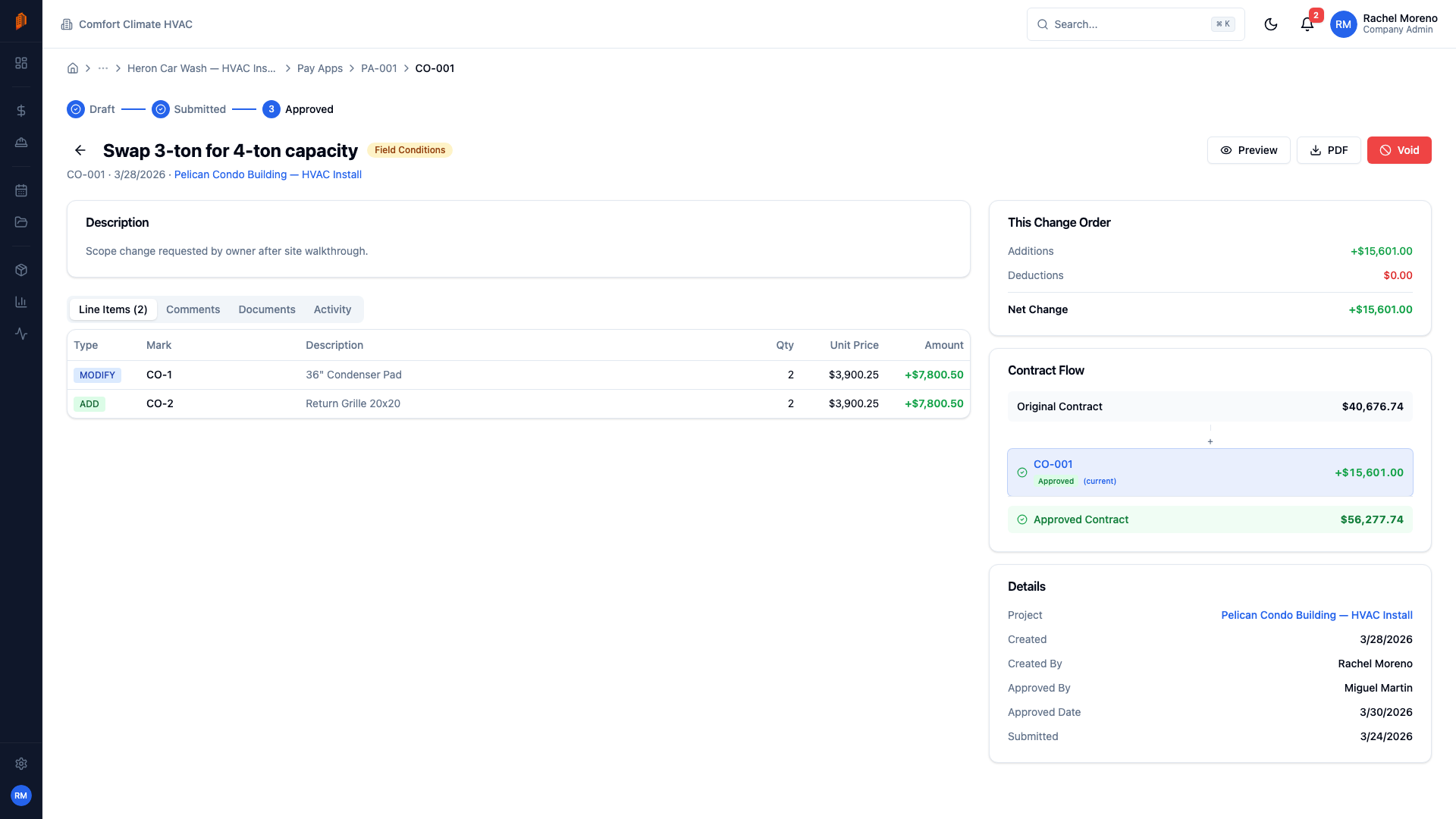
The Approval Workflow
Change orders have a lifecycle, and knowing where yours stands at any given moment is critical:
- Identification. You recognize that work outside your scope is needed or has been directed.
- Notification. You notify the GC in writing that you consider this a change. Do this immediately — most contracts have notice requirements (48-72 hours is common).
- Pricing. You prepare and submit your change order proposal with full backup.
- Review. The GC reviews your pricing, may negotiate, and submits to the owner.
- Approval. The owner approves the change order and it's incorporated into your contract.
- Execution. The work is performed (or has already been performed if it was time-critical).
- Billing. The approved change order is added to your pay application.
The gap between step 2 and step 5 is where subs get hurt. Work often needs to proceed before the CO is formally approved. Keep meticulous records during this period.
Protecting Your Margins
- Never do extra work without written notice. Verbal agreements evaporate when the project gets behind schedule or over budget.
- Submit pricing promptly. Delays in submitting your CO pricing give the GC an excuse to delay approval. Get your number in within a week.
- Don't bundle changes. Each change should be a separate, trackable item. Bundling makes it easier for someone to reject the whole package over one disputed item.
- Keep a change order log. Change order software keeps every potential, pending, and approved CO in one place with status, dollar amount, and submission dates. Review it weekly.
- Know your contract. Your subcontract spells out the change order process, markup percentages, notice requirements, and dispute resolution. Read it before the first change comes up, not after.
Frequently asked questions
What is a change order in construction?
A change order is a formal amendment to a construction contract that modifies the scope of work, the contract price, the schedule, or some combination of the three. Common triggers include owner-directed changes, design errors or omissions, unforeseen field conditions, and new code requirements. Once approved, the change order becomes part of the contract and is billed through the normal pay application process.
When should a subcontractor submit a change order?
As soon as you recognize that directed work falls outside your original scope. Most subcontracts contain notice requirements — often 48 to 72 hours — and missing that window can jeopardize your right to payment. Confirm the direction in writing immediately, then submit your priced change order proposal promptly, ideally within a week.
Can a subcontractor refuse changed work without a signed change order?
It depends on the contract. Many subcontracts require you to proceed with directed changes and resolve pricing afterward, while others let you wait for a signed change order before starting. Refusing directed work can expose you to delay claims, so the safer pattern is usually to give written notice, document costs meticulously, and keep pricing moving while the work proceeds. This is general information, not legal advice — review your subcontract and consult an attorney for your specific situation.
How do change orders affect pay applications?
Approved change orders increase or decrease your contract sum, and that adjusted value is what you bill against on each pay application. In BuildWorkPro, approved change orders roll into the pay app’s contract sum, so progress billing reflects the current contract value. Keep pending change orders moving toward approval so your billing never lags the work you’ve actually performed.
Keep reading
Change Orders in BuildWorkPro
Track scope changes from request to approval with automatic contract-value updates.
Learn moreCreating a Change Order
Walk through writing, pricing, and submitting change orders inside BuildWorkPro.
Learn moreAIA Pay Application Guide
Bill the change orders correctly by feeding them into your monthly pay app.
Learn morePay Applications
Run progress billing that automatically reflects approved change orders.
Learn more