
Free template
Construction Meeting Minutes Template
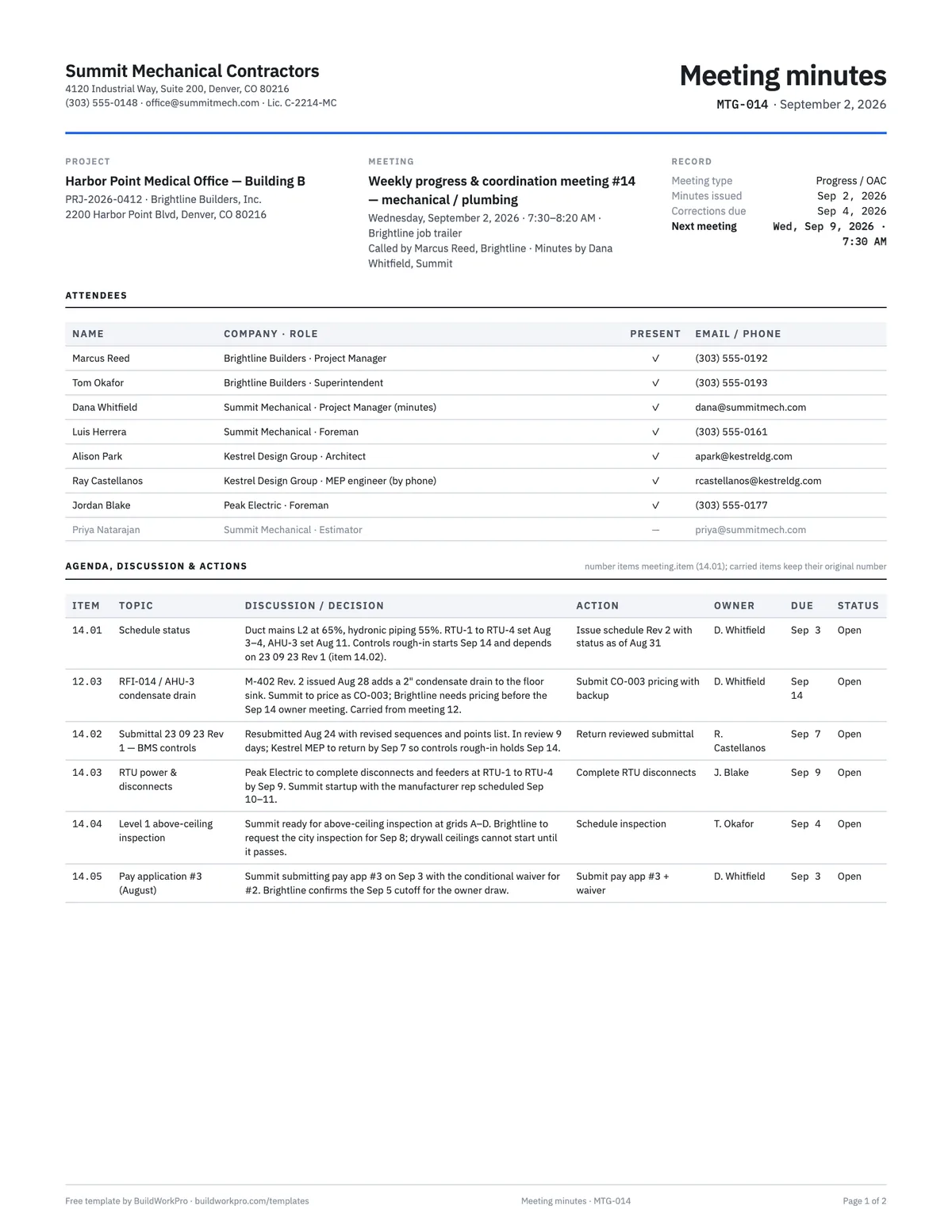
A two-page record for progress, coordination, preconstruction and OAC meetings: attendees, a numbered agenda with discussion and decisions, and an action-item table with owner, due date and status. Built so the same sheet can be handed out at the meeting and filed as the record afterwards.
Free · No email required · Free to use and share for your own business
Updated September 17, 2026 · Built by the BuildWorkPro team, checked on real subcontractor jobs.
What's in the template
How to fill it out
-
1
Set up the header before the meeting
Fill in the project, meeting title and number, date, time and location, and pre-load the agenda with the items carried from last week under their original numbers. A pre-filled sheet is the agenda; the same sheet with the discussion filled in is the minutes.
-
2
Take attendance
Name, company and role, with a present mark — and list the people who were expected and did not come. Absence matters when an action item is assigned to them.
-
3
Record decisions, not conversation
For each item: what was reported, what was decided and what it depends on. Two to four lines. If it needs more, the topic needs its own document — say which (RFI, change order, revised schedule) and record that as the action.
-
4
Give every action an owner and a date
One name, one date, one status. “Brightline to look into it” is not an action; “T. Okafor to schedule the city inspection for Sep 8 — due Sep 4” is. Mark carried items Open and closed items Closed so the next meeting starts from the open list.
-
5
Issue the same day with a corrections date
Sign, distribute to every attendee and the project file, and state the date by which written corrections are due. After that date the minutes stand as the record. Bring the open items forward to next week’s sheet.
Why a subcontractor should write minutes
The GC runs the meeting, so it is tempting to let the GC keep the record. The problem is that the GC’s minutes record what the GC heard, and on the items that cost you money — a delayed submittal review, an inspection that slipped, a directive to proceed before a change order is signed — what the GC heard and what you said are not always the same. Minutes you issue the same day, with a corrections-due date, put your version on the record first. If nobody objects, it stands. If they do, you find out in two days instead of two months.
They also make your own week run. A sheet with ten action items, each with an owner and a date, is the foreman’s and the project manager’s to-do list until the next meeting, and the open items carry forward under their original numbers until someone closes them.
Field by field
- Meeting number and date — sequential per project (MTG-014). The number is the first half of every item number.
- Attendees — name, company and role, with a present mark. List the expected absentees too; an action assigned to someone who was not there needs a phone call.
- Item — meeting.item: 14.01, 14.02. A carried item keeps its number (12.03), so its age is visible.
- Topic / discussion — the subject in a few words, then the facts and the decision in two to four lines.
- Action, owner, due, status — the columns people actually read next week. One owner, one date. Status is Open or Closed.
- Corrections due — the date after which the minutes stand as issued.
A worked example
The completed example is the fourteenth weekly coordination meeting on a medical office job, September 2, 2026, taken by the mechanical subcontractor’s project manager with eight people listed — the GC’s project manager and superintendent, the architect and her MEP engineer (by phone), the electrical foreman, and one absentee. Ten items, and every one is something the rest of the job’s paperwork can be traced to.
Item 14.01 records the schedule status — Level 2 ductwork at 65%, hydronic piping at 55% — and the action is to issue schedule revision 2 the next day. Item 12.03, carried from meeting 12, is RFI-014 on the AHU-3 condensate drain: the revised drawing was issued August 28, so the action is to price it as change order CO-003 by September 14. Item 14.02 is the BMS controls submittal on its second revision, in review nine days, with the engineer’s return date tied to the September 14 controls start. Items 14.03 to 14.05 assign the RTU disconnects to the electrician, the Level 1 above-ceiling inspection to the superintendent, and pay application #3 to the sub — each with a name and a date. Page two closes the crane-day safety debrief — the same lift the toolbox talk and job safety analysis examples cover — and the owner-furnished water heater credit (CO-002), and leaves two items open. Old business and new business summarize what carried and what was raised but not yet assigned.
Read that page and you know the state of the mechanical scope on September 2 without having been in the trailer. That is the test of good minutes.
Minutes, RFIs and change orders
Minutes record that a decision was made; they do not make it contractual. When an item in the discussion column changes what you are building, price it and get it signed as a change order. When the item is a question about the documents, write the RFI and put its number in the minutes. When the item is a submittal, its dates belong on the submittal log and the minutes just say where it stands. The minutes are the index; the other documents are the record. The same goes for the schedule — the minutes report the status, the construction schedule carries the dates — and for the punch list in the final weeks, when the open count is a standing agenda item.
Common mistakes
- Distributing minutes a week later, when nobody remembers enough to correct them.
- Actions without an owner, or with two owners — which means none.
- Renumbering carried items, so nobody can tell an item has been open for a month.
- Recording a directive to proceed in the minutes and treating that as the change order — see change order management for what has to follow in writing.
- Writing a transcript. If the discussion column is longer than the action column, cut it.
- Skipping the meeting-day daily report entry — the minutes record what was said; the daily report records what happened on site that day.
The discussion lives on the project
Every BuildWorkPro project carries a Comments tab — a threaded discussion where mentioning a teammate notifies them — and an Activity history of every change, next to the schedule, change orders, site logs and pay applications for the same job. Construction project management software for $79/month flat, 14-day free trial.
See project management in BuildWorkProFrequently asked questions
What should construction meeting minutes include?
Who was there (and who was not), what was discussed, what was decided, and who has to do what by when. The action-item columns — action, owner, due date, status — are the part that matters a week later. Add the meeting number and date, the next meeting, and a corrections-due date so the minutes become the record if nobody objects in writing.
Should a subcontractor keep their own minutes if the GC issues theirs?
Yes, for any meeting where your scope, schedule or money is discussed. The GC’s minutes record what the GC heard. If the GC’s minutes say something different from what you remember, your own record, issued the same day, is what supports a correction — and if the GC issues none, yours are the only record. Send them to the GC with a corrections-due date so silence becomes agreement.
Can meeting minutes change the contract?
Not on their own. A decision recorded in minutes is evidence of what was agreed, but scope, price and time changes still need a signed change order, and a question about the documents still needs an RFI. Use the minutes to record that the change order or RFI is coming, with an owner and a date, and follow up with the document itself. This template is a general form, not legal advice.
How should agenda items be numbered?
Meeting number, then item number: 14.01 is the first item raised at meeting 14. An item carried to the next meeting keeps its original number (12.03 stays 12.03 at meeting 14) so anyone can trace when it was first raised and how long it has been open. New items at each meeting continue the sequence.
How soon should minutes be distributed?
Within a day, and before the next meeting at the latest. State a corrections-due date — two business days is common — after which the minutes stand as issued. Minutes distributed a week later are a memory test, not a record, and corrections become arguments.
What is the difference between a preconstruction meeting, a progress meeting and an OAC meeting?
A preconstruction meeting happens once, before mobilization, to cover submittals, schedule, site logistics, safety and communication rules. Progress (or coordination) meetings run weekly through the job and are where this template earns its keep. OAC — owner, architect, contractor — meetings are the GC’s formal progress meetings with the owner’s team; subs usually attend for their portion. One template covers all three; pick the type in the header.
How much detail belongs in the discussion column?
Decisions and facts, not a transcript. “Controls rough-in starts Sep 14 and depends on submittal 23 09 23 Rev 1 being returned by Sep 7” is a useful entry; a paragraph of who said what is not. If a topic needs more than three or four lines, it probably needs its own document — an RFI, a change order, a revised schedule — and the minutes should say which.
Templates that go with this one
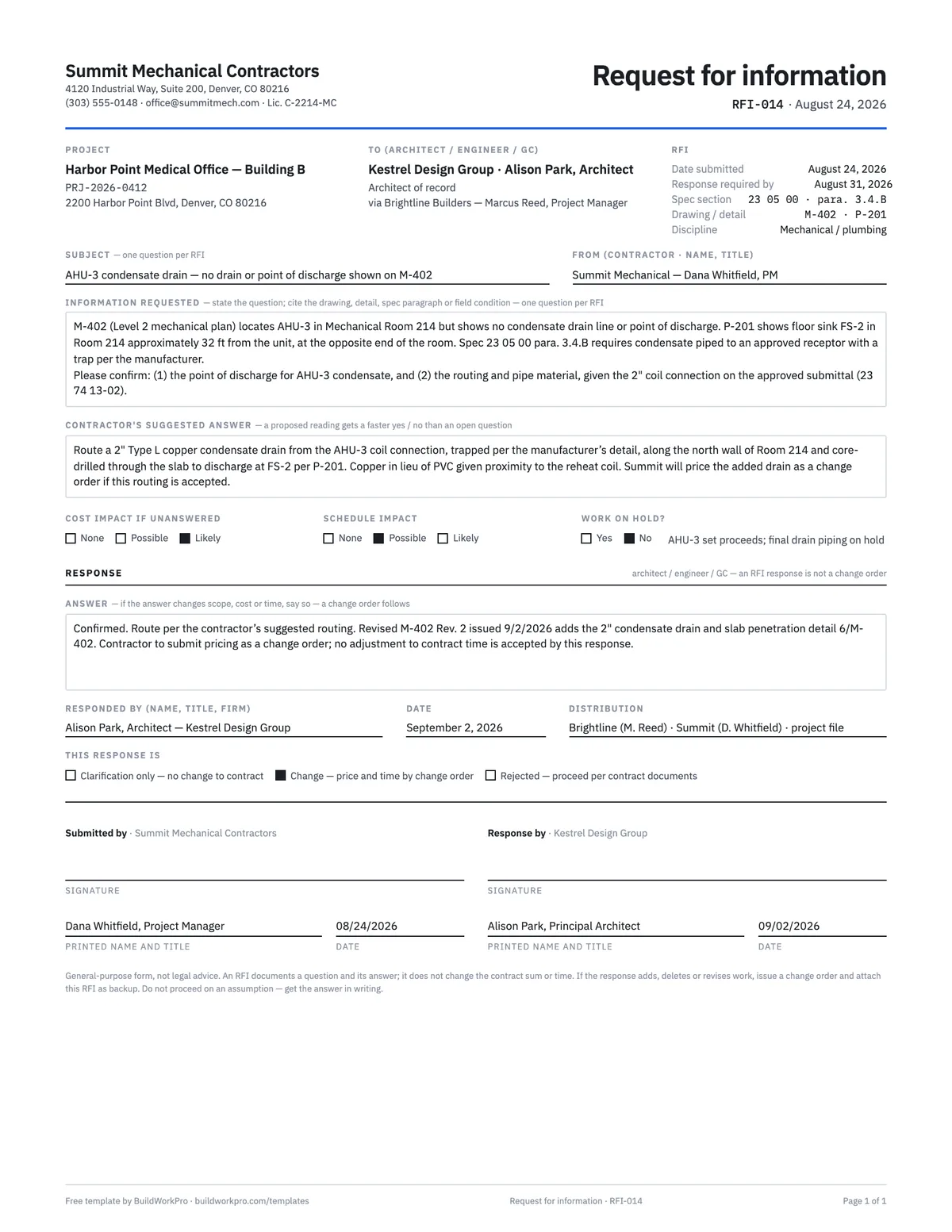
RFI Template
Request for information with the question, suggested answer, cost and schedule flags and a response block.
PDF · Word · Excel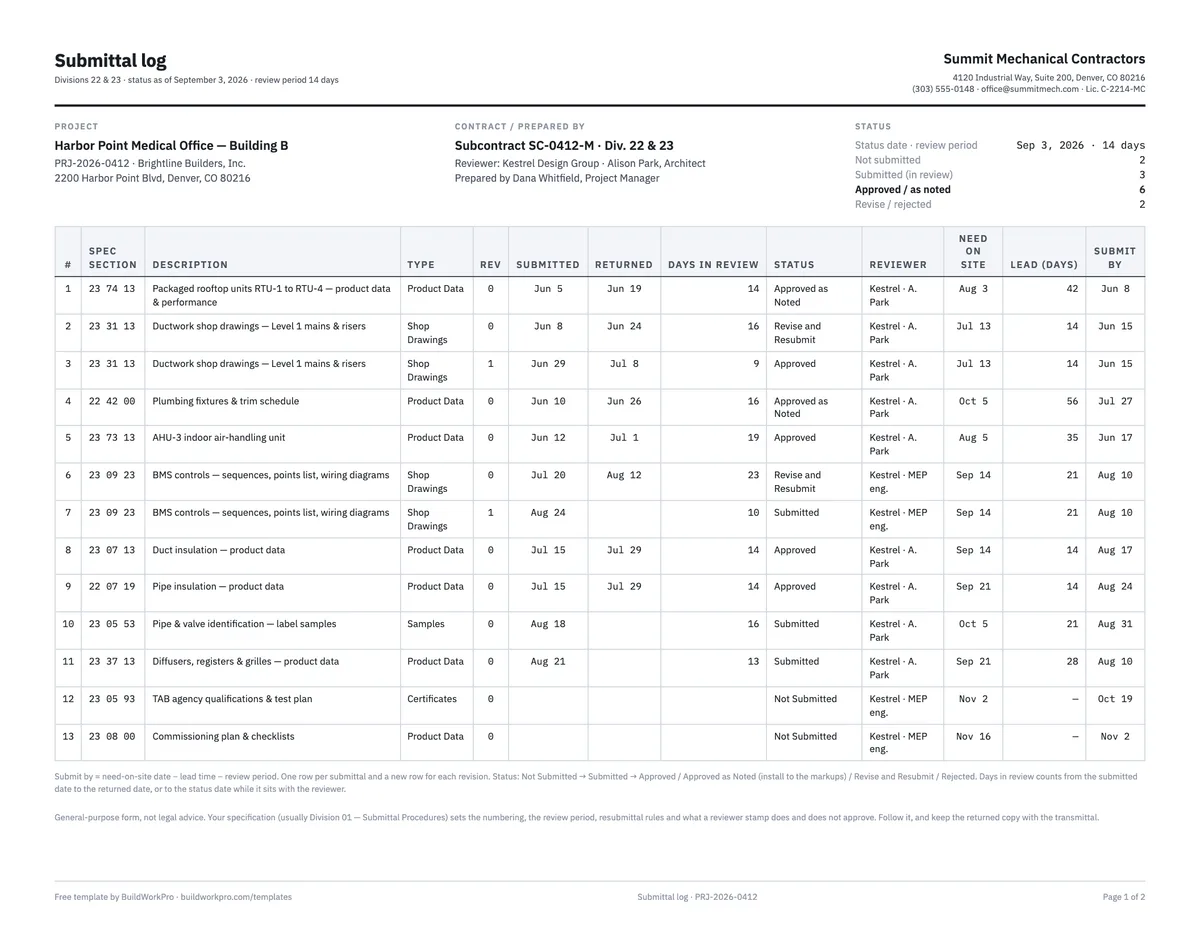
Submittal Log Template
Register of shop drawings, product data and samples with status, dates and lead times, plus a transmittal.
Excel · PDF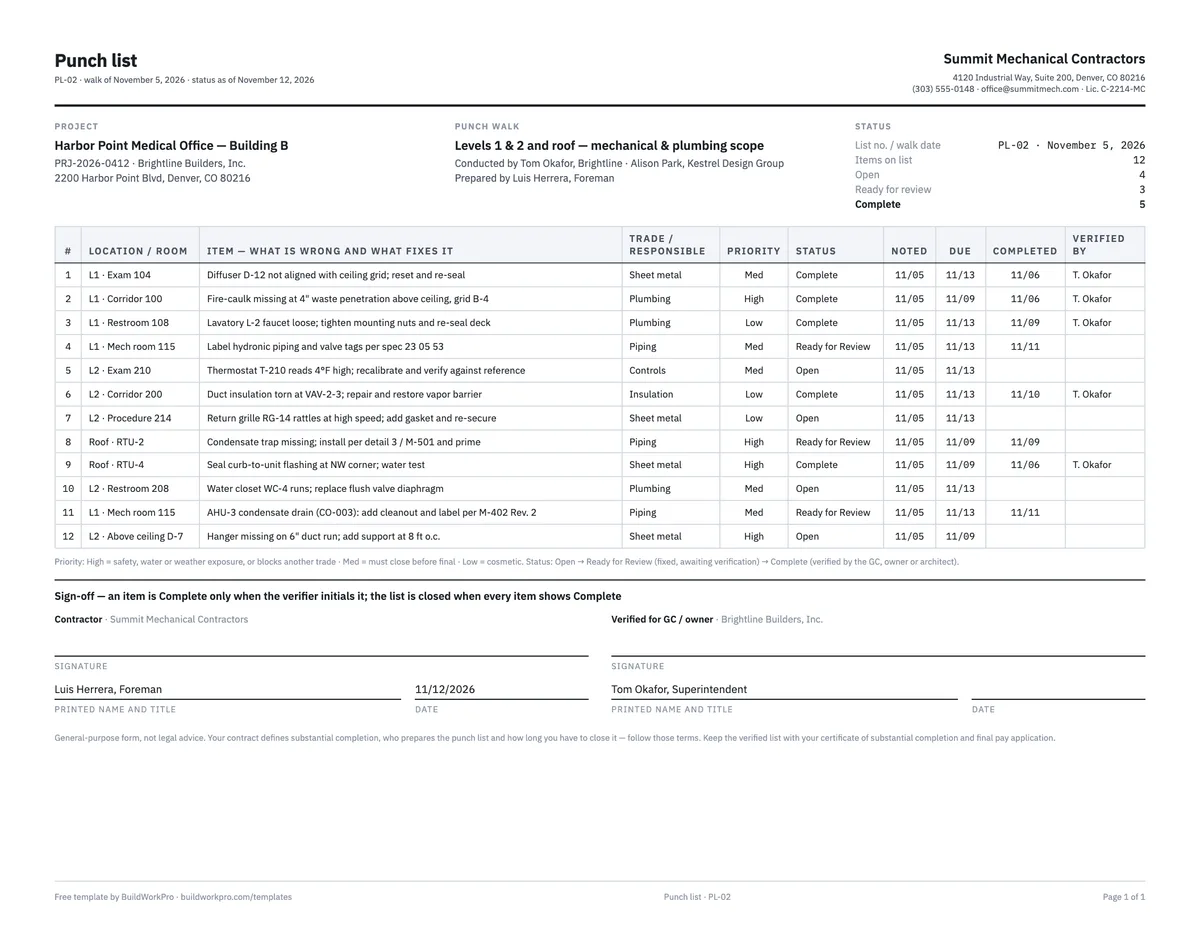
Construction Punch List Template
Item, location, trade, priority, status and verification — with live open/complete counts.
Excel · Word · PDF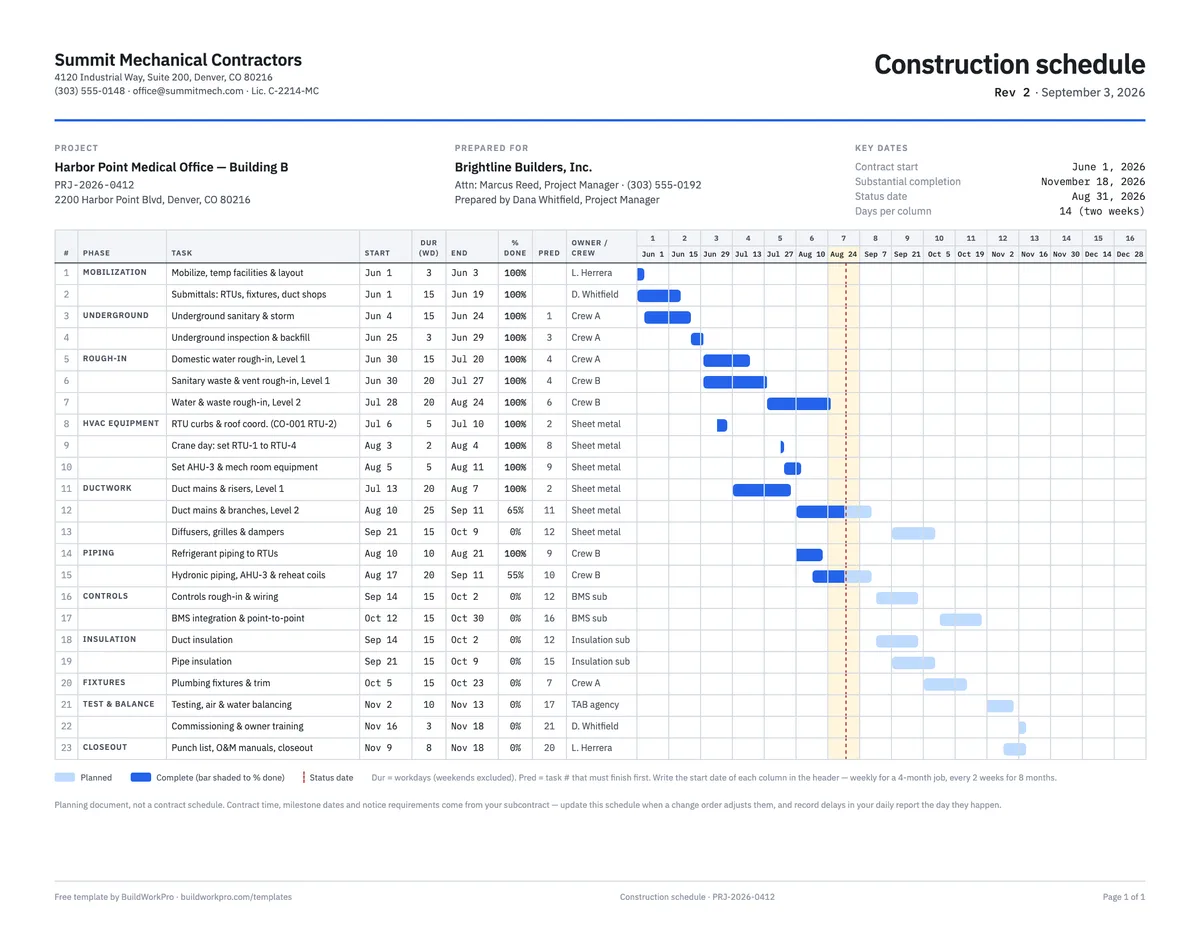
Construction Schedule Template
Tasks by phase with durations, predecessors, % complete and a week-by-week Gantt bar.
Excel · PDFRun every job from one page
BuildWorkPro puts the schedule, the paperwork and the conversation for each job on one project record, so the action item from Wednesday’s meeting is next to the change order it turns into.
$79/month flat · 14-day free trial · No credit card required
General-purpose form, not legal advice. Minutes record decisions and actions; they do not amend the contract by themselves — scope, price or time changes still need a signed change order.