
Free template
Construction Schedule Template
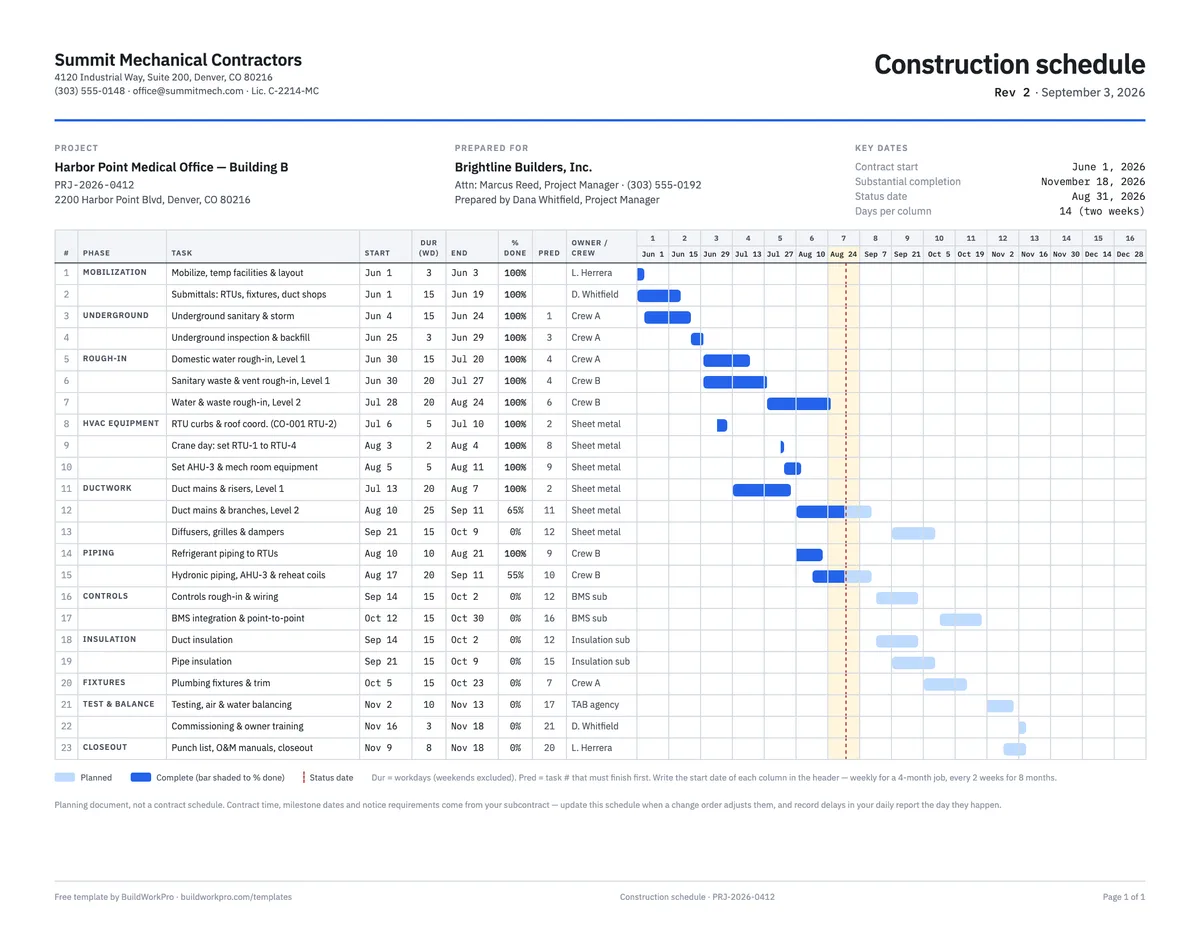
A 40-task Excel schedule that draws its own Gantt chart: enter a start date and a duration in workdays and the end date, the bars and the done-to-date shading calculate. A landscape PDF grid prints for the trailer wall, and the completed example is a real six-month mechanical scope.
Free · No email required · Free to use and share for your own business
Updated September 17, 2026 · Built by the BuildWorkPro team, checked on real subcontractor jobs.
What's in the template
How to fill it out
-
1
Set the window
On the Schedule sheet enter the project, the Monday you want column 1 to start on, and the days per column. Seven gives a 16-week weekly view; 14 fits eight months at two weeks per column. Change the chart start later to pan forward as the job progresses.
-
2
List the work by phase
One task per row, grouped under its phase — mobilization, underground, rough-in, equipment, finish, closeout. Keep durations between two days and two weeks; split anything longer so slippage cannot hide inside it.
-
3
Enter start dates and workday durations
The end date computes with WORKDAY, skipping weekends. Type the number of the task that must finish first in the predecessor column; if the start date turns red, the task begins before its predecessor ends — move it or shorten the predecessor.
-
4
Update % done and the status date weekly
Pick one day a week, update every open task’s % done and set the status date. The dark portion of each bar and the highlighted status column update, and the summary row gives you the overall duration-weighted % complete for the progress meeting.
-
5
Print it and keep it honest
The sheet prints landscape on one page. When a change order adds time, add the days to the affected task and note the CO number; when a delay happens, record it in the daily report the same day and move the dates forward rather than compressing what is left.
What a construction schedule does for a subcontractor
The general contractor has a master schedule. Yours is different: it is the sequence of your own crews through your own scope, at a level of detail the GC’s schedule never shows — which crew is on Level 2 rough-in the week the crane sets the rooftop units, whether controls rough-in can start before the submittal comes back, when the insulator needs to be on site. It is also the document that proves a delay was not yours. A schedule updated every week, with a status date and a % done on every task, is the record you reach for when the GC asks why the ceilings closed late.
This template is built for that use. It is a spreadsheet, not scheduling software, and it stays honest by keeping the math visible: durations are workdays, end dates are computed, and the Gantt bars are drawn by formulas you can read.
How the Excel Gantt works
Every timeline column has a date in its header: the chart start date plus a multiple of the days
per column. Every task row has a start date and an end date computed as
WORKDAY(start, duration − 1). A conditional-formatting rule on the grid then asks
one question per cell: does this task overlap the dates this column covers? Written out, the
rule is
start ≤ column date + days per column − 1 and end ≥ column date. If
both are true the cell shades light blue.
A second rule shades the done portion dark. It computes the point in the task that % done corresponds to — start plus the task length times % done — and shades any column that begins before that point. A third rule tints the column containing the status date, so the printed sheet shows where “today” falls against every bar. None of this needs a macro, and all of it works in Google Sheets and Numbers as well as Excel.
The sequence check uses the predecessor column the same way. For each task with a predecessor number, it looks up that task’s end date and turns the start date red if the task begins on or before it. It is not a full critical-path calculation — the spreadsheet will not tell you which chain of tasks controls the finish date — but it catches the sequence errors that make a schedule physically impossible before you print it.
A worked example: six months of mechanical work
The completed example that ships with the download is a mechanical subcontractor’s schedule on a medical office building: 23 tasks across eleven phases, from mobilization on June 1, 2026 to closeout on November 18, with the status date set to August 31, the end of the period billed on the third pay application. The chart is set to 14 days per column so the whole job fits in the 16 columns; switch it to 7 and the same rows become a 16-week weekly view.
Read across the bars and the state of the job is visible without a meeting. Underground, both rough-ins and the crane day for RTU-1 to RTU-4 are complete and shaded dark. Duct mains on Level 2 (25 workdays from August 10) are 65% done, hydronic piping to AHU-3 is 55%, and both bars change from dark to light in the column holding the status date. Controls rough-in, insulation, fixtures and testing are still light bars in September and October, and the summary row reports the whole scope at 55% complete, weighted by duration. The predecessor column carries the logic: controls rough-in (task 16) waits on the Level 2 ductwork (task 12), commissioning waits on testing and balancing, and the RTU curb task references change order CO-001, the relocation of the RTU-2 curb that added two days to the contract.
That is the level of detail that pays off. A schedule with a task called “HVAC” from June to November tells the GC nothing; one that shows the crane day on August 3 depending on curbs finished July 10 lets the superintendent plan the roofer, the electrician and the crane pad around you.
Schedule, look-ahead and Gantt software
- The baseline schedule is what this template holds: the whole scope, phase by phase, with the dates you committed to. Issue it once after the notice to proceed, then revise it when change orders move dates.
- A look-ahead is the next two or three weeks pulled out of the baseline and broken into crew-level detail for the weekly coordination meeting. Set the chart start to next Monday and 7 days per column and this sheet becomes one.
- Gantt software earns its keep when tasks depend on each other across phases and one slip should move everything downstream. The spreadsheet flags the conflict; software reschedules it. Read about dependencies and the critical path in BuildWorkPro when you get there.
Common scheduling mistakes this template is built to catch
- Durations in calendar days on a five-day crew — a 15-day task “finishes” on a Sunday and the real end date is a week later.
- No predecessors — every task is scheduled to the earliest date someone hoped for, and the sequence falls apart the first week.
- Long bars — a 40-day task at 50% tells you nothing about whether it is on track. Split it.
- Updating irregularly — a schedule updated when someone asks is ignored; one updated every Monday is used.
- Compressing after a delay — pulling every downstream task in to hold the finish date, without adding crew or hours, is a schedule that will slip again next month.
- Losing the change order trail — added days that are not tied to a CO number cannot be defended later. Note the number on the task.
Delays belong in the daily report the day they happen — the schedule shows the effect, the daily report proves the cause; our guide to writing a daily report that holds up covers what to record. As the job closes, the last tasks on this sheet hand off to the punch list, and the same dates feed the cost-to-complete on your construction budget.
Drag the bar, not the spreadsheet
In BuildWorkPro each task carries a start date and a workday duration, tasks link as dependencies with the critical path highlighted, and the Gantt chart is rescheduled by dragging bars — on the same project as your change orders, site logs and pay applications. Construction scheduling software for $79/month flat, 14-day free trial.
See scheduling in BuildWorkProFrequently asked questions
What should a construction schedule include?
Tasks grouped by phase, a start date and duration for each, the computed end date, who owns the task, and what each task waits on. The predecessor column is the one most spreadsheets skip — and it is the difference between a schedule and a wish list. Add a % complete column and a status date so the same sheet doubles as the weekly progress report.
How do I make a Gantt chart in Excel without add-ins?
Put your task dates in columns, put a date for each period across the top, and use conditional formatting with a formula that compares them. This template does exactly that: a column is shaded when the task starts on or before the last day of that column and ends on or after its first day. A second rule shades the done portion darker using the % complete value. No macros, no add-ins — it works in Excel, Google Sheets and Numbers.
Should durations be in workdays or calendar days?
Workdays, for anything you self-perform. A 15-day task starting on a Monday ends three weeks later, not on a Sunday two weeks out. The template uses the WORKDAY function so weekends are skipped automatically; if your crew works Saturdays, or a task is a calendar-day lead time (curing, delivery), enter it as calendar days and note it. Contract time in your subcontract is usually calendar days — keep the two straight when you compare the schedule to the contract completion date.
What is a predecessor, and what is the critical path?
A predecessor is the task that has to finish before this one can start — underground rough-in before slab, RTU curbs before the crane day. The critical path is the chain of predecessors with no slack: delay any task on it and the finish date moves. In the spreadsheet you type the predecessor task number and a red start date flags a task scheduled before its predecessor ends. Scheduling software computes the critical path for you; the spreadsheet needs you to read it.
How detailed should the schedule be?
Task durations of two days to two weeks are the useful range. Finer than that and you are updating the spreadsheet instead of building; coarser and slippage hides inside long bars until it is too late to react. Twenty to forty tasks covers most subcontract scopes; if you have a hundred, you are writing a daily plan, not a schedule.
What is the difference between this and a Gantt chart?
Same data, different picture. A Gantt draws the rows as bars on a timeline so overlaps and the sequence are visible; the Excel template draws those bars with conditional formatting. What it cannot do is move everything downstream when one task slips — you retype the dates. Once tasks depend on each other across phases, a real Gantt with drag-to-reschedule and dependency links saves the eraser work.
How do I handle delays in the schedule?
Record them the day they happen — in the notes here and in your daily report — with the cause. Then reschedule forward honestly rather than compressing everything downstream. A documented delay is a schedule fact and potential time-extension support; an undocumented one is your problem. When a change order adds contract time, add the days to the affected task and note the CO number, so the revised completion date on the schedule matches the signed change order.
Templates that go with this one
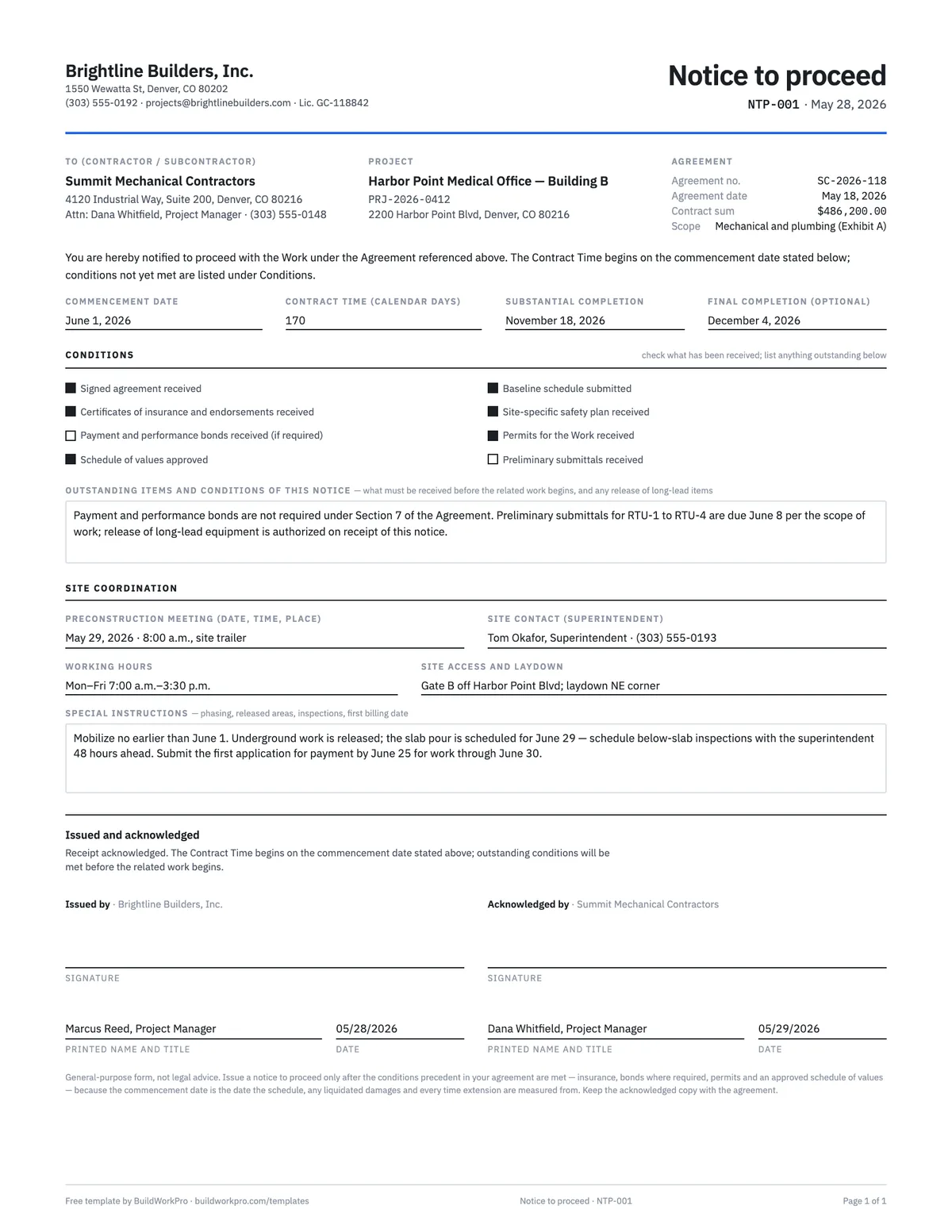
Notice to Proceed Template
Formal start authorization with the contract time clock, conditions and acknowledgment.
Word · PDF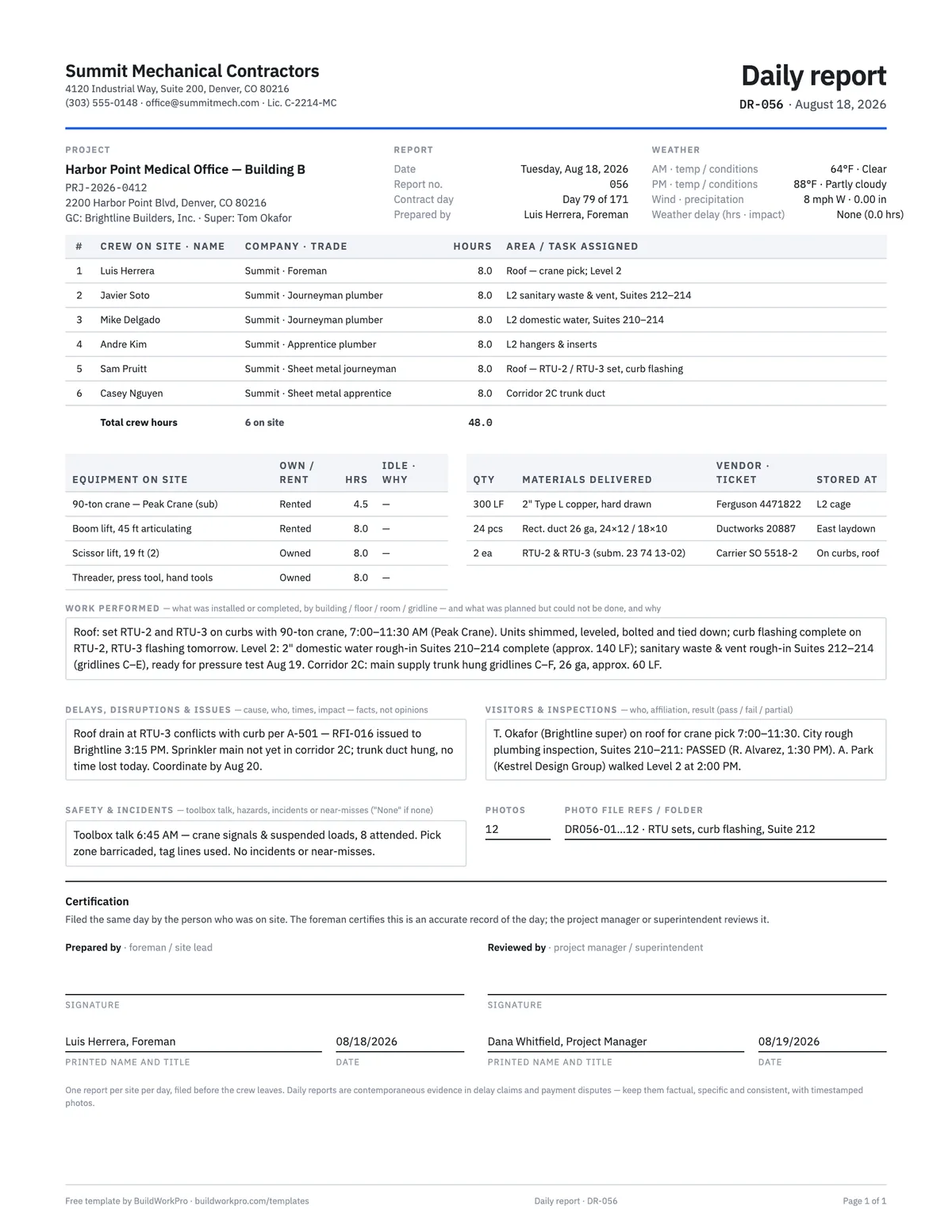
Construction Daily Report Template
Crew, weather, work performed, deliveries, delays, safety and photos — the record that holds up later.
PDF · Word · Excel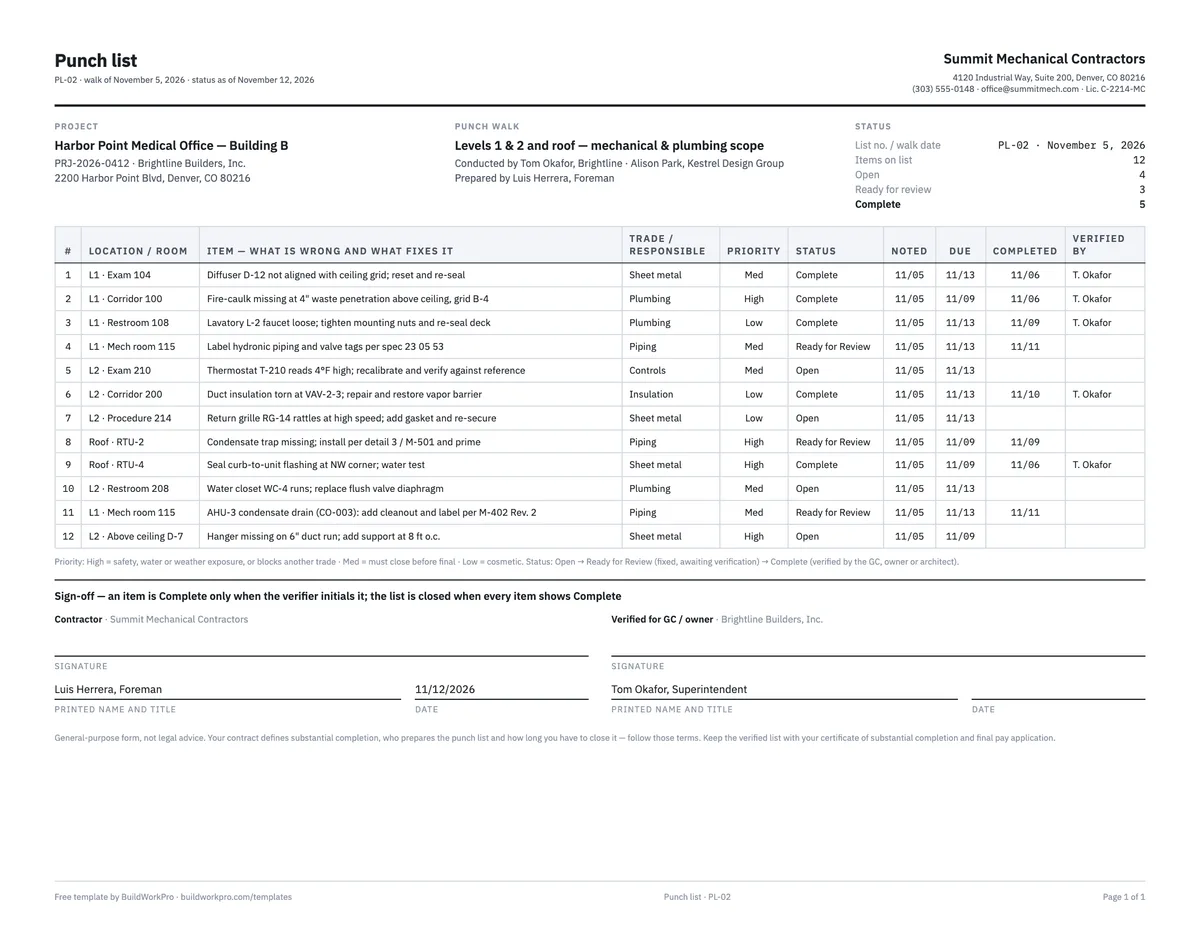
Construction Punch List Template
Item, location, trade, priority, status and verification — with live open/complete counts.
Excel · Word · PDF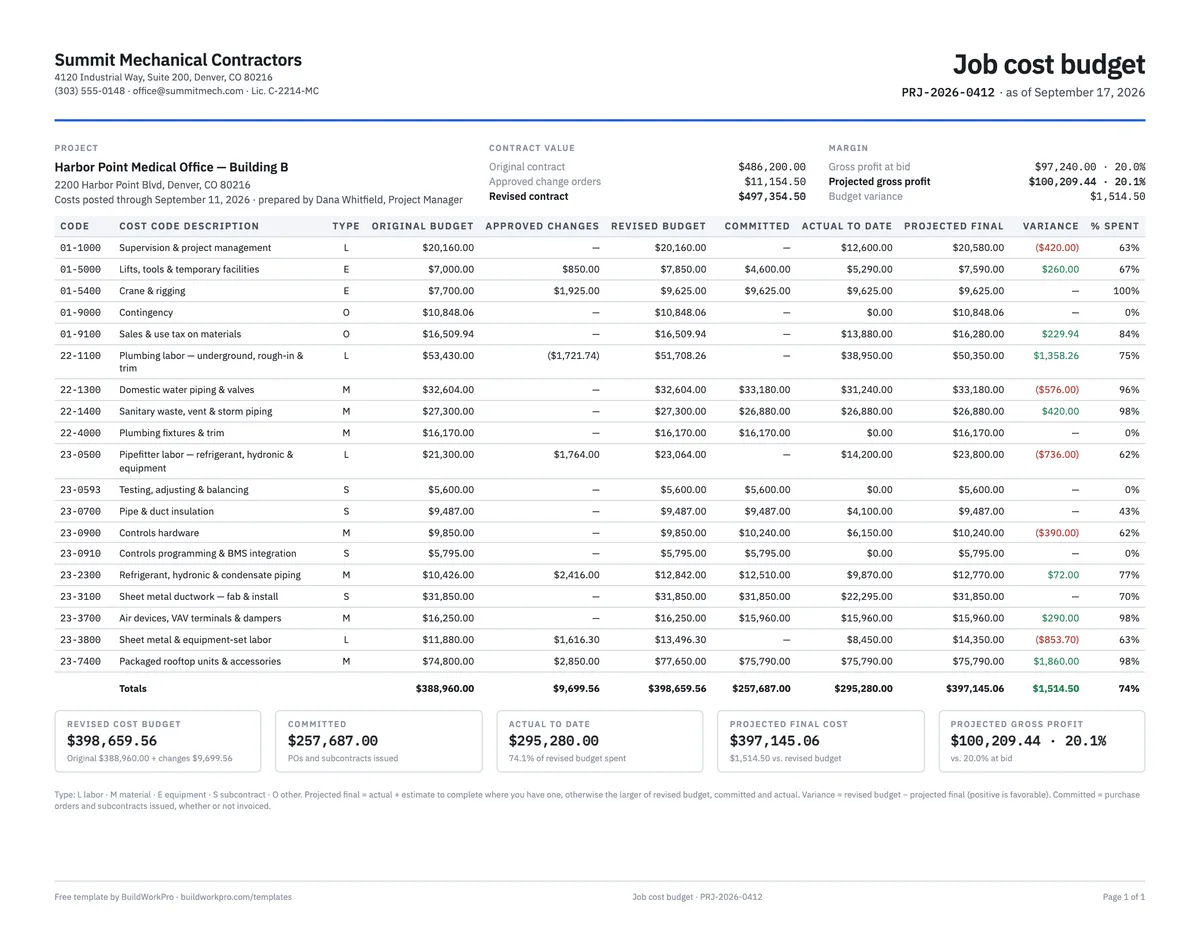
Construction Budget Template
Budget vs. committed vs. actual by cost code, with variance and cost-to-complete.
Excel · PDFEvery job, every crew, one schedule
BuildWorkPro turns phases and tasks into a Gantt chart with dependencies and a critical path, keeps it next to the change orders that move dates, and shows every project you are running for every GC on one screen.
$79/month flat · 14-day free trial · No credit card required
Planning document, not a contract schedule. Contract time, milestone dates and notice requirements come from your subcontract — update this schedule when a change order adjusts them and record delays in your daily report the day they happen.