
Free template
Free Construction Budget Template
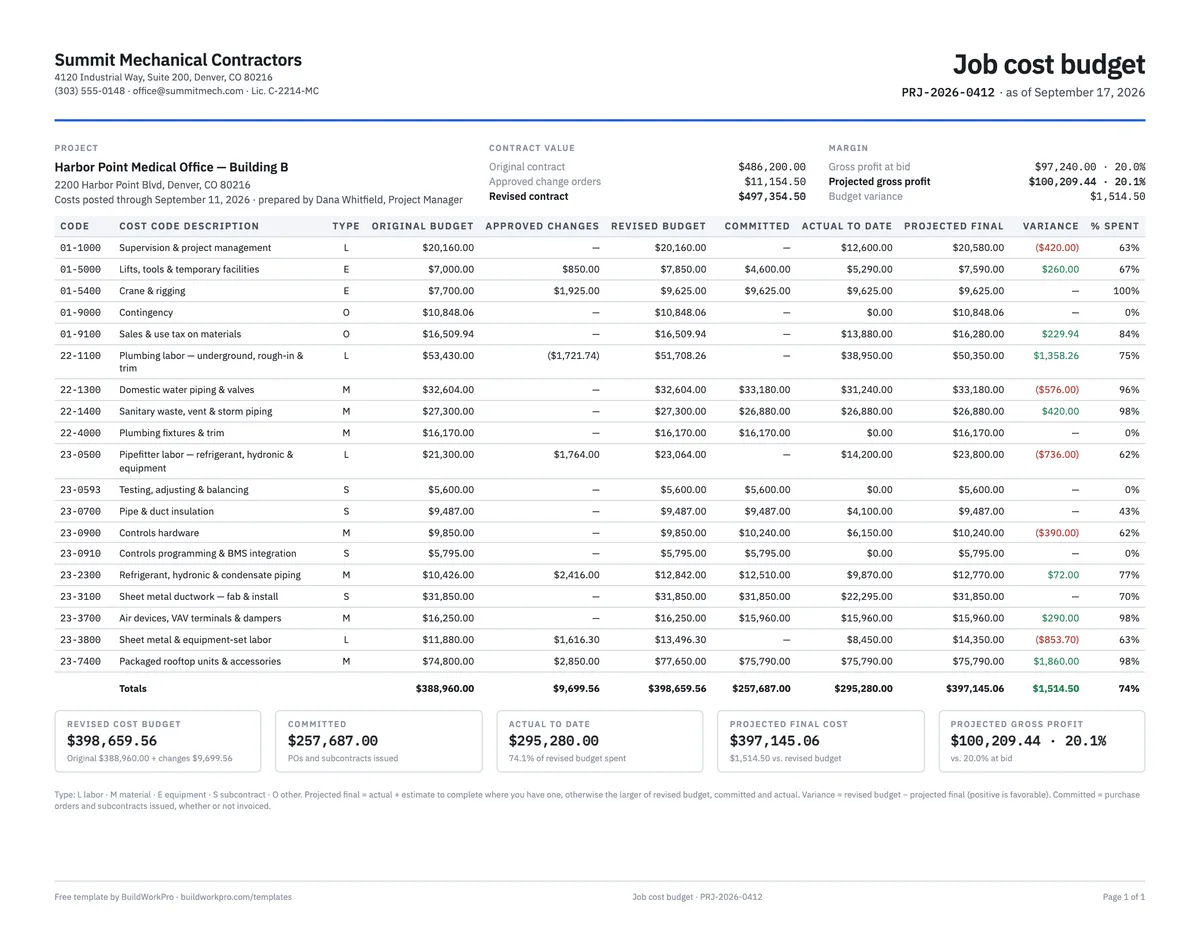
A job cost tracker by cost code: original budget, approved changes, revised budget, committed, actual to date, projected final, variance and percent spent — with a summary that puts projected cost against the contract value so you know the margin you are actually keeping. Excel with a CSI-style cost code list, or a landscape fillable PDF.
Free · No email required · Free to use and share for your own business
Updated September 30, 2026 · Built by the BuildWorkPro team, checked on real subcontractor jobs.
What's in the template
How to fill it out
-
1
Set the contract value
Enter the project and the original contract sum. As change orders are approved, add their price to the approved change orders cell — the revised contract updates and every margin figure is measured against it.
-
2
Build the rows from your estimate
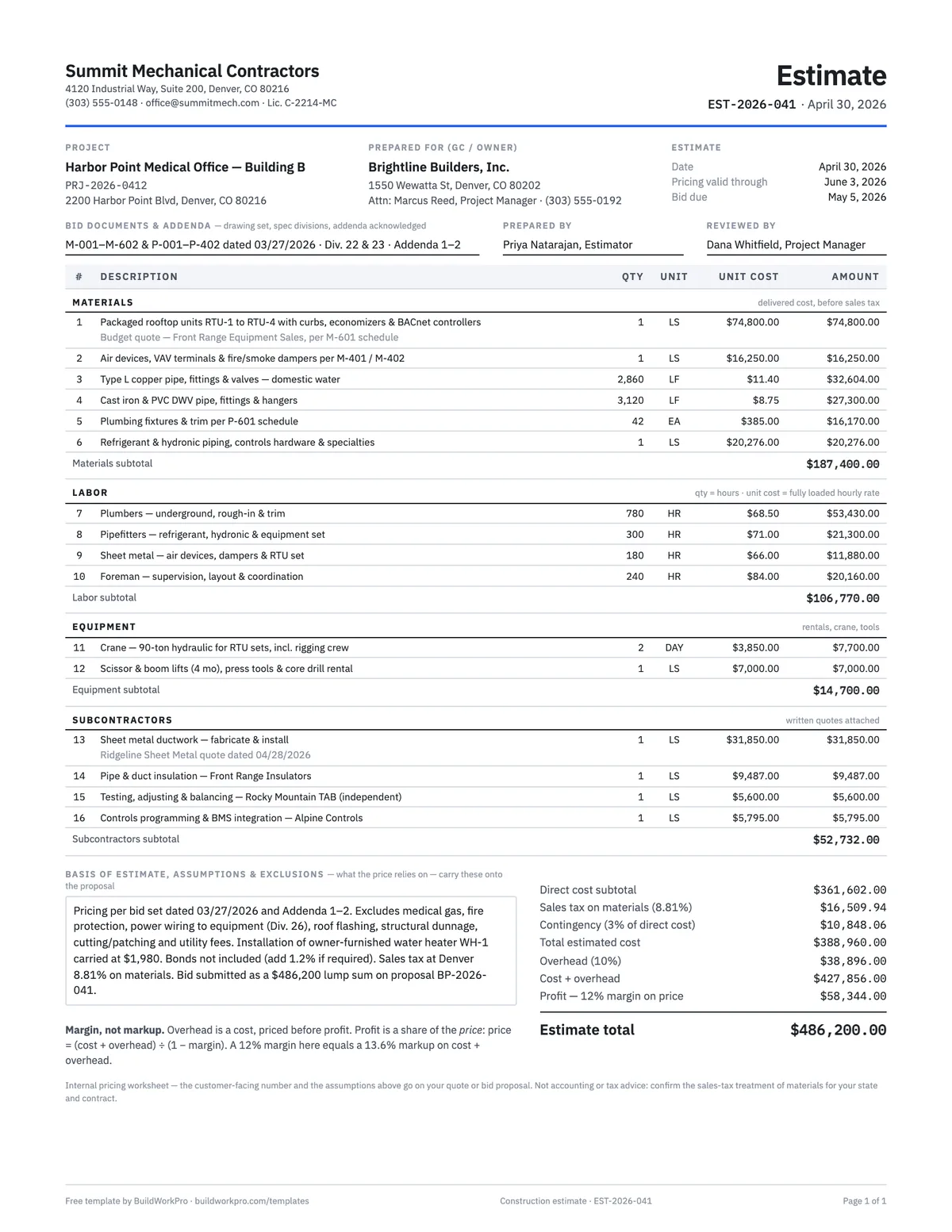
One row per cost code from the Cost Codes sheet, with its type. The original budget for each is the cost side of your estimate — direct cost by section plus contingency and sales tax as their own codes. Overhead and profit stay out; they are not job costs.
-
3
Post approved changes to the codes where the work happens
When a change order is approved, put its cost — before markup — in the approved changes column on the affected codes. A relocated curb is crane, sheet metal labor and equipment; post it to those three, not to one "changes" line.
-
4
Enter committed and actual cost every week
Committed is every PO and subcontract you have issued. Actual is posted payroll, vendor invoices and receipts. Both come from your accounting system; the template is where they meet the budget. Add an estimate to complete on any code where you know the cost to finish.
-
5
Read the projection and act on it
Projected final, variance and percent spent by code, and projected gross profit and margin at the top. Compare percent spent with percent complete — labor at 75% spent on a job 60% done is the earliest warning you get — and reconcile the revised contract to your latest change order and pay application every month.
What a construction budget is
A construction budget — a job cost report, once the job is running — is the cost side of the project by cost code: what you planned to spend, what you have committed, what you have spent, and what you now expect to spend by the end. Set against the contract value, it answers the only question that matters mid-job: are we still going to make the margin we bid?
The numbers come from documents you already have. The original budget is the cost side of the estimate — direct cost by section, plus contingency and sales tax — with overhead and profit left out, because they are not job costs. Approved changes come from signed change orders. Actual labor comes from timesheets and payroll; actual material and subcontract cost from invoices; committed cost from the purchase orders and subcontracts you have issued. The template is where they meet.
Column by column
| Column | What goes in it |
|---|---|
| Original budget | Cost from the estimate, by code. Never changes after the job starts |
| Approved changes | The cost (not the price) of signed change orders, posted to the codes where the work happens |
| Revised budget | Original + changes — the number you are managing to |
| Committed | POs and subcontracts issued, invoiced or not |
| Actual to date | Posted payroll, invoices and receipts |
| Est. to complete | Your forecast of the cost to finish this code, where you have one (Excel) |
| Projected final | Actual + estimate to complete; otherwise the largest of revised budget, committed and actual |
| Variance | Revised budget − projected final. Positive is favorable; red is over |
| % spent | Actual ÷ revised budget — compare it with % complete |
The contract block at the top does the same arithmetic on the revenue side: original contract + approved change orders = revised contract, and revised contract − projected final cost = projected gross profit, shown as a margin next to the margin you bid.
A worked example: the Harbor Point mechanical job at 74% spent
The completed example is the mechanical subcontract that runs through our template set, snapshotted on September 17, 2026 with costs posted through September 11. The original budget is $388,960.00 — the total estimated cost from the estimate template’s example, spread over nineteen cost codes, with contingency ($10,848.06) and sales tax on materials ($16,509.94) as their own lines. Three change orders have been approved for $11,154.50 of price; their cost side, $9,699.56, is posted where the work happened: a relocated curb to crane, sheet metal labor and RTU accessories; a deleted water heater as a credit to plumbing labor; a condensate drain to piping, pipefitter labor and the core-drill line. Revised budget: $398,659.56 against a revised contract of $497,354.50.
Committed cost stands at $257,687 and actual at $295,280, 74% of the revised budget. Projected final cost is $397,145.06, a favorable variance of $1,514.50, for a projected gross profit of $100,209.44 — a 20.1% margin against the 20.0% bid. The detail is more useful than the total. The rooftop units came in $1,860 under budget, which is the buyout saving from the bid tabulation template’s example. Plumbing labor is $1,358 under. But sheet metal labor is projecting $853.70 over, pipefitters $736 over and supervision $420 over, and those three lines are where the project manager’s attention goes this week — not the healthy total.
Cost codes: use the same ones on every job
The workbook’s Cost Codes sheet is a CSI MasterFormat-style starter list for a trade contractor: division 01 for supervision, equipment, permits, contingency and tax; 22 for plumbing labor, piping, fixtures and equipment; 23 for HVAC labor, ductwork, piping, controls, insulation, balancing and rooftop units; and a handful of 02–33 codes for the demolition, concrete, electrical and site work a mechanical sub touches. Edit it to match how you actually buy and track work — but then leave it alone. A code list that changes every job cannot tell you that plumbing labor runs 8% over on medical work, and that is the number that fixes the next estimate.
Budget vs. schedule of values vs. estimate
- Estimate — before the job; cost by section and the price you sold it for. Template.
- Schedule of values — the contract sum broken into billable lines; the revenue side you bill against on each pay application. Template.
- Budget — the cost side, by cost code, tracked weekly. This template.
The three should reconcile: the estimate’s total cost is the budget’s original total, the estimate’s price is the SOV’s contract sum, and every approved change order moves both the SOV and the budget. When the revised contract on this sheet does not match the contract sum to date on your latest pay application, one of them is missing a change order.
Common mistakes this template is built to catch
- Budgeting from the sell price instead of the cost, and reporting a margin you never had.
- Ignoring committed cost until the invoice arrives, and finding out at month end.
- Posting change-order costs to one line, so no trade ever shows as over.
- Updating monthly from the P&L instead of weekly from payroll and invoices.
- Reading % spent without % complete beside it.
- Changing cost codes every job, so nothing compares with anything.
For the discipline behind the sheet, read job costing for subcontractors, and pair the budget with the change order template so every approved change lands on both sides of it.
The contract side, kept for you
In BuildWorkPro the accepted bid becomes the project’s contract value, approved change orders adjust it and flow into the next pay application automatically, and the Reports module shows bid, project and activity KPIs for any period — exportable to CSV or PDF for the person keeping this budget. Construction reporting software for $79/month flat, 14-day free trial.
See reporting in BuildWorkProFrequently asked questions
What should a construction budget include?
One row per cost code with the cost type (labor, material, equipment, subcontract, other), the original budget from the estimate, approved changes, the revised budget, committed cost, actual cost to date, projected final cost, variance and percent spent — and a summary that compares projected final cost with the revised contract value to show the gross profit you are on track to keep. Overhead and profit are not job costs and do not belong in the rows; contingency and sales tax do.
What is the difference between a budget and a schedule of values?
The budget is the cost side: what the job will cost you, by cost code. The schedule of values is the revenue side: the contract sum broken into lines you bill the customer against each month. They use similar categories but different numbers — the SOV line for rooftop units is the sell price, the budget line is what you paid for them. Tracking both is how you know whether a job is profitable, not just whether it is billed.
How often should I update the job cost budget?
Weekly for actual costs, from payroll and vendor invoices; monthly for the forecast, when you have a real view of what is left. A budget reviewed at the end of the job is a history. The template’s percent-spent column is only useful if it is current enough to compare with percent complete this week.
What is committed cost?
Money you have promised but not yet been invoiced for — purchase orders and subcontracts you have issued. A $75,790 equipment PO is committed the day you sign it, even though the invoice arrives at delivery. Tracking committed cost alongside actual cost stops the budget from looking healthy just because the big invoices have not landed yet.
How do change orders affect the budget?
Twice. The change order’s price goes into the contract value at the top, raising the revised contract. Its cost — the labor, material and equipment you priced before markup — goes into the approved changes column on the cost codes where the work happens, raising the revised budget. Posting change costs to a single "changes" line hides which trades are running over.
What are cost codes and which ones should I use?
Cost codes are the categories you budget and post costs to. The template ships a CSI MasterFormat-style starter list — 01 general requirements, 22 plumbing, 23 HVAC, 26 electrical and so on, with sub-codes for labor, material and subcontracts — that you can edit freely. Which codes you use matters less than using the same ones on every job, so that this job’s plumbing labor overrun can be compared with the last three.
How do I calculate projected final cost?
Actual cost to date plus your estimate of the cost to complete, where you have one. Where you do not, the template uses the largest of the revised budget, the committed amount and the actual to date, which is the most conservative number available without a forecast. Variance is revised budget minus projected final, so a positive variance is money you are on track to keep.
Templates that go with this one
Construction Estimate Template
Material, labor, equipment and subs by section, with overhead and true-margin pricing.
Excel · PDF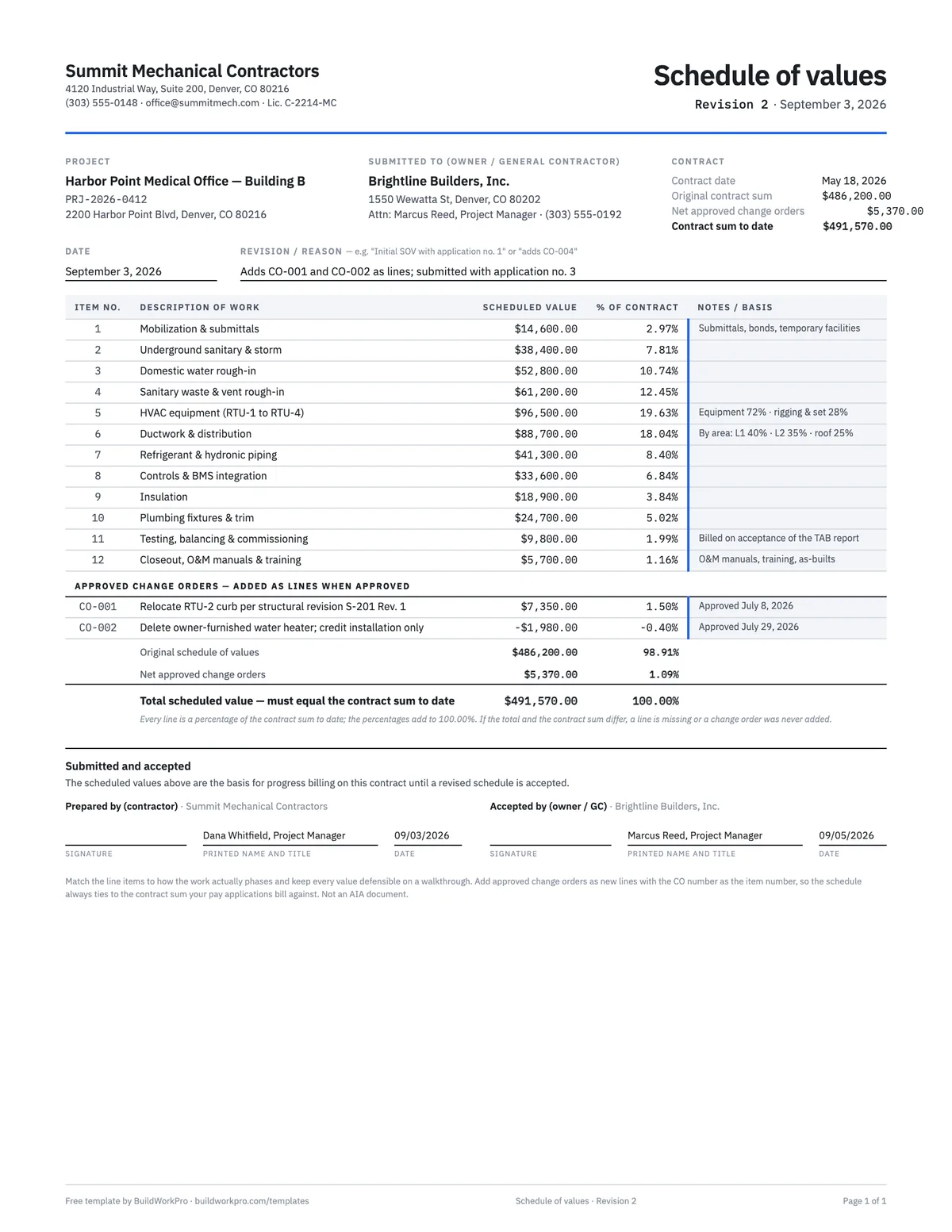
Schedule of Values Template
Break the contract sum into billable line items with % of contract math and a tie-out check.
Excel · PDF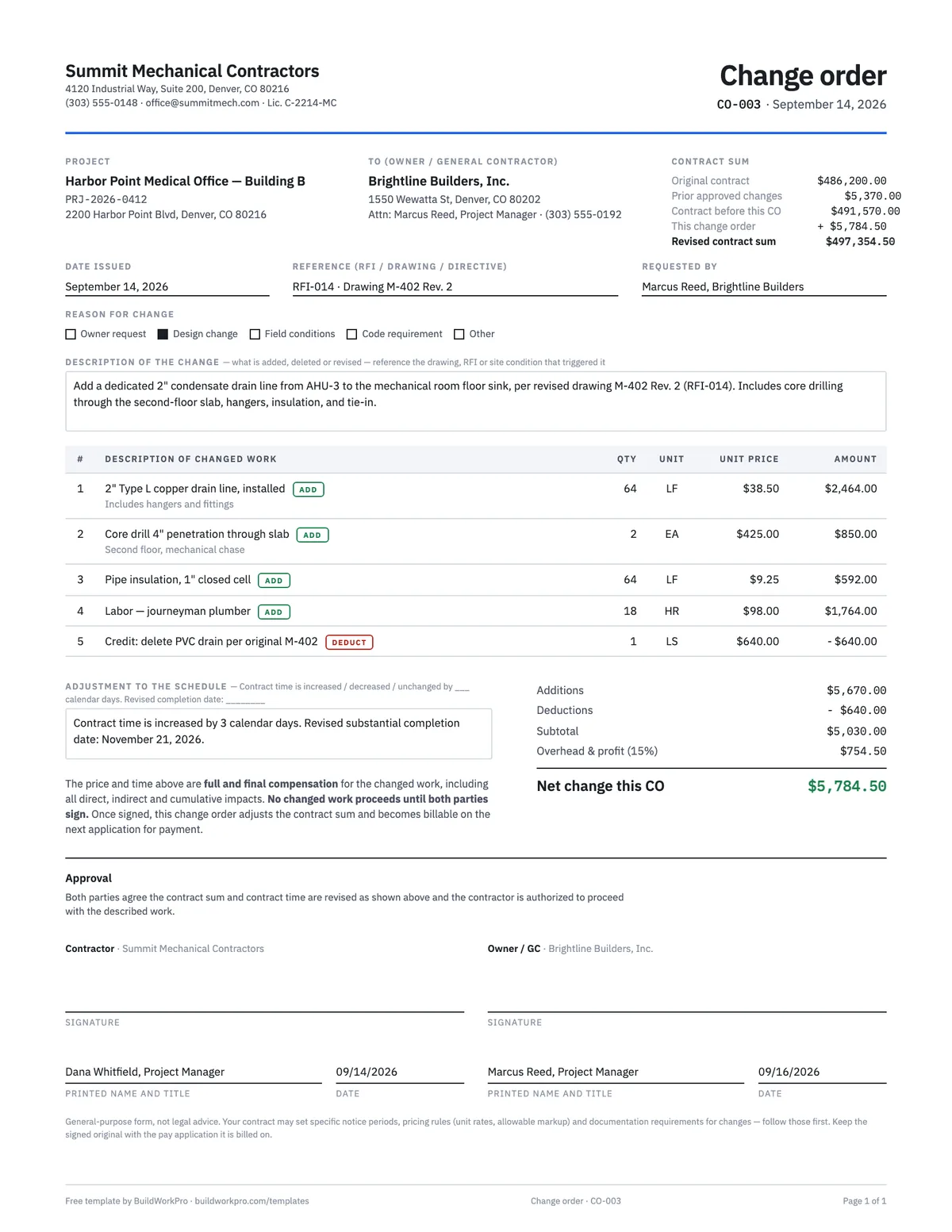
Construction Change Order Template
Price the change, adjust the contract sum and schedule, and get both signatures before the work starts.
PDF · Word · Excel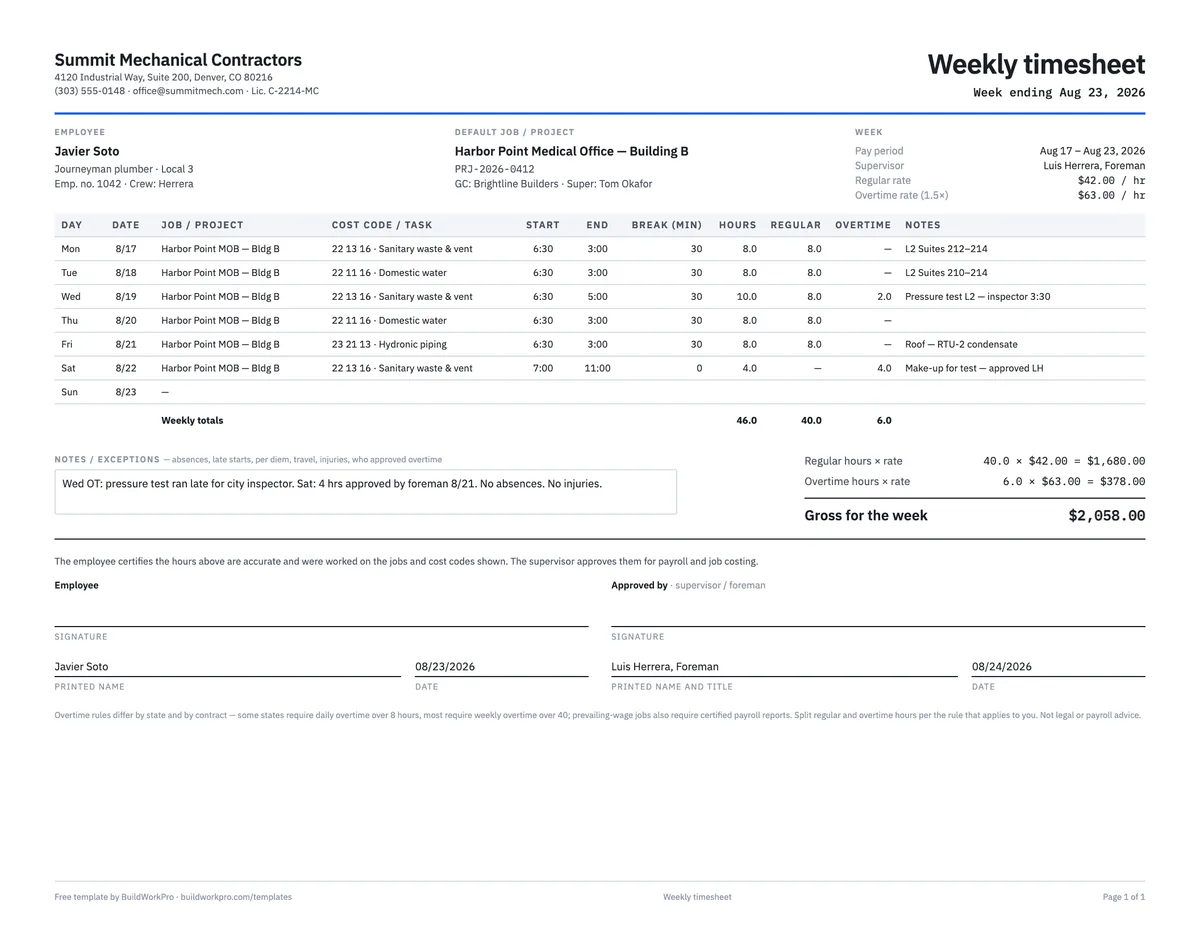
Construction Timesheet Template
Weekly time card by job and cost code with regular, overtime and double-time totals.
Excel · PDFFree calculators and price data for this work: Markup vs Margin Calculator · Labor Burden Calculator · Construction material prices
Know your numbers before the job ends
BuildWorkPro keeps the contract value, change orders, time entries and pay applications on the job record, so the revenue side of this budget reconciles itself and the reports tell you what you quoted, what you won and what each job type is worth.
$79/month flat · 14-day free trial · No credit card required
A management tool, not accounting advice. Cost codes, committed-cost rules and overhead treatment should match your accounting system — confirm with your bookkeeper or CPA before relying on the margin figures.