
Free template
Schedule of Values Template
Break the contract sum into the lines you will bill against every period, and prove it ties out before your GC checks. The Excel workbook computes % of contract, flags any gap to the contract sum, and tracks previous, this-period and stored billing per line; the fillable PDF is the one-page schedule you submit with your first pay application.
Free · No email required · Free to use and share for your own business
Updated September 17, 2026 · Built by the BuildWorkPro team, checked on real subcontractor jobs.
What's in the template
How to fill it out
-
1
Enter the contract sum
Fill in the project, who you submit to, the contract date and the original contract sum. If change orders have already been approved, enter their net; the contract sum to date is the number every line is measured against.
-
2
Break the work into billable lines
One line per phase or system, in the order the work happens: mobilization and submittals, underground, rough-in by system, equipment, distribution, controls, insulation, fixtures, testing and balancing, closeout. Give each a value from your estimate, regrouped by how progress will be measured rather than by cost type.
-
3
Make every value defensible
A line should be something you can point at on a walkthrough. Split labor and material on big equipment lines when the GC allows it, note the basis in the notes column (equipment versus rigging, billed by floor, billed on report acceptance), and keep closeout lines large enough to be worth billing.
-
4
Tie it out
The percentages must add to 100% and the total scheduled value must equal the contract sum to date. In the workbook the tie-out cell turns red until the difference is 0.00; on the PDF, check the total row against the contract block by hand before it leaves your office.
-
5
Revise when change orders are approved
Add each approved change order as a new line with its CO number, update the net approved change orders, and re-issue the schedule with the next pay application. Then bill against it every period on the Billing Tracker sheet or the pay application template.
What a schedule of values is, and who reads it
A schedule of values is the contract sum broken into line items that can each be measured for progress. It is usually submitted with, or before, the first pay application, and once the GC or owner accepts it, every application for the rest of the job bills against those lines. Three people read it closely: the GC's project manager, who checks that it adds up and that no line is padded; the owner's lender or architect, who certifies percentages against what they see on site; and your own bookkeeper, who has to reconcile what you billed to what you earned. Write it for all three.
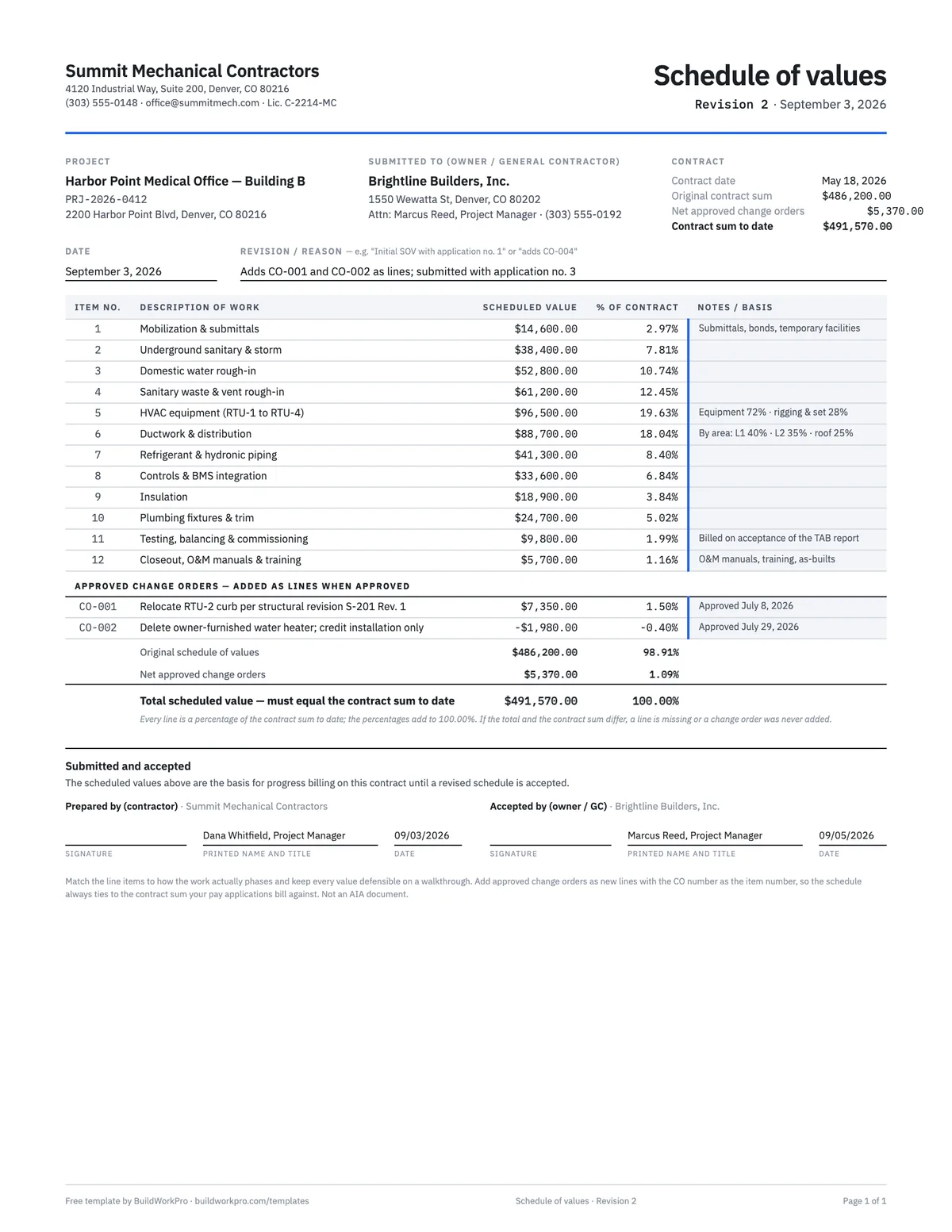
On the form, a contract block carries the original contract sum, the net of approved change orders and the contract sum to date. The table lists the lines with a scheduled value, the percent of contract each represents and a notes column for the basis of the value. A change order section, subtotals and a single total row make the tie-out visible on paper. The schedule of values guide walks through the reasoning line by line.
How to break the contract into lines
Follow the sequence of the work. For a mechanical subcontract that means mobilization and submittals first, then underground, then rough-in by system, then equipment, distribution and controls, and finally fixtures, testing and closeout. Each line should meet three tests:
- Measurable — you can state a percent complete for it after a site walk without argument. "Ductwork & distribution" is measurable by floor; "HVAC" is not.
- Billable in reasonable increments — a $200 line is not worth the row; a $150,000 line will be 40% complete for three months and invite scrutiny. Split it.
- Traceable to the estimate — the sum of the lines equals the contract sum, and you can show how each value was derived if asked. The workbook's percent column makes a padded line obvious at a glance.
Use the notes column to pre-empt questions: which portion of an equipment line is the equipment itself (so stored-material billing is understood), which lines are billed by area, and which are billed on a deliverable like the balancing report.
A worked example
The completed example is the schedule for a $486,200.00 mechanical subcontract on a medical office building, revised in September to add two approved change orders. Twelve lines cover the original scope, from $14,600.00 for mobilization and submittals (2.97% of the contract) through the two largest lines — $96,500.00 for four rooftop units (19.63%) and $88,700.00 for ductwork and distribution (18.04%) — down to $5,700.00 for closeout, manuals and training. The change order section adds CO-001 at +$7,350.00 for a relocated rooftop-unit curb and CO-002 at −$1,980.00 for a deleted water heater installation, for a net of $5,370.00.
The original schedule subtotals to $486,200.00 (98.91%), the change orders to $5,370.00 (1.09%), and the total scheduled value is $491,570.00 — exactly the contract sum to date in the header. The same lines, in the same order, appear on page 2 of the pay application template's completed example, where application no. 3 bills them for August.
Schedule of values vs. estimate vs. pay application
- Estimate — internal pricing by cost type (material, labor, equipment, subs) with overhead and margin. Construction estimate template.
- Schedule of values — external, the contract sum by billable phase, no cost or margin shown. Built from the estimate, accepted by the GC, revised by change orders.
- Pay application — the monthly bill against the schedule: previous, this period, stored, total, retainage. The Billing Tracker sheet in this workbook does that math per line; the pay application template adds the certificate page.
- Budget / job cost — the same lines tracked against actual cost, which is a different question from what you have billed. Construction budget template.
Front-loading and the other mistakes GCs look for
- Front-loading — weighting mobilization or early rough-in above its cost to improve cash flow. A little is customary; a mobilization line above 5% of the contract gets questioned on most jobs.
- Lines that do not tie — a schedule that totals $486,200.00 against a contract that is now $491,570.00 after change orders. The tie-out cell exists for this.
- Closeout too small to bill — a $1,000 closeout line on a half-million contract means the last 10% of the job earns nothing while retainage sits.
- Lumping systems together — one "plumbing" line for underground, rough-in and trim, which will be argued at 30%, 60% and 90% complete.
- Forgetting to re-issue — billing a change order on the pay application without ever adding it to the accepted schedule.
When change orders arrive, price them on the change order template, add the approved amount here as a line, and bill it on the next application. If you are running more than a job or two, BuildWorkPro's pay applications seed the schedule from your accepted bid and keep it tied to the contract sum for you.
Your bid already knows the schedule of values
BuildWorkPro seeds the schedule of values from your accepted bid, keeps it tied to the contract sum plus approved change orders, and bills against it every period on a G702/G703-style pay application — no spreadsheet reconciliation. $79/month flat, 14-day free trial.
See pay applications in BuildWorkProFrequently asked questions
What is a schedule of values?
A schedule of values (SOV) breaks a construction contract sum into line items — mobilization, rough-in, equipment, trim, closeout — each with a dollar value. It is the backbone of progress billing: every month you bill a percentage of each line, and the SOV keeps score across the life of the job. The lines add up to the contract sum, and every approved change order becomes a new line.
How many line items should a schedule of values have?
Enough that every line is independently verifiable on a walkthrough, and no more. For a typical trade subcontract that lands between 8 and 25 lines; the completed example uses 12 for a $486,200 mechanical scope. Match the lines to how the work actually phases — a line you cannot demonstrate progress on is a line the GC will argue about.
Should I split labor and material in the SOV?
When the GC allows it, yes — separate labor and material lines let you bill stored materials before installation and make each line easier to defend. Big-ticket equipment lines benefit most: the example notes that the rooftop-unit line is 72% equipment and 28% rigging and set, so the GC knows what a stored-material billing on that line means.
Can I front-load a schedule of values?
Weighting early activities like mobilization and general conditions is common and generally accepted in moderation — but an obviously inflated early line invites a rejected application and sours the GC relationship. The rule: every value should survive you walking the GC through the site. Keep closeout lines large enough to be worth billing, too, or retainage release stalls.
What is the difference between a schedule of values and an estimate?
The estimate is how you priced the job — internal, by cost type, with markup. The schedule of values is how you bill it — external, by phase or system, summing to the contract sum. They usually share a structure, but the SOV never shows cost or margin, and its lines are chosen for how progress will be measured, not for how the price was built. Start from the estimate, regroup it into billable phases, and check that it ties.
How do change orders affect the schedule of values?
Each approved change order is added as its own line, with the CO number as the item number and the approved amount (positive or negative) as the scheduled value, and the contract sum to date moves by the same amount. That is why the template has a change order section and a tie-out check: if the total scheduled value and the contract sum to date disagree, a change order was approved but never added.
How does the SOV relate to my pay applications?
Every pay application bills against the SOV line by line: work completed this period, materials stored, total to date, retainage. The Billing Tracker sheet in the workbook does that math for every line, and the free G702/G703-style pay application template carries the same lines through every billing period — or let BuildWorkPro build the SOV from your accepted bid and carry it forward automatically.
Templates that go with this one
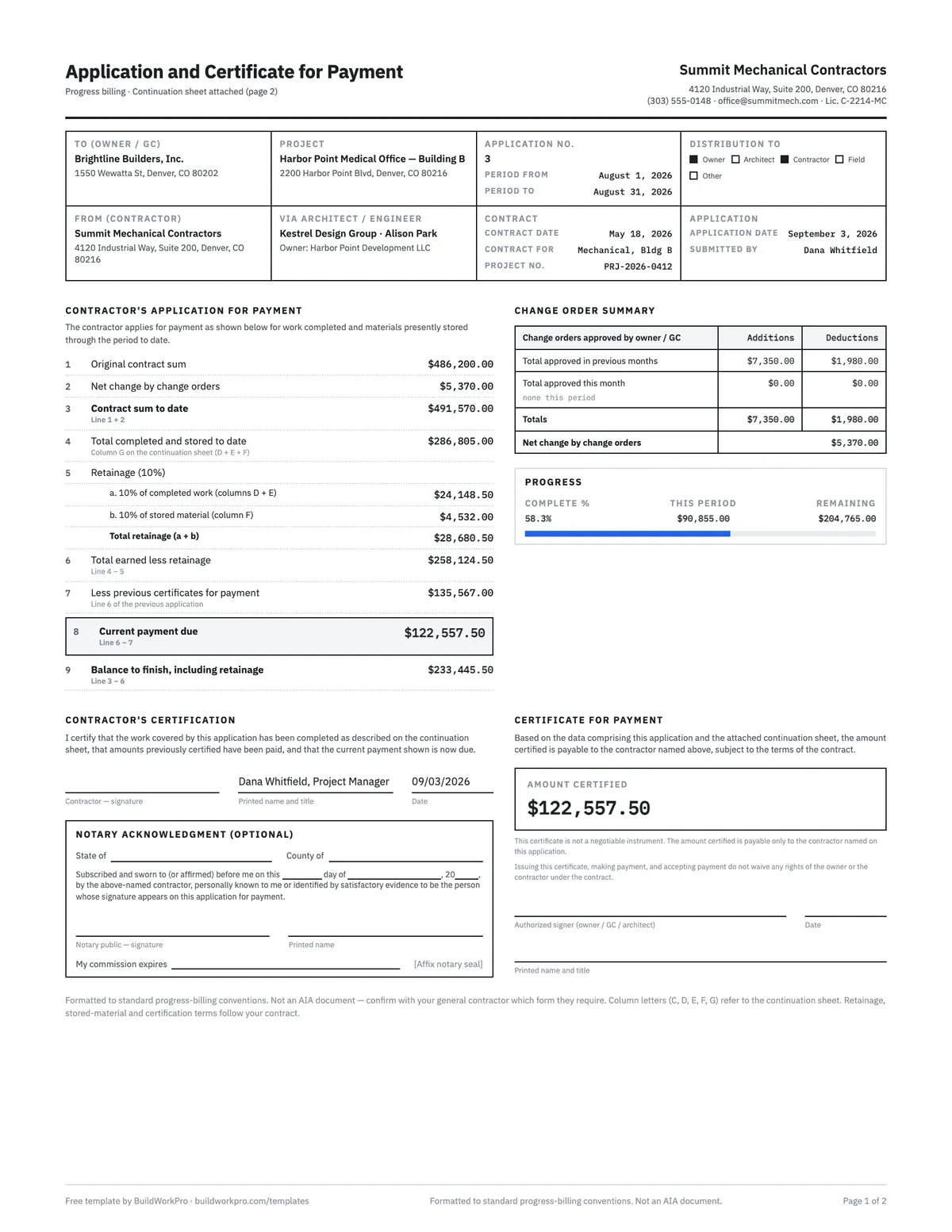
Pay Application Template (G702 & G703 style)
Application and certificate for payment with a continuation sheet, retainage math and carry-forward between periods.
Excel · PDF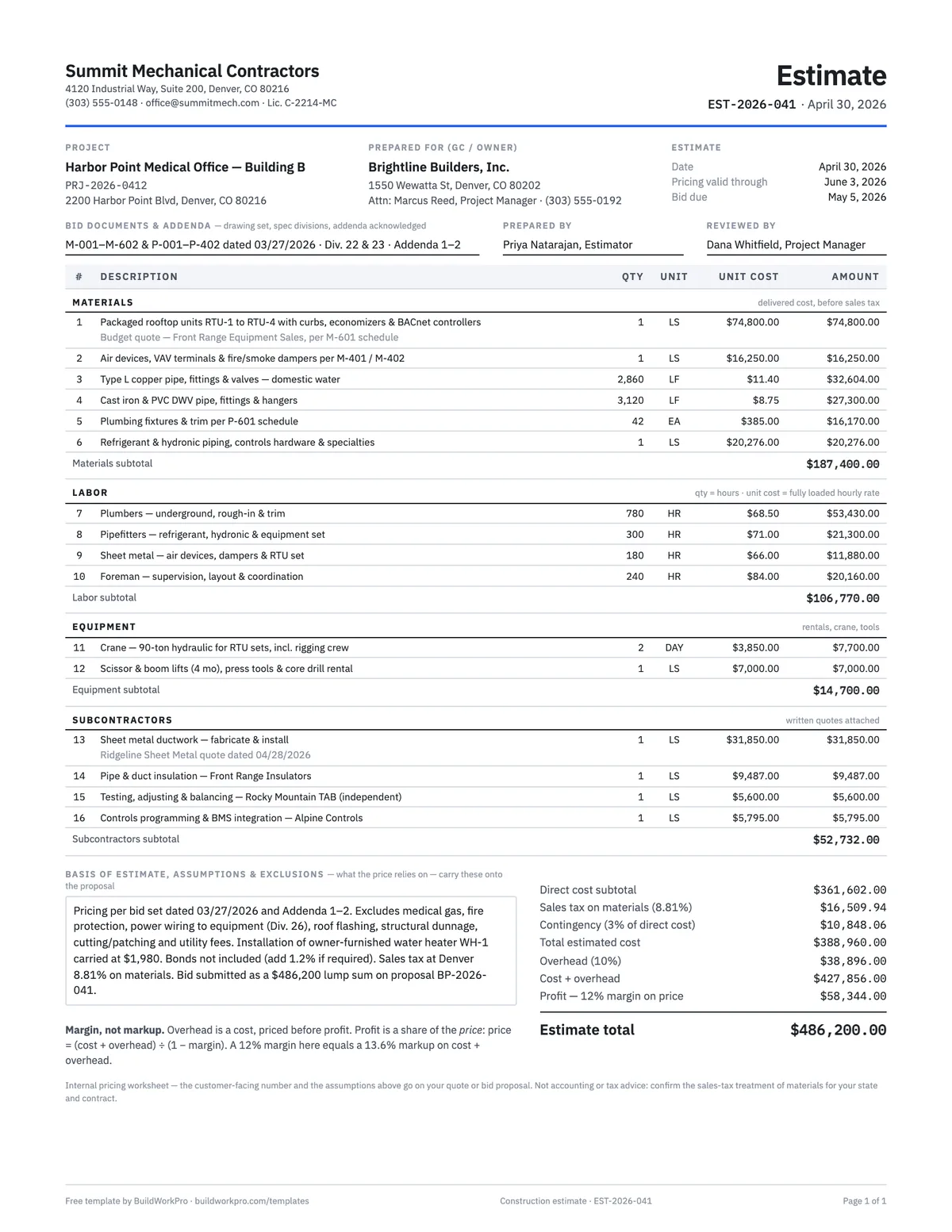
Construction Estimate Template
Material, labor, equipment and subs by section, with overhead and true-margin pricing.
Excel · PDF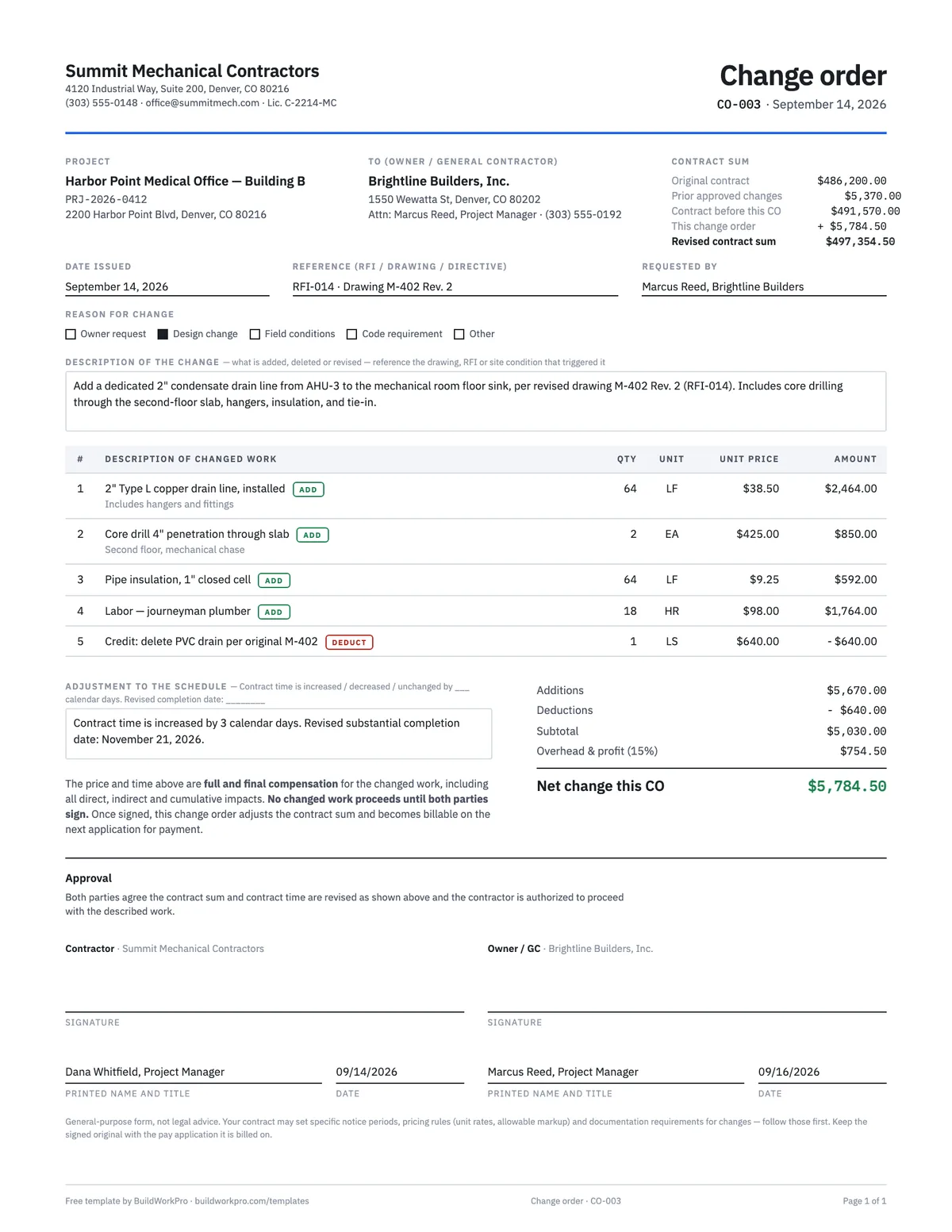
Construction Change Order Template
Price the change, adjust the contract sum and schedule, and get both signatures before the work starts.
PDF · Word · Excel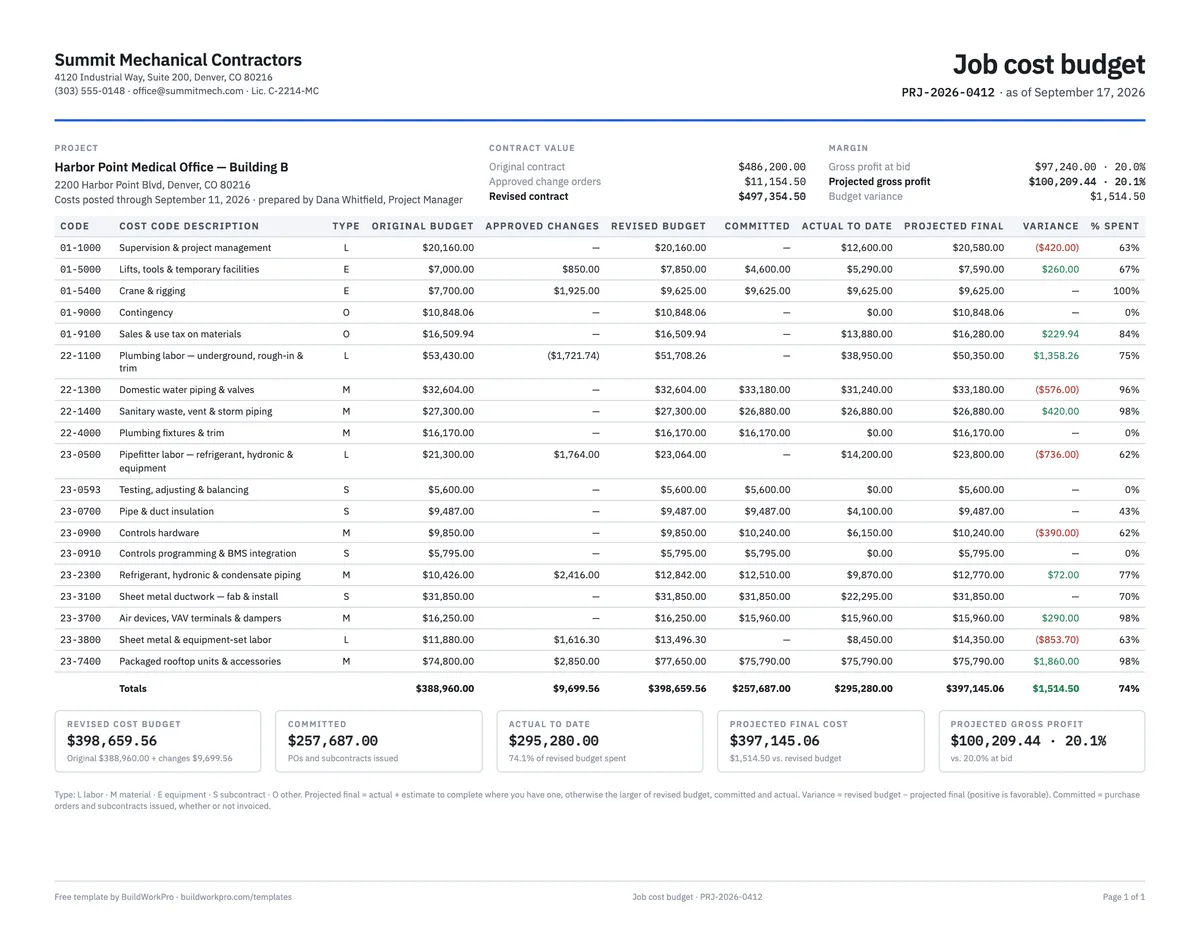
Construction Budget Template
Budget vs. committed vs. actual by cost code, with variance and cost-to-complete.
Excel · PDFFree calculators and price data for this work: Pay Application Builder
Build it once, bill it every month
BuildWorkPro turns your accepted bid into the schedule of values, adds approved change orders as lines automatically, and carries every value forward into the next pay application.
$79/month flat · 14-day free trial · No credit card required
General-purpose form, not legal or accounting advice. Your contract may specify the form and level of detail for the schedule of values — follow it first. Not an AIA document.