
CSV Import Templates
A CSV import template is a reusable map from a spreadsheet’s columns to bid line-item fields. Set one up once, and estimators can import a vendor or supplier CSV straight into a bid’s estimate without re-mapping columns each time.
Where templates live
Section titled “Where templates live”Templates are managed under Settings -> Bid Templates, in the CSV Import Templates card. Click New template to open the wizard.
Build a template
Section titled “Build a template”The wizard has four steps:
-
Sample. Upload a sample CSV so the wizard can read your column headers and preview rows.
-
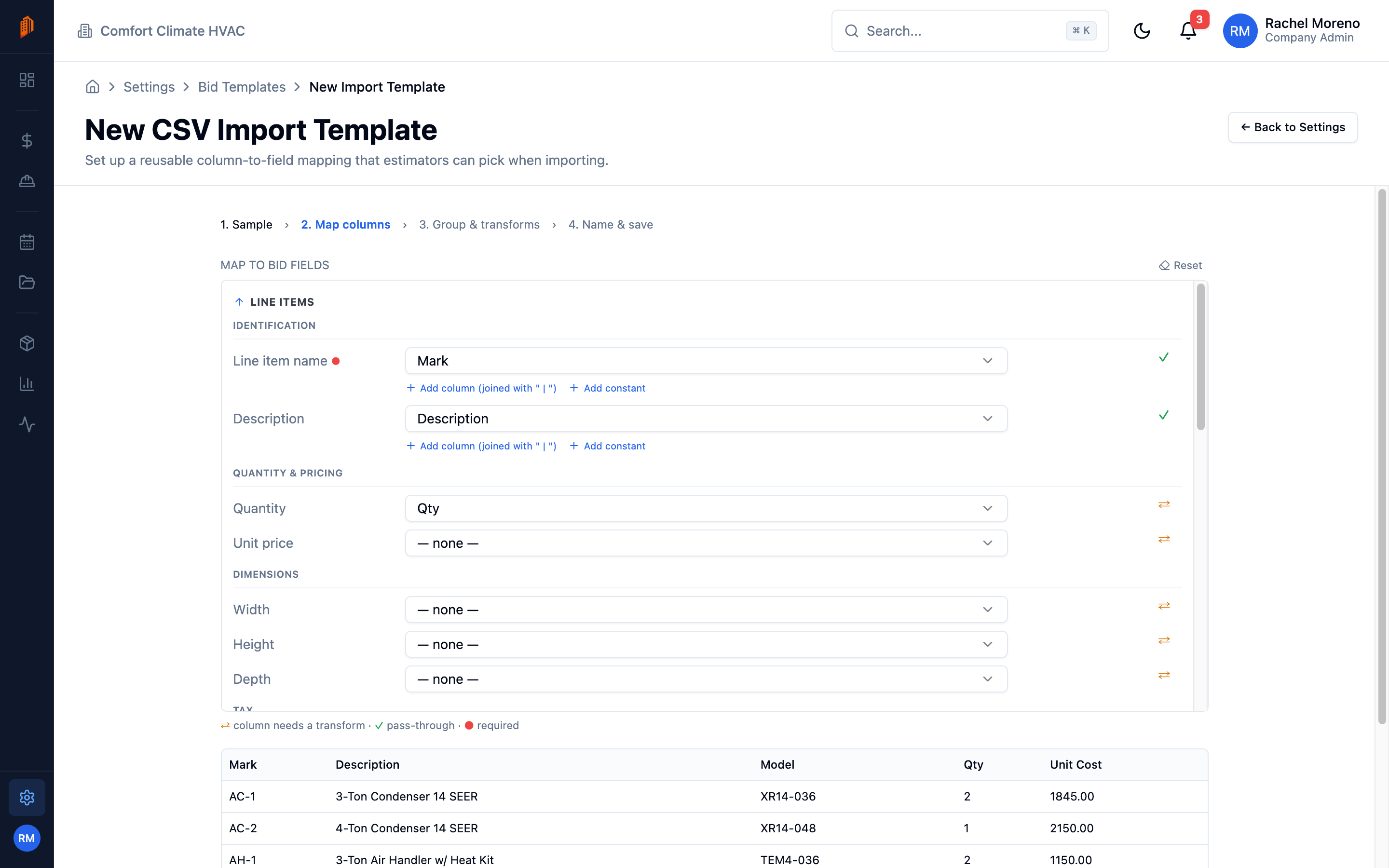
Map columns. Match each CSV column to a bid line-item field.
-
Group and transforms. Choose whether each row is its own line item or whether rows group into a line item with sub-items, and apply transforms – such as converting a price to currency or feet-and-inches to inches.
-
Name and save. Give the template a name and save it.
Use a template on a bid
Section titled “Use a template on a bid”When importing a CSV into a bid’s estimate, pick a saved template and BuildWorkPro applies the mapping automatically, turning the spreadsheet rows into line items and sub-items.
What’s next
Section titled “What’s next”- Line items – where imported rows land on a bid.
- Document library – manage uploaded files.